๐ Secure your network, empower your team, and never miss a beat!
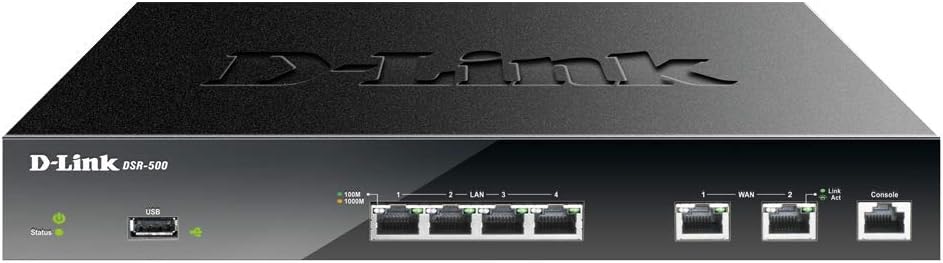
The D-Link Systems Services Router features 4 Gigabit LAN and 2 Gigabit WAN ports, supporting up to 35 IPsec VPN tunnels and 10 SSL VPN tunnels for robust, secure remote access. It offers policy-based firewall management, dynamic web content filtering, WAN failover, load balancing, and energy-saving Green Ethernet technologyโideal for small to medium businesses demanding high performance and reliability.


| ASIN | B004Z9XRQG |
| Antenna Location | Home |
| Antenna Type | Internal |
| Best Sellers Rank | #67,455 in Electronics ( See Top 100 in Electronics ) #456 in Computer Routers |
| Brand | D-Link |
| Built-In Media | AC Power Cable, 1U Rackmount Bracket Set (2) 8 screws, Patch CAT5e Cable, Console Serial Cable (RJ-45 to RS-232), Rubber feet set (4), CD-ROM with QIG and Manual, GPL Code Sheet |
| Color | White |
| Compatible Devices | Personal Computer |
| Connectivity Protocol | Ethernet |
| Connectivity Technology | Ethernet |
| Control Method | Remote |
| Customer Reviews | 3.5 out of 5 stars 16 Reviews |
| Data Transfer Rate | 1000 Megabits Per Second |
| Frequency Band Class | Single-Band |
| Global Trade Identification Number | 00100177341095 |
| Has Internet Connectivity | Yes |
| Is Electric | Yes |
| Is Modem Compatible | Yes |
| Item Type Name | D-Link VPN Router, 4 Port Gigabit Dual WAN with Dynamic Web Content Filtering (DSR-500) |
| Item Weight | 5.8 Pounds |
| LAN Port Bandwidth | 1000 Mbps |
| Manufacturer | D-Link Systems, Inc. |
| Maximum Upstream Data Transfer Rate | 1000 Megabits Per Second |
| Mfr Part Number | DSR-500 |
| Model Name | DSR-500 |
| Model Number | DSR-500 |
| Number of Ports | 8 |
| Operating System | Proprietary Networking Operating System (e.g. ZyNOS, Junos OS, Cisco IOS, RouterOS) |
| Other Special Features of the Product | WPS |
| Router Firewall Security Level | Advanced |
| Router Network Type | wired |
| Security Protocol | 3DES, DES |
| Smart Home Compatibility | Not Smart Home Compatible |
| Special Feature | WPS |
| UPC | 100177341095 790069348242 |
| Unit Count | 1.0 Count |
| Voltage | 12 Volts |
| Warranty Description | Limited lifetime |
| Wi-Fi Generation | Wi-Fi 4 |
| Wireless Communication Standard | 802.11bgn |
| Wireless Compability | 802.11bgn |
F**R
Works with latest firmware and help from tech support
I bought this to replace a DIR-655 (together with a set of DAP-2553). I am happy to say almost everything is now working to my liking and the problems I was trying to solve are fixed (in particular, availability of the Guest network from multiple access points, as well as the WAN failover - although I haven't tested that yet). However, be warned that the documentation (including D-Link KB) mostly consists of restating the obvious (i.e. the UI) and is basically useless when it comes to more advanced topics, like setting up a VLAN and ensuring VLAN separation. D-Link technical support did answer a pre-sales question correctly... but since then has failed to answer two post-sales follow-up questions. The DHCP capabilities of this router are inferior to the DIR-655 - reservations are next to useless because you can't name the devices, and the status page doesn't display the lease time, in addition to being monstrously slow. Schedules don't seem to work in association with Firewall rules. The firmware isn't being updated regularly, so the chances of getting these problems fixed are probably small. Nevertheless if you need the capabilities - dual WLANs and proper VLAN support - it does the trick. UPDATE: I've now tested failover and it works, but there are some caveats. First, by default it will take two minutes to discover that a connection is down. Second, the backup line is then brought up from scratch - it's inactive until needed - and that seems to take rather longer than it should - another one or two minutes. And finally, existing connections may timeout and will need to be re-established - more minutes. It seems that some of these are poor design choices. UPDATE: I did get a response from D-Link about the schedule issue; it was indeed a bug, and they supplied me with a beta build that fixes the issue. It also appears to improve the fail-over behavior. That deserves an extra star! UPDATE: Well, maybe not... while fixing the schedule issue, this beta build introduces other problems, including issues with failover, as well as a large number of error messages in the log on boot. There goes the star again... UPDATE: Tech Support seemed convinced that the beta firmware was better than the released version, and so I upgraded again, this time configuring from scratch. This finally resulted in a configuration that fully replaces the DIR-655 and adds capabilities. So while it was painful to configure, and there are plenty of minor bugs along the way, I'll give it five stars with a sigh of relief. Based on my experience I would budget a week of time, and four hours of work and downtime, to configure it. UPDATE: I'm taking away two stars again. Occasionally the router will update the dynamic DNS server with the address for the *wrong* WAN interface, making it inaccessible. And also occasionally, if you have a printer plugged into the USB interface, it will disconnect the printer and make it inaccessible, just because the printer has gone to sleep. These are pathetic, inexcusable bugs that should be fixed. UPDATE: Many of these issues were fixed over time. However, on two occasions new problems started to appear after a firmware upgrade. The only help from Tech Support was to suggest doing a hard reset, followed by a complete reconfiguration. This takes hours. There goes another star.... (Note : Firmware 1.09 introduced a memory leak. 1.08 however works.) UPDATE: Over time, and given the right firmware, this became a reliable and versatile router.
B**2
Very satisfied with this Dlink router.
Have been using this for a couple of years now. When traveling, I use the VPN service to have full access to my home network. I have updated firmware a few times and the newest version 2.02 has a completely new look and easier to navigate. Probably over powered for my home network, but I wanted a router that had great throughput as my ISP speed gets faster and faster. I had 50 mbps internet speed when I bought this and now the provider has increased speed to 120 mpbs (at same cost). It is more complex than typical "home network" type routers, but I would expect that in a router of this level. Has been rock solid and no need for frequent reboots. I wanted to keep wireless function separate from router so that I can upgrade wireless infrastructure from 802.11 n to 802.11 ac and I always want 2.4 and 5 ghz bands.I have not used the dual wan function, but I know that if one WAN port fails, I can just move the WAN connection to the other port and make a minor configuration change. My only gripes are that the admin web management interface is sluggish and sometimes have to wait a few seconds for a screen to appear or refresh, but maybe that is by design so that the web management is a lower system priority than the routing function. The other gripe is that the SSL VPN is either difficult or not intuitive to get working, I want to try it but have not been successful yet (although I have not really spent much time on it yet.) I have done a lot of comparisons with similar devices from over manufacturers in the same price range before buying and I still do the comparison a couple times a year and I would still buy this router again.
D**A
It locks up all the time.
Don't even think about it!!! Get the Cisco RV325 instead of this one. The D-Link DSR-500 is nothing but troubles. What's wrong with this VPN firewall? It locks up (and then it resets) randomly many times per day, every single day!!! Users on dlink forums reported the same problems (RMA didn't solve the problem because it wasn't a defective product, it's a design flaw). Yes, I upgraded the firmware to the latest release (Firmware: 2.02_WW / Hardware: A1), but IMO, a better looking GUI it only makes things worse because it overloads the hardware (CPU and RAM) of the DSR-500. They should focus on improving overall performance first, maybe even adding more VLANs too (only 5 VLANs, including default VLAN1). The only really nice feature of this VPN Firewall is the WFC (Web Content Filter) license that you can buy for just $70 (1 year). Considering this kind of product for SMBs or a branch office enviroment is a bad joke, unless you want to be the most unpopular person around the office (for recommending this product in the first place). It could have been a real nightmare if we had used these for our customer's IT projects. There's a good reason why you don't see good reviews on the web about the DSR line of products, simply because they don't perform as expected. If you need to find something in the same price range, go with the ZyXEL USG50 or USG40 UTMs. Yes, you will have to learn object-oriented configuration and a different/simplified/ankward terminology ("policy rule" for everything), and they don't have many VPNs (only 5 IPsec and 1 SSL VPN users, and 8 VLANs). But the ZyXEL UTMs deliver what they promise on paper (they are solid). If you need more VPNs, and you don't mind paying a little more, go with the Cisco RV325 (PPTP, IPsec, L2TP, SSL VPNs, 14 LAN port swicht,17 VLANs) or ZyXEL ZyWALL 110 (lots of IPsec and SSL VPNs).
T**1
Four Stars
Works great. 8.10.14
D**I
Mediocre Router, there are better out there for this price
Ok Router, sub standard console, outdated UX, stangnant firmware, non-refreshing graphs. Might have been acceptable 10 years ago. After a few months I switched to the Peplink Balance 20, allot better in all aspects.
J**I
but the second one worked great.
Had to RMA the first one through the manufacturer, but the second one worked great.
C**.
Proceed with caution...or skip entirely.
Well...after having the DSR-500 replaced twice, I am here to tell you...this device, while full of promise, has proved to be extremely problematic. I have concluded that it is our particular combination of ISP, Switch, WAP (can't say which exactly) that will not allow this device to operate 24hrs in a row without crash/reboot...and that does not work for me. I actually originally bought two of these, one for a branch location, and out there they've had zero problems...me...on my third unit and can't get it to stabilize. I would point out that I am a 35+ year networking veteran, so no, it's not Operator Error :-)
K**L
SSL VPN not supported on Windows 10
I bought this specifically to use as an SSL VPN router after having issues with users not being able to connect via IPSEC when on Xfinity residential gateways. With my clients screaming at me to get their VPN access fixed, I bought this router as a stop gap until I could sort out the Comcast issues. SSL VPN is not supported on Windows 10. I contacted support after having issues installing the client only to find out that I spent $270 on a useless brick. THIS SHOULD BE MADE OBVIOUS!
R**S
Excelente producto
Llego antes de la fecha programada, muy bien empaquetada. El router funciona excelente muy facil de configurar, apenas lo configure y la velocidad de internet se incremento considerablemente.
Trustpilot
1 week ago
1 month ago