


📊 Elevate your projects with precision that moves as fast as you do!
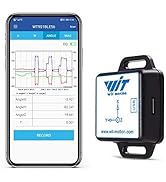
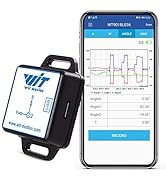
The WITMOTION WT901 is a compact 9-axis inclinometer module integrating a 3-axis accelerometer, gyroscope, and electronic compass with MPU9250 sensor. Featuring a Cortex-M0 processor and Kalman filtering, it delivers ultra-precise 0.05° angle accuracy and up to 200Hz data output. Designed for seamless integration with PC, Android, and Arduino platforms, it offers versatile UART and I2C interfaces, low power consumption, and robust stability—ideal for advanced robotics, flight control, and dynamic attitude measurement applications.




| ASIN | B07GBRTB5K |
| Are Batteries Included | No |
| Brand | WITMOTION |
| Color | Black |
| Computer Memory Type | DDR SDRAM |
| Customer Reviews | 4.1 4.1 out of 5 stars (54) |
| Date First Available | 30 September 2019 |
| Graphics Card Description | Integrated |
| Graphics Card Interface | Integrated |
| Graphics Chipset Brand | TDK Corporation |
| Graphics Coprocessor | Integrated Graphics |
| Graphics RAM Type | GDDR6 |
| Hard Disk Description | External USB 2.0 |
| Hard Drive Interface | USB 2.0 |
| Item Weight | 9 g |
| Item model number | WT901 |
| Manufacturer | WitMotion |
| Maximum Memory Supported | 16 GB |
| Memory Technology | DDR4 |
| Operating System | android |
| Processor Brand | ARM |
| Processor Count | 1 |
| Processor Socket | LGA 1151, AM4 |
| Processor Speed | 1 GHz |
| Processor Type | Core i7-3770 |
| Product Dimensions | 1.52 x 0.2 x 1.52 cm; 9 g |
| RAM Size | 16 GB |
| Resolution | 3840x2160 |
| Screen Resolution | 3840 x 2160 |
| Series | WT901 |
| Wireless Type | Bluetooth |
M**.
Excellent job on how these guys have made such a complicated device so easy to use. There is a lot going on with the fusion algorithms that go into this and having done this myself with all the code that is involved in getting this to work, these guys have removed a lot of the complexity and provided a fairly easy-to-use interface. Very good documentation (assuming you can find it all) and good videos made it fairly straight forward to get it to work OOB (out-of-the-box) and calibrate it. From what I have seen from using competing devices, this by far is the easiest to use and get working - I highly recommend it! Having an I2C and a UART interface is a huge plus - doesn't take long to get it up and running and providing meaningful results.
J**R
Works great! Very easy to get going. Just gave the manual to Claude Code or Codex to write the code. Was up and working in a couple of hours on an ESP32-S3. It's very accurate, low power and the form factor is amazing. Will buy again.
J**Y
I have now connected the device to a PC through the 6:1 USB adapter and the Witmotion PC software shows me the attitude of the sensor which is promising. I would now like to use the device with an Arduino MCU board and the Arduino IDE but so far I have not been able to find any suitable Arduino example software. I have found Arduino software for the WT901JY (6 axis version), this does not seem to compile, a library file seems to be missing. If I can eventually get this working I will update this review.
T**I
This product is very easy to use and has multiple ways to access its function, by PC Apps, Smartphones, and embedded programming. Two communication protocols are available: Serial and I2C. I'm using it for a capstone project so we use the serial portal to connect to the Arduino board. There are numerous tutorials and they even got YouTube video demos! The support staff is quick and helpful. Just email them and they will promptly answer your questions (with more documents provided). Please understand that the company is based in Asia so you should expect some reasonable delay due to time zones. Overall, very good experience developing it.
S**N
I used UART. The software they recommend is very good and almost a must to easily configure the device, with a USB to UART cable. Amazing accuracy for the price, but very difficult to interface with. Their online code samples are not good at all, but you can make your own or find things on github. For Python I would recommend the pywitmotion library on GitHub. All the heavy lifting has been done and its easy to implement.
Trustpilot
1 week ago
2 months ago