We remain fully operational. Our teams are working around the clock to ensure your deliveries continue safely.

DOWNLOAD THE APP


Customer Services
Copyright © 2025 Desertcart Holdings Limited
DOWNLOAD THE APP

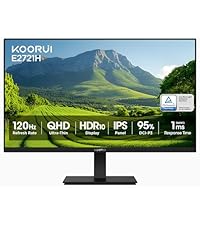
🎯 Elevate your workspace with KOORUI’s 27" 4K color powerhouse — see the difference, feel the edge!
The KOORUI 27 Inch 4K Monitor features a stunning UHD 3840x2160 IPS display with 1.07 billion colors, covering 99% sRGB and 95% DCI-P3 color gamuts for exceptional color accuracy. Equipped with Adaptive Sync (FreeSync & G-Sync), it ensures smooth visuals free from tearing. Designed for comfort, it includes flicker-free technology, Low Blue Light mode, tilt adjustment, and VESA mount compatibility, making it ideal for professionals seeking vibrant, fatigue-free viewing.



| ASIN | B0C6T7Y81Q |
| Adaptive Sync | FreeSync, G-Sync |
| Additional Features | Frameless |
| Aspect Ratio | 16:9 |
| Best Sellers Rank | #2,458 in Electronics ( See Top 100 in Electronics ) #106 in Computer Monitors |
| Brand | KOORUI |
| Brightness | 300 cd/² |
| Color | Black |
| Compatible Devices | Desktop |
| Connectivity Technology | DisplayPort |
| Contrast Ratio | 1000:1 |
| Customer Reviews | 4.4 out of 5 stars 9,980 Reviews |
| Display Resolution Maximum | 3840 x 2160 Pixels |
| Display Technology | LCD |
| Display Type | LCD |
| Hardware Connectivity | DisplayPort, HDMI |
| Has Color Screen | Yes |
| Image Contrast Ratio | 1000:1 |
| Item Dimensions D x W x H | 8.08"D x 24.15"W x 18.07"H |
| Item Weight | 5.5 Kilograms |
| Manufacturer | KOORUI |
| Model Name | N07 |
| Model Number | N07 |
| Mounting Type | Wall Mount |
| Native Resolution | 3840x2160 |
| Number of Component Outputs | 2 |
| Picture Quality Enhancement Technology | HDR10 |
| Refresh Rate | 60 Hz |
| Resolution | 4K UHD 2160p |
| Response Time | 4 Milliseconds |
| Screen Finish | Matte |
| Screen Size | 27 Inches |
| Screen Surface Description | Matte |
| Series Number | 7 |
| Specific Uses For Product | Business |
| Total Number of HDMI Ports | 2 |
| Viewing Angle | 178 Degrees |
| Voltage | 19 Volts |
| Warranty Description | 2 year manufacturer |
B**R
Koorui 34E6UC (34" 3440×1440, 180 Hz, 1000R curved VA panel) — But Missing Info Buyers Should Know
Review: I purchased two of the Koorui 34‑inch curved ultrawide monitors for a dual‑monitor setup, and so far I’m very pleased with them. The picture quality is sharp, the brightness is solid, and the “Normal” color preset looks natural without any adjustments. For the price, these 34‑inch panels deliver very good performance. That said, there are a few important details the product listing and reviews don’t mention — and knowing them ahead of time would have saved me some stress during installation. 1. YES, the 34‑inch model DOES include stand‑offs (spacers) This is not mentioned anywhere in the listing, and even Amazon’s Rufus incorrectly says they are *not* included. They actually come in the small accessory packet with the manual. If you’re mounting these monitors, you will need those stand‑offs because of the recessed VESA pattern. They are already in the box — just not advertised. I rushed to order a separate spacer kit because the listing didn’t mention it, so I’m putting this here to help the next person avoid that. 2. One of my monitors flashed briefly until I disabled FreeSync On one of the two monitors, I noticed a quick bright “flash” when moving the mouse. Turning off Adaptive Sync / FreeSync in the monitor’s menu fixed it instantly. The other monitor didn’t have this issue, so it seems to vary by panel. Not a defect — just something to be aware of if you see flicker or brightness pops. 3. Color and brightness match well once set manually After setting both monitors to the same brightness, contrast, and color mode, they match very well side‑by‑side. The “Normal” color preset looks the most accurate on these VA panels. 4. Build quality and packaging are solid Both monitors arrived well‑protected, and the included cables work fine. The stand is basic, but I’m using monitor arms, so that wasn’t a factor for me. 5. Too early to comment on long‑term support or durability I’ve only had these monitors set up for a few hours, so I can’t speak yet to long‑term reliability or how responsive Koorui’s support is. I’ll update this review if anything changes over time. Bottom line: These 34‑inch Koorui ultrawides are excellent for the price, especially for gaming or a dual‑monitor setup. Just be aware that: - Stand‑offs ARE included (despite the listing not saying so) - FreeSync may need to be turned off on some units - Picture quality is great once you match settings manually - Long‑term support is still unknown If the listing had mentioned the included spacers, it would have saved me a last‑minute order — so I hope this review helps the next person.
C**.
Awesome monitor! (my 3 year review)
So I've owned this monitor for about 3 years now and here's what I have to say about this monitor. The picture quality is actually really good. I got the 1080p version and I mostly use it with my Xbox series x and occasionally will use it for some lighter gaming on my gaming PC both work effortlessly well. The screen size is okay I think next time if it's in the budget I'll buy there 34 inch curved monitor. But for right now I'm sticking with this monitor until it dies and so far it's running strong 3 years later. Right now this monitor cost $80 which is an absolute steal at that price. I paid $130 for it and would say it's absolutely worth getting. There's no flickering. The setup process went smoothly. It's compatible with both my console and gaming PC! I absolutely love this monitor! I don't own the 27 inch version but I'd recommend going with either that size or bigger if you can afford it.
A**B
It REALLY is a 4K monitor.
Today I set up my dual KOORUI 27" model N07 monitors. I was somewhat worried by multiple reviewers reporting that this model isn't really a 4K screen. So while I don't usually write reviews, I'm here to assure you the N07 is in fact a 4K screen with resolution of 3840x2160 and refresh rate of 60hz. And I know why some people got this wrong. When I unplugged my old 1920x1080 monitors and tried to use the same HDMI cables, Windows identified the monitor as having a 1920x1080 native resolution. But my cables were very old. I plugged both my new monitors in using DisplayPort cables and they were instantly reporting 3840x2160. My monitors did not come with DP cables, just new HDMI cables. But my office had extra DP cables laying around. If you're still having trouble getting 4K on one of these, be wary of adapters, such as DP-to-HDMI, DVI-to-HDMI, etc. Also try shorter or newer cables. You CAN get 4K out of HDMI cables, but remember that HDMI has been around since 2002 and that standard has gone through many versions with new capabilities over the years. As for reviewing the other aspect of these monitors... they look great to me! Neither of mine had dead or stuck pixels. the colors look good and image is sharp. I'm not a professional monitor reviewer, but these seem like perfectly good office monitors for a fantastic price compared to big brand names. I took a chance on some of their smaller screens several months back and was blown away at the quality and low price. I'm glad this higher end model hasn't let me down! UPDATE: My original review was written 10/13/2023 and now it's 5/16/2025. I have never had a single issue with these monitors in the 1 year 7 months I've been using them. In fact I stumbled across my own review after looking to purchase a 3rd matching one... because a triple-monitor setup with these bad boys would be awesome! By the way, I use them on a dual-monitor desk mount. I love that they have VESA mounting holes so they can be used on wall or desk arms/mounts.
E**A
Smooth Performance, Great Colors for the Price
Excellent value for the price. Runs super smooth during my workflow and the colors look sharp and vibrant. The high refresh rate makes everything feel responsive, and it’s great for both work and casual gaming. Solid monitor if you want performance without overspending.
J**M
Good Monitor, Check Images for how to mount on overly large VESA brackets
Only had it a few days, will update this review in a year. Very pleased with this monitor, works great, and sound through the HDMI via my very old GFX card works well. Overall just extremely pleased, this replaced two older heavier monitors. I have attached pictures on how the to use this with a VESA bracket that is overly large. The monitor comes with extension bolts / screws to allow the bracket the clearance needed.
R**D
Outstanding monitor for the price
I’m not a gamer or a monitor snob. I don’t count pixels or check to see if every square millimeter of the monitor is flawless and even. I work from home and needed a larger monitor in order to have all the information up that I needed. This is a wonderful monitor that works perfectly for me. I can watch movies videos do all my work and I’ve had no problems whatsoever. I don’t do any intense gaming as I’m sure there’s much better monitors for that. But if you need a monitor for your home that actually works for most everything this works well.
T**G
Better off saving your money for a quality brand like Acer or Samsung
If you were looking for a decent gaming monitor with a good refresh rate, you better keep looking. Honestly, I wanted to really like this thing. For $120, it ticked off a lot of great features for me: at least 120Hz refresh rate, 1080p quality, and some nifty reticule marks for FPS gamers like myself. And for a year I had no problems with it until a few days ago. The ability to control input's, power, and toggle the reticule features all lie on one singular button behind the monitor. Here lie's the issue; if that power button starts messing up, there is no way to control or turn on/off the monitor. This is exactly what happened on my unit; the power button/control went out and the monitor was basically useless. I contacted Koorui support via email, and all I got was a vague "Did you confirm the button is really broken" response. Replied back that I did, and the manufacturer has ghosted me. Basically, I HIGHLY advise you just save up a few $80 or $100 dollars and get a decent entry level gaming monitor. By going cheap with this one, you will just end up probably wearing out the power/control button and be left with an expensive paperweight. If you are DIY repair savvy, I am sure that replacing the power/control button probably is not that big of a deal. In which case, go right ahead as it is a decent monitor for the price. But with that said, having this thing break leaves you with basically no options to get it fixed and good luck trying to get a hold of Koorui for support. Sadly, this is a growing trend on buying electronic's here on amazon from smaller brand sellers. *Update* So as of writing this review, I got Koorui to reach out to me. They would agree to replace the monitor for free, but I would have to front the shipping costs. They have their operations out in California, so if you live on the east coast then expect to pay around $40-50 for shipping for the monitor all the way out there (nearly half the monitor's value). I told Koorui that this just did not make any financial sense and they offered to refund me 50% of the monitor's value. However, they have yet to specify how they will send the refund, so I am unsure of whether I will see my partial refund when this is all said and done. So know that if you do proceed to get this monitor and need to return it past the 30 day return window covered by Amazon. TLDR: just save up an extra $50-100 for a big brand gaming monitor and save yourself the headache of dealing with all of this.
A**N
Beautiful monitor!
This is a beautiful monitor with a great contrast ratio of 4000 to 1. The blacks are inky and look great after adjusting via the menu. I can get 100hz on hdmi and 180hz on display port.
Trustpilot
2 weeks ago
3 weeks ago