Buy anything from 5,000+ international stores. One checkout price. No surprise fees. Join 2M+ shoppers on Desertcart.
Desertcart purchases this item on your behalf and handles shipping, customs, and support to Sri Lanka.
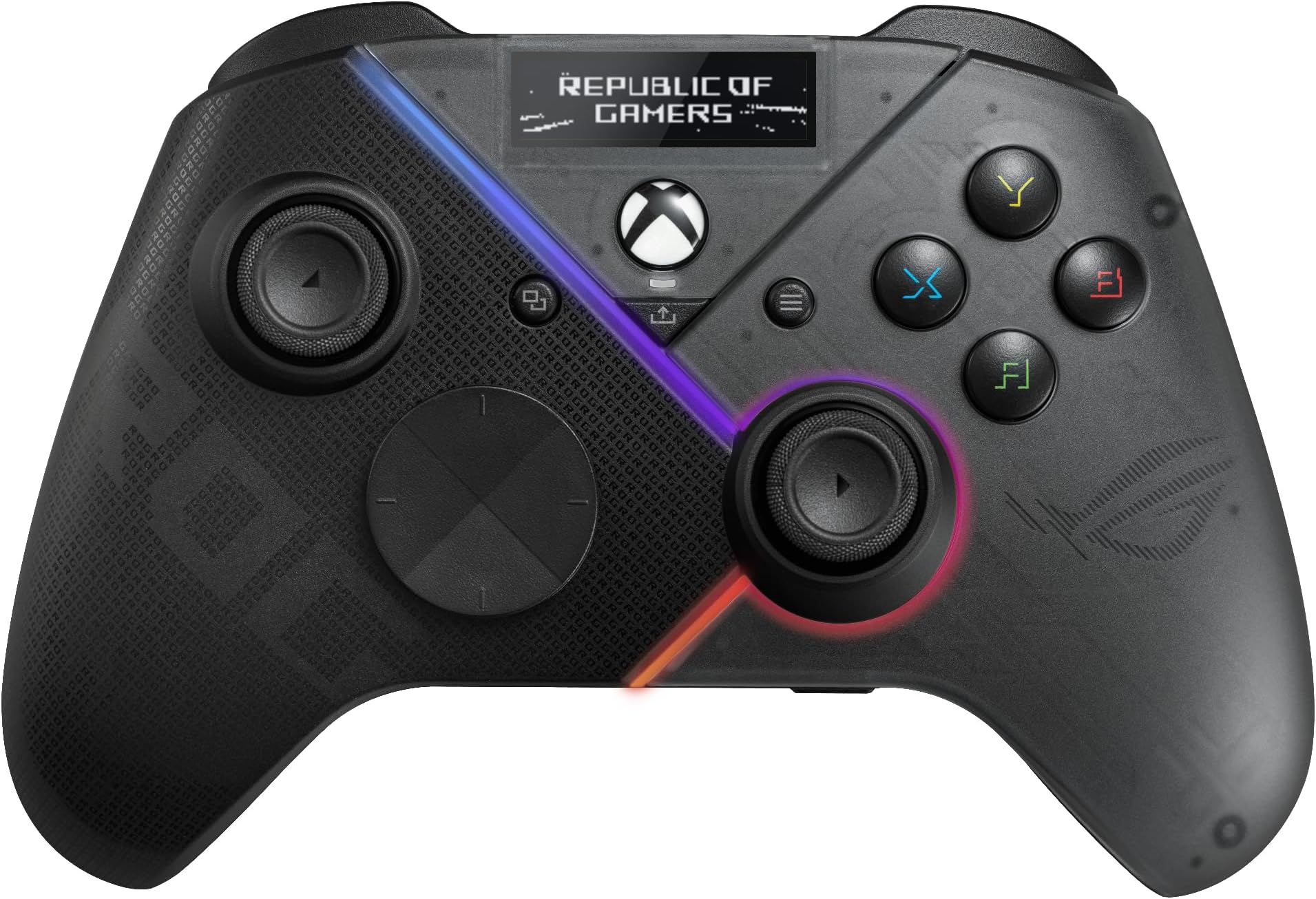
🎮 Elevate your game with the ASUS ROG Raikiri Pro — where style meets pro-level precision!
The ASUS ROG Raikiri Pro is a premium gaming controller featuring a customizable OLED display, tri-mode connectivity (USB-C, 2.4 GHz RF, Bluetooth 5.0), and four programmable rear buttons. Designed for PC and Xbox, it offers adjustable joystick sensitivity, selectable step triggers, and an ESS DAC for superior audio quality. Its ergonomic design and extensive customization options make it a top-tier choice for serious gamers seeking both style and performance.


| ASIN | B0CJN1LXT8 |
| Additional Features | Wireless |
| Best Sellers Rank | #4,136 in Video Games ( See Top 100 in Video Games ) #76 in PC Gamepads & Standard Controllers |
| Brand Name | ASUS |
| Button Quantity | 6 |
| Color | BLACK |
| Compatible Devices | Windows |
| Compatible Video Game Console Models | Microsoft Xbox SERIES S, Microsoft Xbox SERIES X |
| Connectivity Technology | Bluetooth |
| Controller Type | Joystick |
| Customer Reviews | 3.9 3.9 out of 5 stars (756) |
| Global Trade Identification Number | 00195553919845 |
| Hardware Platform | Gaming Console |
| Item Dimensions | 6.1 x 4.06 x 2.52 inches |
| Item Dimensions D x W x H | 6.1"D x 4.06"W x 2.52"H |
| Item Weight | 330 Grams |
| Manufacturer | ASUS |
| Manufacturer Part Number | GD300X ROG RAIKIRI PRO/BK/WW//6 IN 1 |
| Model Name | GD300X ROG RAIKIRI PRO/BK/WW//6 IN 1 |
| Model Number | GD300X ROG RAIKIRI PRO/BK/WW//6 IN 1 |
| Package Quantity | 1 |
| Power Source | Battery Powered |
| UPC | 195553919845 |
| Warranty Description | 1 Year Warranty |
S**E
Love the Asus Ecosystem!
If you have any other Asus gaming products then you know what I am talking about when I say they just work. Together that is. Very well as a matter of fact. The entire Asus Gaming ecosystem, be it Rog, Strix, TUF, whatever it is their products intelligently know each other and play well together. I can compare it to the Apple ecosystem. Great controller, easy to set up. I use as an external controller with my ROG Xbox Ally and it works flawlessly unlike the Turtle Beach I just replaced. Its got a nice weight to it, doesn't feel cheap at all. Recommend!
T**N
Stylish and Feature-Packed – The ROG Raikiri Pro Delivers on Performance!
The ASUS ROG Raikiri Pro is a stunning controller that instantly impresses with its sleek design and built-in OLED display. The RGB lighting adds flair, while the aluminum accents give it a premium, solid feel. It’s incredibly comfortable to hold, and the addition of rear paddles provides a competitive edge during intense gaming sessions. The control response is precise and responsive, whether you're navigating fast-paced shooters or exploring adventure titles. Connectivity is excellent with tri-mode support—2.4 GHz wireless, Bluetooth, and USB-C—making it easy to switch between PC, console, and handheld devices. The battery life is robust, lasting up to two days of regular use, and charging via USB-C is fast and convenient. Plus, the programmable buttons and intuitive customization through the ROG software let you tailor the controller perfectly to your play style. If you want performance, style, and versatility in one package, the ROG Raikiri Pro is truly a standout choice.
M**C
Received defective item, Instead of dealing with asus returned and purchased another.
Rgb controller is burnt and only half of it works, ordered another and will request refund. See the attached picture, i did troubleshooting and tried different methods to see if it would work. The 2.4ghz dongle doesn't work with amoury crate as it should either, doesnt sync with aura sync at all unless pluged in via usb and the rgb still only illuminates partially. The quality of the controller is nice, coming from an elite 2 it will take some adjusting to. The programmable bumpers/triggers on the back are not what I'm used too and seem to not be where your fingers rest. Some might prefer this, most do not... This is a light controller, much lighter than my elite 2 from what I'm accustomed to and used for 4 years. I moved to this controller for esthetics as was let down due to a defective pos. If the controller wasnt defective i would give it 4 stars, -1 star due to placement of back programmable buttons, seems very odd, as if no one tested the design before release, I can already tell you it wasn't tested in qc before being sold. Anyone could tell is was broken. Sometimes it is a hit and miss with Amazon resell (previously wharehouse) these are returned merch and I purchased to save some money, not to be sold a defective broken controller.
K**L
Very good controller with minimal drawbacks
The controller's build quality is great. It's plastic, but doesn't feel cheap. It also looks great. The Asus branding is all other the place, but it isn't prominent The buttons are responsive, but they're not mechanical, so there's no sound when you click them. I do prefer clicky controller-buttons. The thing that sets this apart from the non-pro version, the OLED screen, does add functionality as you can change profiles and connection settings without having to connect to a computer. This controller does have 3 connection methods: USB(wired), Bluetooth, and 2.4Ghz wireless via the USB dongle. In my experience, the Bluetooth connection does have noticeable latency which would make it unacceptable for fast-paced games, but the 2.4Ghz dongle connection has almost no latency. The battery life is pretty good. With RGB on, I get almost 6 hours of playtime
K**I
Outstanding Controller with Impressive Features!
I recently got the ASUS ROG Raikiri Pro, and it has completely elevated my gaming experience. The OLED display is a standout feature, providing clear and useful information right on the controller. The tri-mode connectivity ensures seamless switching between my PC and Xbox, making it incredibly versatile. The remappable buttons and triggers, along with the four rear buttons, offer a high level of customization, allowing me to tailor the controller to my gaming style. The step and linear triggers provide precise control, which is especially useful in racing and shooting games. The adjustable joystick sensitivity is another great feature, giving me the exact responsiveness I need for different types of games. The 3.5mm jack with ESS DAC delivers excellent audio quality, enhancing my overall gaming experience. The build quality is top-notch, and the controller feels comfortable during long gaming sessions. Overall, the ASUS ROG Raikiri Pro is an exceptional controller packed with features that cater to both casual and competitive gamers. Highly recommended!
M**D
Display panel is pretty much for watching OLED animations
Model purchased: Raikiri Pro OLED Display TL;DR: This would be a 4.5 star review but the display panel is mostly worthless in its current state, making it a very overpriced product. Outside of the bottom back buttons having really sharp points, the controller itself feels great. The controller software is actually really nice, except for the fact that you can only remap the back buttons to other buttons on the controller, and not custom things like macros/keyboard combos. The biggest issue that I have is with the display panel, and how that make me feel about the overall price. I bought this controller for the display panel, because based on advertising and reviews I was under the impression that we would be able to use it to quickly check the battery life. Checking controller battery life in Windows is hit-n-miss, often involving software overlays. This controller seemed like a perfect solution to that, because you could quickly look at the OLED panel instead of hoping that the gaming overlay you used would show the battery status of your particular device. As it turns, you can only kind of do that with this controller. When you first wake this controller from sleep, it shows a 3-4 second animation, then transitions to the useful info: battery life and connection type, which is only shown for a few seconds before going dark. However, after that there is no way to see the battery life on the display again unless you force the device to sleep and wake it. This could be a bug with this unit where the display is concerned, but there's way to tell, because the rest of the controller experience is good, if not great. As it stands, the only thing that I can do with the display panel once the device is play the selected animation or scroll a text message on it. That is fun to do once. After that, it's no longer fun, because what I want to see is actual, useful info on the display panel, like battery life status. The user manual says that the special R/L device buttons next to the USB port can be double-pressed or long-pressed to invoke things on the screen, but this unit only responds to a single press and double-press. Long press only does what single press does. This could all be avoided by ASUS adding more display options in the Armoury Crate software for the Raikiri Pro, but as it stands (and it has been this way for months), all you can do in the display section of that software is add/edit animations and text. It's also worth noting that as of this review, there is no option to fully disable animations/text scrolls, so most of the time, bringing up the display means that you're going to have to watch a 3-4 second animation. All of this adds up to a very disappointing experience where the display is concerned. I wanted it for the ability to quicky see useful information. What I got was a tiny display that shows various ASUS logo animations. If you're a big fan ASCII level animations and have always wanted to watch them on a super tiny screen, then this is the device for you. Otherwise, you're paying $110 for a screen that doesn't show useful info. With it lacking the ability to you know, let us see said useful information, this is a $50 controller at best.
P**R
Early review. Good so far, but instructions book is used?
The instruction book and warranty book looks used since it was like dirty and pretty worn out, which is weird... anyways I barely got this yesterday so this is a very early review.. but so far I like it on my ally.. you do have to turn off the embedded controller setting on the ally to use this. Was a little hard to pair this controller well learning how to pair this controller when switching it to Bluetooth because you have to switch in the oled screen to Bluetooth when trying to pair it to your handheld or computer.. when thats done then everything else is easy to use and later on ill write a full review on how overall I like it or don't like it. Will update in probably a few weeks to a month
J**H
Good on paper...
If the software was better, this would be a 4 or 5 star review... But since it requires Armoury Crate to utilize all its features, I cannot in good conscience recommend it to you under any circumstance. The fact that an industry-leading specialized tech company like Asus can design and force upon its users such an excruciatingly incomprehensible software, is beyond excuse. The design and controller itself is of passing craftsmanship, and works as it should. The 3 connectivity options (on PC anyway) is the real winner here. My old controller would randomly disconnect sometimes, which is why I impulsively purchased this, and I'm happy to say that is no longer an issue here. The trigger stops are great, and the buttons all have a nice tactile feel, though you will find the middle group take some getting used to, as they are somewhat awkward in size and position. I can't speak in regard to the back paddles because I refuse to get the college degree necessary to navigate their half baked software, nor have I explored the lighting for the same reason (which IS cool, btw, if you're into that). Battery life is pretty solid, just don't jack up the brightness of the screen too hard. Speaking of which... I don't know why there's a screen on it. There's some options on it, I guess?... Seems kinda redundant. But once again, sorta looks neat... It's plug and play otherwise, but don't expect to be able to use the paddles or change the lighting unless you want to endure the software. Have I mentioned the software enough?... You get the picture.
Trustpilot
4 days ago
3 weeks ago