Desertcart purchases this item on your behalf and handles shipping, customs, and support to Sri Lanka.
🖥️ Elevate your rig’s style and performance—because your desk deserves the best.
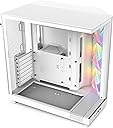
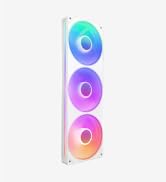
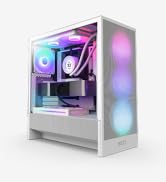
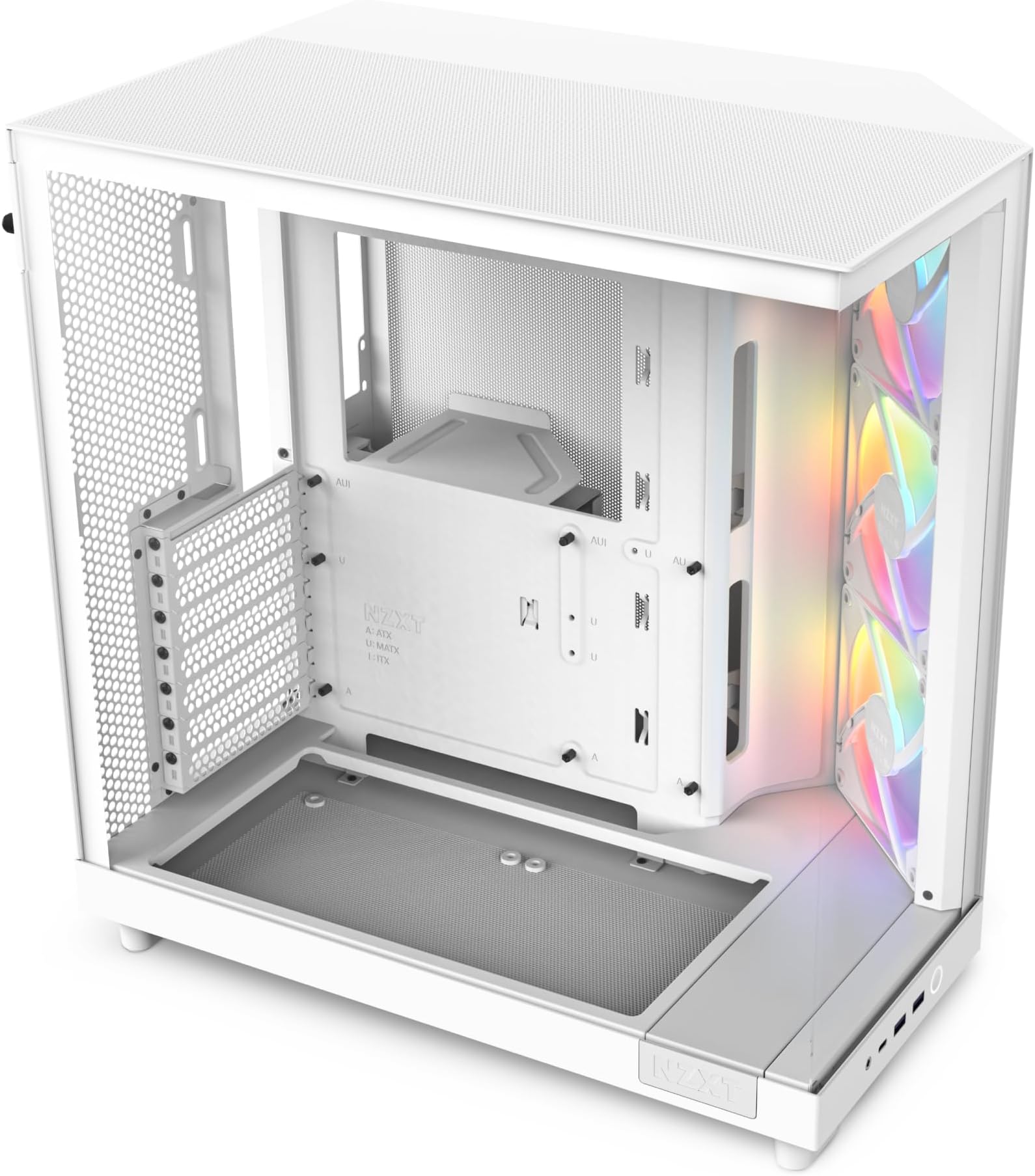
The NZXT H6 Flow RGB is a compact dual-chamber mid-tower PC case featuring panoramic tempered glass panels and three pre-installed 120mm RGB fans. Designed for superior airflow with perforated top and side panels, it supports ATX, micro-ATX, and mini-ITX motherboards. Its intuitive cable management system and sleek white finish make it ideal for professionals seeking a clean, high-performance build with vibrant RGB aesthetics.


| ASIN | B0C89S5PC5 |
| Antenna Location | Gaming |
| Best Sellers Rank | 2,976 in Computers & Accessories ( See Top 100 in Computers & Accessories ) 3 in Computer Cases |
| Brand | NZXT |
| Brand Name | NZXT |
| Case Type | Mid Tower |
| Case type | Mid Tower |
| Colour | White |
| Compatible Devices | ATX, Micro-ATX, Mini-ITX motherboards |
| Cooling Method | Air |
| Customer Reviews | 4.8 out of 5 stars 1,840 Reviews |
| Enclosure Material | Tempered Glass |
| Fan Size | 120 Millimetres |
| Hard Disk Form Factor | 3.5 Inches |
| Internal Bays Quantity | 1 |
| Item Dimensions D x W x H | 41.5D x 28.7W x 43.5H centimetres |
| Item Weight | 9.4 Kilograms |
| Light Color | RGB |
| Manufacturer | NZXT |
| Manufacturer Part Number | CC-H61FW-R1 |
| Material | Tempered Glass |
| Model Name | CC-H61FW-R1 |
| Model Number | CC-H61FW-R1 |
| Motherboard compatibility | ATX, micro-ATX, mini-ITX |
| Number of Fans | 3 |
| Number of Items | 1 |
| Other Special Features of the Product | RGB Lighting |
| Power Supply Mounting Type | Bottom Mount |
| Product Warranty | 2 year manufacturer |
| Recommended uses for product | Gaming |
| Supported Motherboard | ATX, micro-ATX, mini-ITX |
| Total Expansion Slots Quantity | 7 |
| Total USB 2.0 Ports | 2 |
| Total USB 3.0 Ports | 2 |
| Total USB Ports | 3 |
| UPC | 810074844154 |
| Unit Count | 1.0 count |
P**K
Great looking case for an all-white build
I used this for an all-white setup and I've been really happy with it. The panoramic glass design looks fantastic once everything is built and lit up, and the dual-chamber layout does a good job of hiding cables and keeping the main compartment looking clean. The airflow has been excellent as well, which is important with modern hardware running hotter than ever. The included RGB fans were a nice bonus and saved having to buy extras straight away. Building in it was straightforward with plenty of room for cable management, and overall it feels like a premium case without reaching some of the prices that enthusiast cases can command these days. Most importantly, it simply looks good on the desk. If you're putting together a white-themed build and want something that shows off the components properly while still keeping good airflow, this is an easy recommendation.
J**N
Stunning case
Brilliant and stunning case. The 3 included fans and very good and provide a lot of cooling while still staying quiet. Very good for the money. it’s quite a big case and has a lot of room to cable manage and very easy to work with.
M**S
Superb little case!
Superb little case! I wanted a similar case to my outgoing pc and liked the design of this one, ports at front, and the white/grey NZXT H6 really matches the rest of the installed components I used in this build (Klevv ram and Aorus 5080 master on a Aorus Pro X3D ice board).. the overall white with grey/silver accents really works well. Loads of room for top mount 360 AIOs with no fowling on the CPU 4+4 connectors like my old case had.. even can fit a monster sized GPU in it like the 5080s and 5090s. I did fit different reverse flow fans as the backside of the fitted NZXT fans didn't sit well with me. That would be my only negative about the case as standard supplied. Really pleased with it though and was a great price in spring sale. Highly recommended especially the white variant.
G**E
Nice case for what it costs
Very good and spacious case, not very expensive and materials don’t feel that cheap. I have it since last year and no issues with fans or anything else. I recommend it
F**D
Great case
I’ve had this case for 2 years now and it’s been great. If cable management isn’t your strong point, this is the one to get — the roomy interior makes it easy to fit everything neatly. Looks great as well.
J**N
Cool case, but just a few points to note re assembly and noise
This is my third NZXT case in almost 15 years. Coming from an H440, the aesthetics of this case really appealed to me and after almost 10 years with that case, I fancied something a little different to house my recent build (which I had initially built in the H440, but have now moved into the H6 Flow). This is a good case all in all and a lot of reviews you'll read here and other places online will cover most of the pros and cons of it, so I'm going to cover a few key things I learned about this case when building in it that you might want to be aware of: - Plan ahead when building. Although this case can support ATX motherboards, it is quite small - both a blessing and a curse! You should put all the cables you need through the cut-outs in the motherboard tray before attempting to install your board - particularly the CPU power cable(s) and anything you need to plug into the bottom of your board - power/reset buttons, front audio and PCI-E power for graphics cards. Space is tight and you might struggle to get the cables routed through and plugged in if you don't do this. On the topic of the power/reset buttons, it is nice to see these are now just one plug you can plug into your board and no longer individual plugs that are tricky to get in! That said, board installation itself was exceptionally easy in this case - my ATX board slotted in just fine and the built-in risers are a nice touch, too. - The included fans are NZXT's own brand which use different ARGB and fan header plugs to other manufacturers. NZXT include adapters on the included fans so you can plug these into a headers on any board and control the speed and colours using any software you like (no need to buy an NZXT fan controller or use their CAM software), but if you want to add additional NZXT fans you will need to either buy an NZXT fan controller to use, or use adapters to adapt the NZXT ARGB plugs to regular ones for use on normal fan controllers or your motherboard. I didn't know this. - You might find the case is very loud if you fill it with fans as there is no sound dampening at all. You need to go into your BIOS and adjust your fan curves so the fans only spin at high RPM when the system gets hot. Additionally, the included fans do not appear to be PWM (or the included adapters to adapt them from NZXT's own header into a generic header disables this), so you need to set a DC fan curve for these that changes the voltage of the fans based on heat of the system. If you plug these fans directly into your board (not controller), you can set a fan curve based on voltage for these, and most boards will allow other fans plugged into your system to be adjusted either by PWM or DC. This made the system so much quieter for me. - All of the included fans are plugged into splitters/adapters that adapt NZXT's own fan and ARGB headers into ones you can use on any motherboard. This is lovely, but creates a huge amount of cable mess. Luckily, there is ample room for cable management (thanks to the dual chamber design) but this is just something to be aware of. You definitely want a modular power supply if you're using this case as you'll likely have loads of fan cables to hide away. However, the included velcro straps are very helpful and this may be the first build I've done where I've not used a single cable tie to anchor cables - which is nice! - This case is clearly designed with the use of an AIO cooler mounted to the top in mind, so if you're using an air cooler you need to make sure it fits before buying this case. There is not a lot of CPU cooler height clearance, so larger air coolers will not fit. I'm using a Noctua NH-U14S heatsink with a CoolerMaster 140mm Halo fan attached and it barely fits - there are probably literal millimetres of space between the heatsink and side panel. NZXT's own air coolers may fit, but do check compatibility before you buy. The chamber that your PC itself sits in is quite narrow. I had to mount the fan quite low on the heatsink, so it seems unlikely I'll be able to use the RAM slot nearest the CPU cooler. - I'm not sure if there is an issue with interference with this case, but when I had my build in the H440 I had very few problems with static / interference sounds coming out of my speakers - in the H6 Flow, every time the GPU is stressed, I get a lot of interference (I have recently upgraded my GPU, too). I had to buy a ground loop isolator to resolve this. Not sure if the case has anything to do with this, but seems coincidental. - Quality seems OK. For a £100+ case I did expect better, especially given how well built the H440 was. The H440 cost about the same in 2014/15 as the H6 Flow RGB costs today if my memory serves me correctly, and feels like a much better-built case. The quality of the H6 flow is unfortunately closer to that of my old NZXT Lexa S from about 2009. There are no dust filters, but hopefully with the H6 Flow being designed to be placed on desks rather on than floors, hopefully it won't be a huge issue. Time will tell if this case gets too dusty. - Thermals are excellent, however - no doubt that this case helps keeps everything cool. Your CPU and GPU cooling will also determine this, but at idle my i5-13400 is sitting at about 30c with the front fans spinning at 500 RPM and the CPU and other three system fans at 760 RPM. The fans on my GPU don't even spin unless I'm gaming and seems to sit around 37c when idle (MSI RTX 4060 Ti). My fan setup is the 3x included 120mm intake fans, 2x 140mm intake at the bottom and 1x 120mm rear exhaust, as well as one 140mm on the CPU cooler. This not only keeps the case cool, but lights it up really nicely too. The three RGB intake fans alone probably isn't enough to illuminate the whole case, unless you have other RGB components. On the whole this is a good case - certainly a very striking one and suited to being sat on your desk to show off your system, but just make sure you do your research on it before you assemble your system in it.
A**R
I LOVE IT
I absolutely love my PC case, there is so much space inside and looks sooooo good. Is very quiet and I like the lighting. I recommend this case if you're looking for one.
H**K
Amazing case 10/10
An amazing case, amazing cable management, cooling, airflow and aesthetics, it is really heavy but is worth it and the panels are practically invisible to the point i forgot they were on there 😂
R**N
🌟🌟🌟🌟🌟 ECCEZIONALE! Il miglior case che abbia mai usato!
Dopo alcune settimane di utilizzo quotidiano e attento, posso affermare con sicurezza che l’NZXT H6 Flow RGB è un case eccellente, progettato per chi cerca spazio, qualità costruttiva e una gestione dei cavi impeccabile. 🔹 Costruzione e materiali: La struttura è solida e ben rifinita, con pannelli in acciaio di qualità e una splendida vista interna grazie al doppio vetro temperato angolare. Tutto è assemblato con precisione, senza vibrazioni o difetti di fabbrica. 🔹 Spazio interno: Il layout interno è sorprendentemente generoso. C'è spazio abbondante per schede grafiche di grandi dimensioni, sistemi di raffreddamento a liquido custom o AIO e più dischi di archiviazione. Il flusso d’aria è ottimizzato anche con configurazioni più complesse. 🔹 Gestione dei cavi: Uno dei punti forti del case. Grazie al pannello posteriore ben strutturato e ai canali dedicati, il cable management risulta intuitivo e ordinato anche per chi non è esperto. Il risultato estetico è pulito e professionale, con pochissimo sforzo. 🔹 Ventilazione e RGB: Le tre ventole RGB preinstallate offrono un flusso d’aria eccellente già out-of-the-box, mantenendo il sistema ben raffreddato e silenzioso. L’illuminazione è elegante e completamente personalizzabile tramite il software NZXT CAM. ⸻ ✅ Punti di forza: • Qualità costruttiva elevata • Spazio abbondante per qualsiasi configurazione • Gestione dei cavi estremamente facile • Ottimo flusso d’aria e ventole RGB già incluse • Design moderno e curato nei dettagli ❗Nota: Non include ventole posteriori o superiori extra, quindi per build ad alte prestazioni si consiglia di aggiungerne a seconda delle necessità termiche. ⸻ 🎯 Conclusione: Un case solido, elegante e funzionale, perfetto per chi vuole costruire un PC ordinato e performante senza complicazioni. Consigliatissimo per appassionati, gamer e content creator che cercano qualità e praticità in un unico prodotto.
M**A
A Compact Powerhouse with Style and Functionality!
The NZXT H6 Flow RGB (2023) is hands down one of the best cases I’ve worked with. It’s sleek, functional, and designed with modern PC builders in mind. Here’s why I’m loving it: Design & Build Quality Minimalist Aesthetic: The clean lines and subtle RGB accents give it a premium, modern look that complements any setup. Compact Dual-Chamber Design: The internal layout is well thought out, keeping cables neatly tucked away for an ultra-clean build. Performance Highlights Optimized Airflow: The mesh front panel ensures excellent airflow, keeping my components cool even during intense gaming sessions. Pre-Installed RGB Fans: The included RGB fans are a great touch—quiet yet effective in both cooling and adding visual flair. Ample Space for Hardware: Despite its compact size, it easily fits an ATX motherboard, large GPUs, and multiple storage drives. 🛠️ Ease of Use Tool-Less Panels: Removing and reattaching panels is a breeze, making the building process much smoother. Cable Management: The dedicated cable routing channels and velcro straps make it easy to keep things tidy. Radiator Support: Plenty of room for AIO coolers, supporting up to 280mm radiators at the top or front. What Could Be Better? The PSU chamber is a bit tight, so installing larger power supplies requires some patience. More USB ports on the front panel would have been a nice addition for users with multiple peripherals. Who Is This For? Gamers building a compact, high-performance rig. PC enthusiasts who want a balance of aesthetics and functionality. Beginners looking for a user-friendly case with advanced cooling features. Final Verdict The NZXT H6 Flow RGB blends style, cooling performance, and ease of use into a fantastic package. It’s perfect for anyone looking to build a sleek, modern PC without compromising on airflow or RGB customization. Despite minor nitpicks, it’s a standout choice in its price range. Highly recommended! Build your dream rig in style with this case—it’s a showstopper! 🖥️✨
A**I
ممتاز
Next رائع وغني عن التعريف
C**S
este case es glorioso. La mejor compra de mi vida
No dejo de verlo. Esteticamente es impresionante. El material es excelente y los ventiladores funcionan sin necesidad de un RGB hub. Parece una nave espacial futurista. La mejor compra que he hecho en mi vida con amazon. 100 de 10. No te vas a arrepentir es casi orgasmico voltear a verlo. Nisiquiera pensaba en gastar mas pero esta marca me impresiono tanto que ahora busco ventiladores que combinen y le voy a meter otros 100 USD. Compralo sin pensarlo no te vas a arrepentir. (Unico defecto es que no incluye RGB hub, pero por la calidad no te pesa en absoluto)
S**V
Sleek and Powerful NZXT H6 Flow
Pros: • Airflow-focused: Those angled front fans are doing real work, pushing air straight to the GPU and motherboard area. • Showcase-ready: The dual-glass panel design is chef’s kiss for showing off your internals. • GPU orientation: Vertical mount in this case looks perfect. It really lets the GPU shine. • Spacious layout: You’ve made great use of the space — good clearance for the AIO, GPU, and bottom fans. Suggestions (if you’re looking to tinker): • If you ever want to max out airflow, throwing another fan or two on the top or rear exhaust can balance positive pressure. • Custom lighting zones (e.g., a little RGB strip along the bottom edge) could add that extra “pop” without going overboard. Overall: sleek build, clean execution, and the H6 Flow is doing what it was born to do — keep things cool and look damn good doing it.
Trustpilot
2 months ago
3 days ago