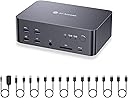
🚀 Elevate your workspace: triple monitors, 8K clarity, zero downtime switching!
The AV Access iDock D23 is a premium desktop-only KVM switch and docking station that supports 3 DisplayPort monitors simultaneously, delivering stunning 8K@60Hz and ultra-smooth 4K@165Hz visuals. It features a powerful 12-in-1 hub with USB 3.0, USB-C, Ethernet, and audio ports, enabling seamless peripheral sharing between two computers. With ultra-fast switching in 2-3 seconds and a durable aluminum build, it’s designed to maximize productivity for professionals demanding high-performance multi-display setups.


| ASIN | B0CRDQW4GT |
| Batteries Included | No |
| Batteries Required | No |
| Best Sellers Rank | #1,150,721 in Electronics ( See Top 100 in Electronics ) #471 in KVM Switches |
| Brand | v AV Access |
| Country of Origin | China |
| Customer Reviews | 3.7 3.7 out of 5 stars (79) |
| Date First Available | 20 April 2024 |
| Does it contain liquid? | No |
| Hardware Interface | USB 3.0 Type C |
| Includes Rechargeable Battery | No |
| Item Dimensions LxWxH | 16 x 11 x 5.5 Centimeters |
| Item Weight | 2 kg 190 g |
| Item model number | iDock-D23-NA |
| Manufacturer | AV Access |
| Material | Aluminum |
| Model | iDock-D23-NA |
| Mounting Hardware | KVM Dockx1, USB Type-A to Type-B Cablex2, DP 1.4 Cablex6, Power Adapterx1 |
| Mounting Type | Surface Mount |
| Net Quantity | 1.0 Count |
| Number of Ports | 24 |
| Number of items | 1 |
| Product Dimensions | 16 x 11 x 5.5 cm; 2.19 kg |
| Total USB ports | 6 |
| Wattage | 36 |
R**G
I needed a KVM switch to drive x3 monitors from both a work laptop and a Mac Studio. The product info says that the D23 only works with desktops and DP connections, so I was a little reticent to purchase, but took the chance. On arrival it didn't work - only two monitors and many peripherals not connecting. I emailed the AV Access team who came back to me within 24 hours with solutions. (For those with similar setups: 1/ connecting the D23's USB-B inputs to the computers (cable supplied) in addition to the DP inputs solved the peripherals issue, and 2/ to resolve the issue with the monitor connected through HDMI, I replaced my passive DP>HMDI cable, with a £25 Startech active DP>HDMI adaptor). Now everything works - and it's amazing! Being able to switch at a click of a button all three monitors (+audio adaptor/mic +webcam +Stream deck +prompter) is game-changing. The device itself has a high build quality, and looks nice on my desk. I may still invest in the clicker button. The service from AV Access was quick and friendly (thanks Johnny and James). I got the feeling that they genuinely cared to solve my issue, and was left in no doubt that if not resolved there would be no problem returning the item.
P**T
Since covid, I must have tried every permutation to get a convenient home working setup that easily switches between a work PC and home mac. Every solution to date has had compromises that niggle on a daily basis. Finally I have a working setup with 3 * 24" IPS screens, webcam, wireless headset, wireless keyboard and wireless mouse that switch between a mac mini and work laptop with a single button. All inputs and outputs are to the back of the switch box and I've got multiple devices connecting in via an unpowered USB hub so this keeps the desk environment uncluttered and cable free. To make the user experience even better, switching is possible via keyboard shortcuts. I could move the switch box out of sight but it's handy to have USB sockets on the desk for occasional keyboard/phone charging. The only thing that would make this better is if all video connections were HDMI. If you don't have displayport connectors on your source device (or in the case of the mac mini, the third output device needs to be USB), most converter cables are directional and in the wrong way. Whether you're looking to get a mac or work laptop connected to 3 displays, a USBC hub with 3 displayport connectors appears to be a good solution. Have found HDMI to displayport cables (both powered and unpowered) to be unreliable.
G**S
I was given a laptop from my work, and I am working mostly from home. I have a very specific setup (monitor/keyb/mouse/chair/desk/sound) which I wanted to keep using with my work laptop, so I decided to buy the iDock. Most important factor was the ability to display 3440x1440@165Hz via the DP port, and it was the best choice at that range. Good quality, as it is described, no problems in general, works fine. However it misses few features that would be nice to see in future models. -No power switch. Apart from the power consumption, which is low, but still, why being on 24/7? Also, both my keyb/mouse are LED illuminated, therefore they are on 24/7. Fortunately they are in my office, but if someone have their PC/Laptop in their bedroom, that could be a problem. -LAN is always connected, even without a cable attached. This wouldn't be an issue in most cases, however my laptop is heavily locked by my employer, and when I connect it to the iDock, reverts the connection there instead of WiFi, and I cannot switch back (company policy). I had to ask my support to disable the USB-to-LAN adapter in Windows to properly work, as there is no way to disabled on the iDock -When I have both computers connected and on, while one has two monitors connected but the laptop just the main, and I switch it, all windows from my main screen, on my personal PC, move to the secondary monitor. This means that the signal sent to a connected PC when you switch to another, is that this monitor is disconnected, which again, is not a good practice. It shouldn't change anything, just "hide" the signal. Overall it is a very good solution, even though it is missing the above features. I am not sure if any other has them in this price range.
L**O
I’ve been using this KVM for a a couple of weeks now multiplexing between 2 monitors and my Windows PC and my Macbook Pro, and overall I’m pretty happy with it. Here’s a quick breakdown of my experience so far: Form Factor: - The design is sleek and modern, which I appreciate. It actually looks nice on my desk, unlike a lot of competitor brands out there. At about twice the height of my previous AVAccess KVM (visible on the bottom left in the picture), it’s a little too tall to fit under my desk stand though — I wish it were just a bit shorter. - One minor annoyance is with the supplied cables — unplugging the middle or bottom cables is tricky. You have to press a release lock on top of the cable head, but it’s hard to do that without first unplugging the top cables. Features & Performance: - Switching inputs is fast — faster than my old AVAccess KVM, which is great. There's no flickering so far, which was an issue with some other KVMs I’ve tried - I’m a fan of all the extra ports: headphone jack, SD card slot, USB ports on the back for a webcam or monitor hub. My old KVM didn’t have a rear USB port, so I had to awkwardly route my webcam wire around the unit. This is a small but really nice improvement for wire management. - One feature I miss: a power button. It’d be nice to have the option to turn it off without unplugging it. - I haven't had it for very long yet, so time will tell how reliable it is. If it breaks down before the warranty is over, I will definitely update my review with my experience. Compatibility: - It’s DisplayPort (DP) only if you’re using a laptop, which is a bit of a pain for MacBook users like me. I had to buy some Thunderbolt-to-DP cables. I get why DP was chosen, but it would’ve been nice if 2-3 adapters were included in the box. - My Apple keyboard works fine in every USB slot except the dedicated USB 1.1 keyboard slot. It worked fine in the USB 1.1 port on my older AVAccess KVM. Sometimes I have to play USB port roulette a few times to get it to connect properly. - Occasionally, it seems to interfere with my WiFi. Even though I’m not using the Ethernet port, I’ve had to restart my computer or switch inputs back and forth to get my connection back. - One more downgrade from the previous model: no dedicated mic input port this time. Not a dealbreaker, but something I noticed. Overall, this is a really solid KVM switch with a lot of thoughtful improvements over my previous model.
A**E
EDIT: as of 3 months owning this product, it stopped working. Keyboard not responding to key strokes, audio devices are choppy. I do not recommend this product and has request a refund. I've been using this product for a few weeks with 2 of my monitors and it seems to be working fine. My monitors are one Ultrawide 3440x1440p 144Hz OLED with HDR, Gsync and one 2560x1440p 144hz. I used the ultrawide for gaming and work, while the second screen is just for displaying additional contents. The KVM works fine it is able to handle the 3.5K resolution, 144hz and HDR with Gsyncs. At first I have flickering problems so I switched out all of my cables with the provided ones, it got stable and no more flickering. So I would suggest that if anyone got problems, use the supplied cables or buy ones that are at least DP1.4 certified (or DP2.0/2.1 cables). The cable lengths should be short, like 6ft or less. This KVM claims to support UHBR13.5, which is the second highest DP standard (UHBR20 is the highest at the time of this review). So far I haven't use it up to 8K60Hz, but since it is stable at 3440x1440p 144hz with HDR and Gsync, I believe the claims to be true. I would have given this 5* star overall, but only 4* because of a few things. It does not support EDID emulation, which is a useful feature to prevent your windows from shifting when you switch PC inputs. Keyboard hotkeys is kind of limited. I can only use 4 keys: Tab, CapsLock, Shift, Ctrl to switch. If I have hotkeys enabled, and I accidentally double-tap one of those keys, the hotkey function will be assigned to those keys. This is pretty annoying. But overall, I like the product because it has a decent price and supports high resolution and high refresh rate. KVM that can support DP1.4 or higher is either extremely expensive or extremely crappy. This KVM is only one that works as well as it claims, and at an affordable price. I do wish it is EDID capable though.
Trustpilot
2 weeks ago
2 days ago