🚀 Upgrade your WiFi game — never settle for buffering again!
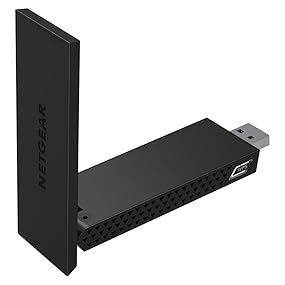
The NETGEAR AC1200 Wi-Fi USB 3.0 Adapter (A6210-100PAS) is a high-performance wireless adapter designed for Windows desktops and laptops. Featuring dual-band AC1200 speeds (up to 1200 Mbps), SuperSpeed USB 3.0 connectivity, and high-gain antennas with Beamforming+ technology, it delivers extended range, reliable connections, and lag-free HD streaming. Its flexible desktop dock allows optimal placement for the best signal, making it ideal for professionals seeking seamless video conferencing, gaming, and streaming in challenging WiFi environments.


| ASIN | B00MRVJY1G |
| Best Sellers Rank | #547 in USB Computer Network Adapters |
| Brand | NETGEAR |
| Built-In Media | USB cradle, WiFi USB Adapter |
| Color | Black |
| Compatible Devices | Desktop, Laptop |
| Compatible Operating System Family | Windows |
| Customer Reviews | 4.3 4.3 out of 5 stars (2,926) |
| Data Link Protocol | 802_11_ABGNAC |
| Data Transfer Rate | 1200 Megabits Per Second |
| External Testing Certification | Não aplicável |
| Global Trade Identification Number | 00606449103328, 10606449103318 |
| Hardware Interface | USB 3.0 |
| Item Dimensions L x W x H | 6.36"L x 5.31"W x 1.61"H |
| Item Type Name | Netgear A6210-100PAS A6210 Network Adapter SuperSpeed USB 3.0 802.11 B/A/G/n/AC |
| Item Weight | 0.51 Pounds |
| Manufacturer | Netgear |
| Mfr Part Number | A6210-100PAS |
| Model Number | A6210-100PAS |
| UPC | 724627111504 804067318159 809395318277 808113001873 804904121539 012304133827 801947299508 606449103311 |
| Warranty Description | 1-year Limited |
D**N
Great Buy!!
I have only had this for 1 day so at this time here is my story. I have Brighthouse Cable 200 meg download and 15 meg upload. I have a Netgear N900 and a Netgear X6 Nighthawk router both connected to my Brighthouse modem. I have 23 devices that connect to my routers including 1 iPhone, 2 iPads, 3 iPods, 1 Galaxy Note 4, Laptops, Security cameras, 2 Wireless Printers an Amazon Echo and 5 Hue Lights. Everything works great except for my Lenovo Flex 2 15 laptop that only has 2ghz WiFi adapter connection. My laptop is running Windows 10 Pro and when watching Netflix, Hulu or Amzon Prime movies it got to the point where I felt like I was watching pain dry. Everything was always buffering and I was at the point where I wanted to buy a new laptop. I removed everything from my network except for the laptop. I turned off Bluetooth, made sure I had the latest drivers and made numerous changes to the settings of my adapter and router but nothing seemed to help. I decided it had to be the WiFi adapter built into the Lenovo laptop so I decided to take a chance and purchase this Netgear adapter to see if getting a 5ghz connection would make a difference. I received the adapter, ran the installation, plugged in the adapter and connected to the 5ghz connection. The 1st thing I did was run a speed test and all I can say is WOW! The speed test showed my download speeds were over 200 meg. I reconnected everything to my network and then ran another speed test and was still hitting the 200 meg speeds on the 5ghz channel. See attached picture. At this time I have zero buffering on anything I watch and I am quite surprised at how well this $60 adapter has made a difference. While it has only been 1 day I will update this review if I notice any difference from what I am seeing today.
D**N
A solid little device and really good value for the money. Buy this device today!
I waited a few months before giving this review from experience with another product (wireless mouse). Let me start by saying I have never liked USB wireless adapters since using them on laptops a couple years back. I've always found them to work for a bit then start getting twitchy. And as a result I almost passed over this device when looking for a wireless solution for my home gaming computer. This device is pretty solid. My internet connection is stable as a rock, and full disclosure I don't even have this directly plugged - it's hanging off a USB3 hub. I don't recommend that however; but my point is it's a very decent device for both gaming and work purposes. Latency is extremely well managed as is full speed transmission (I have a 250Mb connection at home and typically hit within a factor of 0.5-1% for cabled speedtest.net).
C**L
Nice Netgear :)
My initial install of this device was simple and it is working very well however, there were some things worth noting regarding its operation and the software. First off, while connected using the A6210, it shows in my task try icon that my connection is 802.11n and not 802.11ac. My router, NETGEAR R6300v2 is 802.11ac capable and I have another device that connects and shows an 802.11ac connection. Additionally, the NETGEAR A6210 Genie software shows that my 5 GHz network is AC capable. In conversation with Netgear support, they have indicated that this is a limitation of Windows 7. My link rate is fairly consistently 866.5 Mbps and my download rates have gone up significantly also when compared to my internal Wi-Fi adapter that was only 2.4 GHz capable. Where I would get about 50 Mbps download speeds, I am now consistently above 80 Mpbs. The connection is rock solid and I have had no issues otherwise with the performance of this device. Next, when using the NETGEAR genie software that came with the A6210, under the section "Other", the "Software Update" button "Check", I receive an error message, "ERROR: Could not connect to the NETGEAR server. Please check your Internet connection." Clearly my Internet connection is working, so there must be an error in either the server it is looking for or the server is unavailable. Netgear did not respond to this issue when I brought it up. The last issue I have noticed is, when selecting the "Get Diagnostics Info:, Get Info" feature, a separate window pops up, with a progress bar and this updates to 75% where it does not progress any further regardless of how long you wait for it to continue. From this pop up window, the only option available is "Exit" as the "Save to File" option is greyed out. Netgear did not respond to this issue when I brought it up. All of that having been said, I have tried uninstalling and reinstalling the software and there is no change to the issues I have noted. I rated it 4/5 stars simply because it isn't perfect, but it does work very well aside from what I consider the minor issues listed above. The packaging says requires Windows, to include Windows 7, yet Netgear insists that Windows 7 doesn't support 802.11ac. I am fairly confident that this is a defect in the presentation of the connection as my download speed is consistent with my other device (MacBook Air) that is showing an 802.11ac connection. Subsequent to installing this device, I have gone back and disabled my internal wireless adapter, though I don't believe that was required. The last thing worth noting is that my current setup is a large laptop that I have essentially setup as a desktop replacement and I am using the A6210 via a USB 3.0 (powered) hub and using the supplied cradle. I did this initially as my laptop only has one USB 3.0 port and I have two other devices (external portable hard drive and an external Blu-Ray optical drive) so I had reservations that it would work. I was happy to discover that it has worked just fine in this configuration. Overall I am pleased with its performance and I am happy to say that it was a good purchase.
C**E
Un buen dispositivo que sirve su propósito, pero lo que mas destaco es que es de los pocos que funciona en Linux sin necesidad de compilar un driver. Solo lo conectas y funciona.
P**H
The Netgear AC1200 A6210-100PES USB High Gain Dual Band Wi-Fi Adapter has been a fantastic upgrade for my home network. Here’s why this adapter stands out: Key Highlights: Dual Band Connectivity: The dual-band capability is a major plus. It connects seamlessly to both 2.4GHz and 5GHz bands, providing faster speeds and more reliable connections. I’ve noticed a significant improvement in internet stability and speed for both streaming and gaming. High Gain Antenna: The high gain antenna ensures a strong and stable connection even at greater distances from the router. It has greatly improved my Wi-Fi performance in areas of my home that previously had weak signals. Easy Installation: Setting up the adapter was a breeze. The included installation CD made the process straightforward, and it was also easy to download drivers from the Netgear website. It took just a few minutes to get everything up and running. Compact Design: The compact and sleek design of the adapter is unobtrusive. It’s small enough to fit snugly into a USB port without interfering with other connections, which is a great feature for a clutter-free workspace. Reliable Performance: I haven’t experienced any drops in connection or issues with the adapter since I started using it. It maintains a consistent and high-speed connection, which is crucial for streaming HD content and online gaming. Good Value for Money: Considering its performance and features, this adapter offers excellent value for money. It’s affordable and provides a significant boost to Wi-Fi connectivity, making it a great investment for improving network performance. Verdict: If you’re in need of a high-performance USB Wi-Fi adapter, the Netgear AC1200 A6210-100PES is a great choice. It’s easy to install, provides strong and reliable connectivity, and offers dual-band support for enhanced performance. Highly recommended for anyone looking to upgrade their Wi-Fi setup!
V**C
My computer: Sager NP9150 Windows 10 No 5GHz card Problem: Internet was slow, roommates internet was not. Did this solve it: Yes, my internet is extremely zippy, with very good quality. Highly recommend.
A**M
I have had my Sony VAIO laptop since 2011, so it neither supports 5Ghz Wi-Fi nor USB 3, but this NETGEAR dongle was a game changer, whenever I downloaded a movie with Internet Download Manager using 2.4Ghz , the downloading speed was 2-3 Mbps which now is 25, yes!, twenty five Megabytes per second!!! I uploaded the photos from SPEEDTEST.NET for you to see the difference between 2.4Ghz speed with laptop Wi-Fi card and 5Ghz with NETGEAR Wi-Fi adaptor. Heads up , my laptop USB ports are USB 2, not 3, (this NETGEAR adaptor {AC1200} is USB 3), so if I had USB 3 ports, the speed was so much much more.(almost 300-350 Mbps according to manufacturer). Installing the driver is too easy, just INSERT CD AT FIRST!! then insert the adaptor when it asks you to do.
R**Y
Pros: >Fast and reliable connection. (Been using it for around 3-4 months now) >Durable >Sleek Cons: Setup will require you to install the driver from netgears site as the cd version is generally not reliable in terms of setup and working.
Trustpilot
1 week ago
2 weeks ago