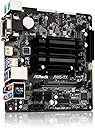
🚀 Elevate your setup with powerhouse efficiency and sleek 4K visuals!
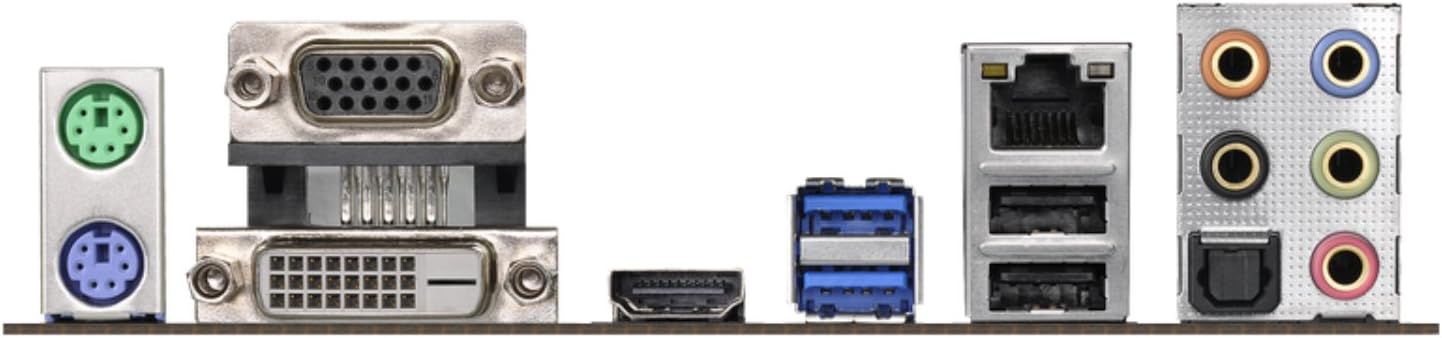
The ASRock J5005-ITX motherboard features an Intel Quad-Core Pentium Silver J5005 processor clocked up to 2.8 GHz, supporting DDR4 2133/2400 SO-DIMM memory and equipped with 4 USB 3.1 Gen1 ports. Designed with ASRock Super Alloy components, it offers robust durability and energy-efficient performance. With native 4K 60Hz HDMI output and multiple connectivity options including PCIe 2.0 x1 and M.2 (key E), this compact 6.69-inch ITX board is ideal for low-power, high-performance home servers, media centers, or compact workstations.
| ASIN | B079G91MQ1 |
| Brand | ASRock |
| Computer Memory Type | DDR4 SDRAM |
| Customer Reviews | 4.5 4.5 out of 5 stars (217) |
| Date First Available | February 2, 2018 |
| Is Discontinued By Manufacturer | No |
| Item Dimensions LxWxH | 6.69 x 6.69 x 1.97 inches |
| Item Weight | 1.32 pounds |
| Item model number | J5005-ITX |
| Manufacturer | ASRock |
| Memory Speed | 2400 MHz |
| Number of Processors | 4 |
| Number of USB 2.0 Ports | 4 |
| Processor | pentium |
| Product Dimensions | 6.69 x 6.69 x 1.97 inches |
| RAM | DDR4 |
| Series | ASRock J5005-ITX |
E**E
Very solid and low power
Using this as a FreeNAS server with 3 4TB drives and an SSD, and 2 8GB sticks. Draws about 22 watts. Rock solid for the last six weeks or so. FreeNAS wouldn't install natively on this board, but there was no issue installing it onto the SSD on another machine and then moving it over, an advantage of FreeNAS. Rare to find this board because of the chip shortages, and the price is all over the place. Update: four years later, still using this as my main TrueNAS server with 16gb memory and two mirrored 14tb drives. Just changed from Core to Scale (Debian-based), and that was seamless. I installed Plex, and this activated hardware acceleration, which never worked with BSD. My backup TrueNAS server is more robust, with a Xeon D1518, 32gb ECC memory, but at 60 watts I only turn it on to run the backups, since it would cost best case $70/year more. Under heavy load the CPU temp increases from around 40C to around 60C.
L**K
Good bang for the watt
I had a J1900 based server box that acted as a MythTV backend/media server as well as NAS, zoneminder household monitoring system, and an integral part of a backup solution. Everything worked fine with that server but one of the more recent additions to the task list involved performing gpg encryption of backup data before sending it to offsite storage was a bit too much in some cases. On the first of the month when full backups are automatically created it was taking about 24 hours to encrypt the ~1TB data package. Enter the J5005 with AES instruction extensions and that same encryption task now takes about 4 hours so it easily finishes overnight. This benchmarks for this CPU exceeds that of a Intel's flagship consumer processor from a little over a decade ago. So while it is modest by today's standards, it is still a pretty nice little system. The great part however is the low power consumption. That Intel CPU of a little over a decade ago was upward of 120W while the J5005 is a 10W design (which is the same as the J1900 which it replaced in my case). My system has two 4TB hard drives, a 128MB SSD, uses an efficient 80W pico PSU DC-DC converter paired with a 12V brick and it only draws 18W, as measured from the wall, most of the time and under extreme load peaks at just over 26W. Over the course of a day the average consumption is a little over 18W and of this the hard drives are the bulk of the power draw. BTW, Ubuntu 18.04 loaded on this system with no issues.
A**S
Solid performer caught between small server and desktop segments.
I use it to play with FreeBSD. Low power makes the PC inaudible. That is very much appreciated and for me is most important. On (somewhat) problematic side: * Totally UEFI BIOS - the old boot drive was not understood which required reinstall - not a problem for me, but can be for some. * There IS an M2 slot for WiFi for which I do not care. An M2 for NVME is missing. Oh, and PCIx is only v2. As a result SSD IO is limited to a theoretical max of 600MB/s. * Realtek NIC, I'd rather have Intel. Though FreeBSD recognized the NIC perfectly and it works in my tests as expected. * Only 2 SATA3 connectors handled by Intel chipset. They have two more on ASM1061 for which I do not care. In summary, this is neither small server (no ECC support, underpowered I/O - look at A2SDi-4C-HLN4F if you are into that), nor small desktop (underpowered CPU). Streaming box - maybe, I never bothered to test GPU. For me it is a perfect (silent) testbed for BSDs and Linux's. Reasonably priced.
A**R
32 gigabytes RAM worka
Upgraded from a J3455-itx. Basically plug n play, besides RAM. Upgraded performance as expected. Installed both of the below modules, G.SKILL 32GB (2 x 16G) Ripjaws Series DDR4 PC4-19200 2400MHz 260-Pin Laptop Memory Model F4-2400C16D-32GRS Installing both it appeared like it didn't POST. Removed 1 stick, and it POSTed, but seem'ed to be rather slow before it did. TLDR; Give it a few minutes if it seems not to boot. The above 2x16g RAM is working without issues, but it may have taken 2-3+ minutes to POST on first boot. After that boots like normal.
R**C
Excellent value and small form factor
This is a real bang for the buck and easy to install, zero fan noise, and offers plenty of CPU power. Would buy again.
B**N
Upgraded my Kodi Box
I replaced a j3445 with this newer version in a Kodi media player. I've had problems with the J3445 switching resolution when watching movies, which blacks the screen out for 3 seconds or so. Somewhat annoying to say the least. The J5005 hasn't done this in the time I've been testing it. It seems like the overall picture is better too; crisper and colors look better. This board has 4 sata ports instead of just 2 and a wifi m.2 port. I've got three hard drives connected to it, two 14TB WD drives for media and a 250 gb Samsung SSD for the OS. So far, so good. I'll probably be upgrading another Kodi box with this board if the video doesn't flake out.
M**G
Great fast MiniITX system.
I have a home NAS/DVR/Print server, which was running of Atom D510. But it can't keep with current demands, so I've upgraded it with this and now everything is working fine. This is an excellent fanless system with not so bad performance, I even tested it with 60fps 4k videos and everything was butter smooth. I'm using it with 4GB of RAM, but as online search shows, some guys manage to run it even with 2x16GB modules.
V**N
Nice MoBo, though beware of Linux issues
Nice MoBo for my Ubuntu + Kodi + Tvheadend custom built DVR. Plays all kinds of video with hardware acceleration, while staying cool and quiet. Minus 1 star for BIOS, which is quite confusing and no longer supporting legacy boot, so I had to reinstall OS from my previous setup. Also my TV loses signal while booting up Linux - I have to switch sources to make it work again. Luckily I rarely reboot this system, so this problem is not too annoying.
F**I
Une carte parfaite : - compatibilité hardware avec la virtualisation, - puissante avec ses 4 processeurs à fréquence variable, - composants reconnus par Linux, - très basse consommation, - aucun bruit. C’est la troisième carte mère installé (une chez mes parents, une chez moi, ...). Par contre elle est souvent en rupture de stock, il faut être patient pour en avoir une. Une fois les bonnes options activées dans le bios et Ubuntu 19.04 Server installé, tous les composants sont biens reconnus, donc aucun driver à installer manuellement. Ma machine fait ensuite tourner plusieurs machines virtuelles Linux : contrôleur WiFi Unifi, système domotique, enregistreur TNT (avec 2 doubles tuners TNT USB) capables également de diffuser la TNT sur les micros (comme la Freebox), etc. Le processeur est puissant, il se tourne les pouces malgré toutes les machines virtuelles qui tournent en parallèle. Il remplace mais en beaucoup plus rapide, plusieurs Raspberry Pi 3. La carte mère consomme très peu, moins que deux Raspberry Pi 3. Et j’ai 6 prises usb donc idéal pour brancher 1 clé 3G, 2 tuners TNT, 1 clé ZWave+,1 clé ZiGate et 1 onduleur (pour faire du monitoring et remonter des alertes par sms en cas de problème électrique). J’ai comparé la consommation électrique avec une ancienne carte mère dite basse consommation ... ... avec processeur Intel Atom D510 + disque dur mécanique format 2.5" + vieux boîtier avec alimentation 60Wh intégrée et Linux installé : • consommation 21.4Wh ... boîtier sans carte mère ou disque pour mesurer la consommation de l’alimentation de 60Wh à vide : • consommation 0.4Wh ... même boîtier avec la nouvelle carte mère (ASRock J5005-ITX ) + 16Go de mémoire (kit 2x8Go HyperX Impact DDR4 2400 MHz CL14) + SSD interne 1To (Samsung SSD 860 EVO) + carte format M.2 WiFi 802.11ac / Bluetooth 5 interne (Intel Wireless-AC 9260 WLAN/Bluetooth) et Linux Ubuntu 19.04 server : • consommation 8.0 Wh 👍 ... éteint avec un « shutdown -h now » (tous les voyants se sont alors éteints) mais laissé branché électriquement : • consommation 1.4Wh Une Raspberry Pi 3 avec un petit disque SSD de 32Go consomme un peu plus de 4.0Wh. Les mesures ont été effectuées avec une ancienne prise électrique avec affichage à cristaux liquide qui mesure la consommation en tenant compte de l’éventuel déphasage tension/intensité.
M**X
Riconfermo che può montare più di 8 GB di RAM io ho usato un banco da 8 e uno da 4 GB vengono riconosciuti benissimo.La parte software va benissimo con Windows 10 e Linux (Mint/Ubuntu) ci sono tutti i driver invece su Android x 86 o bliss( build di estate 2019) non riconosce la scheda audio quindi niente audio esiste una soluzione online ma e complicata.Comunque rimane un ottima scheda fanless che non si scalda quasi mai e consuma quasi niente lo usavo con l'alimentatore di un vecchio modem da 12v a 2 ampere più che sufficienti
C**S
This is a brilliant little mini-itx board. In 2009 I purchased a SQA-5H from tranquil pc, this little 5 disk home server came with an Intel motherboard and a single core dual thread Atom Z330. For 11 years it's looked after my data, but it hasn't been supported by Microsoft for at least 7 years. It's been slowing down and I've been meaning to do something about it. The case supplied from Tranquil is the reason I bought it in the first place and I definitely wanted to keep using it. The height dimensions listed for the board show 50mm and measuring the case I estimated I had no more than 42mm of width to fit the board. As soon as the board came I got the ruler out and measured appropriately 35mm! I was so happy. The board went in very easily and I also fitted a pcie 1.0 sata interface and 120gb Samsung 2.5" ssd. First job was to update the bios and then I installed open media vault on the ssd and it booted up right away. I've also installed motion eye to record my eufycam home cameras. I'm just waiting on another Western digital blue hdd. The 5 slots in the case will be used to run a raid 6 setup with a Toshiba external 2.5 USB 3 drive for back up. I'm using 8 gb of crucial ddr3 sodimm and it's running a treat. Debian reports the load average below 0.3 over 15 minutes. It boots very quickly and runs far better than the windows home server. I love it!
R**M
Ich habe lange hin und her überlegt, ob ich mir dieses Board mit Prozessor kaufe oder doch den höheren Pentium. Durch des enorm niedrigen Stromverbrauches und die erhöhte Leistung gegenüber des Celeron entschied ich mich für den Kauf dieses Teiles. Und ich habe es bis jetzt nicht bereut. Die 4 SATA-Anschlüsse waren für mich ausreichend und mit der aktuellen Gemini-Lake-Architektur bewegt man sich momentan auf einem sehr aktuellen CHipsatz. Ein Bonus ist, dass das Board komplett lautlos arbeitet. Ein extra Lüfter wird soweit nicht benötigt. Da ich aber insgesamt 4 Festplatten habe, entschied ich mich für ein ein Gehäuse mit einen 120mm Lüfter, der dann doch für etwas Luftzirkulation im Gehäuse sorgt. Dieser ist aber im Silentbetrieb auch absolut nicht hörbar. Als Betriebssystem benutze ich die aktuelle Debian-Stretch-Server Software. Als Homeserver wird dieses Board bei mir verwendet. Alle Geräte werden ohne zutun erkannt. Verwendet wird als Speichermodul ein "Corsair CMSO4GX4M1A2133C15 Value Select 4GB". (ACHTUNG - siehe Zweiter Nachtrag!!!) Dieser wird auch von Asrock empfohlen. Wer mag, kann auch 2 dieser Module einsetzen. Für meine Zwecke war einer mehr als ausreichend. Das Problem, wie bei der Vorgängerversion schon mal erwähnt, dass es kein Starten des Gerätes ohne angeschlossenen Monitor gibt, wurde behoben. Keine Probleme damit. Achtung! Der vorhandene M.2 - Anschluss ist nur für ein "M.2 Key-E für 2230 W-Lan Modul" geeignet. Also definitiv nicht für eine SSD. Desweiteren gibt es auch keine Möglichkeit, das Bios auf Efi zu stellen. Hier wird ausschließlich das aktuelle UEFI verwendet. Was aber für aktuelle Windows- und Linuxversionen funktioniert und kein Problem darstellt. Wer dennoch z.B. OMV4 als Serversoftware verwenden will, muss erst das Debian installieren und danach das OMV4 per Hand installieren (einen einfachen Guide dafür gibt es z.B bei "Technikaffe"). Die Original OMV4-Software verweigert bei eine Neuinstallation den Dienst. Die Geschwindigkeit des Prozessors ist Top. Auch die Netzwerkkarte arbeitet ohne Verluste und bringt die 112 Mbit Datenübertragung im Gbit-Lan, die verlangt wird. Beim Trascodieren kommt der Prozessor und die Igpu schon ins "Schwitzen". Aber es funktioniert bestens und es gibt keinerlei "Hänger". Allerdings kann ich nur von HD-Qualität (1080p) sprechen, da ich noch kein 4K benutze. Gegenüber des Vorgängers "J4205" rechnet der "J5005" etwa 35% schneller. Diese Information habe ich aber nur von einer Technikseite aus dem Internet. Unterm Strich kann ich nichts negatives erzählen und würde jedem, der einen eigenen Home-Medienserver aufbauen will, dieses Teil wärmstens empfehlen. Da das Board mit einer TDP von 10 Watt eine sehr geringe Leistungsaufnahme hat, kann ich dazu auch das "PicoPSU-90 mit einem Salcar 72W Externes Netzteil" empfehlen. Auch mit 4 Festplatten im Gepäck funktioniert das bestens. Allerdings sollte man hierbei keine extra Grafikkarte verwenden. Dann könnte die Leistungsaufnahme des gesamten Systems evtl. dafür nicht mehr ausreichen. Nachtrag: Auch für Windows 10 ist diese Board empfehlenswert, wenn man es als Office-Anwendung bzw. als Büro-Computer verwenden will. Auch hier konnte ich keine Nennenswerten Fehler bzw. Hänger feststellen. Alles läuft flüssig, wie man es erwartet. Internet, Office 2016 und Facebook konnte ich ausgiebig testen. Wer von vornherein in Erwägung zieht zu "Spielen", der sollte die Finger davon lassen. Dafür wurde das Board nicht gebaut. Zweiter Nachtrag: Ich muss unbedingt darauf hinweisen, dass die neue Version des von mir im Beitrag beworbenen Ram-Speichermoduls NICHT mehr funktioniert, da dort wohl ein anderer Chipsatz verwendet wird! Bitte verwendet stattdessen den "Crucial CT4G4SFS824A 4GB Speicher (DDR4, 2400 MT/s, PC4-19200, Single Rank x8, SODIMM, 260-Pin)" oder den "PHS-memory 8GB RAM Speicher für ASRock J5005-ITX DDR4 SO DIMM 2400MHz". Bei PHS-Memory werden die Speichermodule speziell für den J5005 getestet. 5 Sterne, weil es von mir, in meinem Einsatzbereich, absolut nichts zu Meckern gibt. Dritter Nachtrag: Zur Information! Ich habe das Board im Juni 2018 für 125€ gekauft!!!
完**し
本製品の性能は数年前のノートPCの中身をMini-ITXサイズに再翻訳したと捉えれば大体あってると思います。 低価格と低消費電力に突出しつつ必要な性能はしっかり押さえた高C/Pな超バランス派の優等生。 普段使いの日々の雑用を黙々と確実かつ穏やかに支えてくれています。 今は上位互換の J5040-ITX が同価格帯で手に入るので新規購入時に J5005-ITX を選択する意味は薄れました。 もっとも既に J5005-ITX を運用中の場合、敢えて買い替える意味も薄い程度の性能差ではありますが。 買い替える人は自分の中に理由を見出している人なので思うがまま突っ走りましょう。
Trustpilot
1 week ago
2 weeks ago