๐ Elevate your home network to pro-level speed and security โ donโt get left behind!
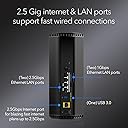
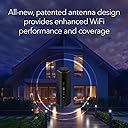
The NETGEAR Nighthawk RS280S WiFi 7 Tri-Band Router delivers cutting-edge wireless speeds up to 9.2 Gbps with tri-band 6 GHz support, covering up to 2,500 sq. ft. It features a 2.5 Gigabit Ethernet port for multi-gig wired connections and includes a 1-year subscription to NETGEAR Armor for advanced cybersecurity. Designed for high-performance gaming, streaming, and smart home setups, this router combines next-gen technology with robust security in a sleek, compact design.


| ASIN | B0DGPLBRDQ |
| Antenna Location | Business, Gaming, Home |
| Antenna Type | Internal |
| Best Sellers Rank | 372,205 in Computers & Accessories ( See Top 100 in Computers & Accessories ) 2,626 in Routers |
| Box Contents | One (1) 12V/3.5A power adapter, One (1) 2m Ethernet cable, One (1) WiFi 7 Tri-Band Router (RS280), Quick start guide |
| Brand | NETGEAR |
| Brand Name | NETGEAR |
| Colour | Black |
| Compatible Devices | Gaming Console, Personal Computer, Security Camera, Smart Television, Smartphone |
| Compatible devices | Gaming Console, Personal Computer, Security Camera, Smart Television, Smartphone |
| Connectivity Protocol | Wi-Fi, Ethernet |
| Connectivity Range | 2500 Square Feet |
| Connectivity Technology | Ethernet, Wi-Fi |
| Control Method | Touch |
| Coverage | 2500 square feet |
| Customer Reviews | 4.2 out of 5 stars 464 Reviews |
| Data Transfer Rate | 9.2 Gigabits Per Second |
| Frequency | 6 GHz |
| Frequency Band Class | Tri-Band |
| Frequency band class | Tri-Band |
| Has Internet Connectivity | Yes |
| Has Security Updates | Yes |
| Is Modem Compatible | Yes |
| Item Dimensions L x W x H | 15L x 10.2W x 24.9H centimetres |
| LAN Port Bandwidth | 2500 Mbps |
| Manufacturer | NETGEAR |
| Manufacturer Part Number | RS280S-1CCNAS |
| Maximum Upstream Data Transfer Rate | 9200 Megabits Per Second |
| Model Name | RS280S-1CCNAS |
| Model Number | RS280S-1CCNAS |
| Model name | RS280S-1CCNAS |
| Number of Items | 1 |
| Number of Packs | 1 |
| Number of Ports | 1 |
| Operating System | Proprietary Operating System |
| Other Special Features of the Product | Internet Security |
| Router Firewall Security Level | Advanced |
| Router Network Type | hybrid |
| Security Protocol | WPA2-PSK or WPA3 |
| Special feature | Internet Security |
| UPC | 606449171310 |
| Unit Count | 1.0 count |
| Wi-Fi Generation | WiFi 7 |
| Wireless Compability | 802.11.be |
| Wireless communication standard | 802.11.be |
H**R
Exelent
Exellent
N**E
Really great unit.
I bought this 1 year ago and have used it daily ever since then with 3 users' PCs, phones, laptops and tablets, It's been used for routine web browsing, e-mail, online purchasing and ...wait for it...gaming. I've had several modems and routers. I prefer Netgear overall. This one and the 2 prior were this brand and were trouble-free. The ONLY reason for change was to upgrade due to improvements in the current technologies. Also my earlier units were combination modem-routers. This time I got a modem that takes advantage of the near-DOCSIS 4.0 speeds I can now get. (Hitron CODA56 Multi-Gigabit DOCSIS 3.1 Modem) I have Comcast/Xfinity which is upgrading its systems to DOCSIS 4.0. Xfinity in my area is officially DOCSIS 3.1. However, not all DOCSIS 3.1 modems are created equal. Some are more advanced than others and can take advantage of the system upgrades. This unit is NOT a modem. It is a dedicated router. It runs perfectly. The WIFI on this router handles the whole house (slightly over 2000 sq. ft.) The grandson games on a pc in the next room via WIFI. The streaming boxes on our TVs run on the wifi from this. Zero negative issues; it just works. Install was very normal and no issues. I absolutely highly recommend this unit - especially in combo with the Hitron modem as earler stated.
M**S
Netgear Nighthawk BE9200 RS280S - So far, So good....
The Netgear Nighthawk was fairly easy to set up. The software is a bit "clunky" when it MAKES YOU WAIT 3 minutes for a complete reboot when you can clearly see the router is "ready to go", and 3 minutes FEELS like an eternity, but it's not so bad. The router comes with a year of "Armor Security" (which has already detected some DDOS attacks on my home) but I have to wonder what happens after the "free year?" What if I DON'T renew? What functions will I lose completely? The wireless range is not quite what I was expecting, but it's still pretty good. I've only had it a few days, and I'm still learning, but, so far, so good.
E**S
RS280S - Setup was Simple and Seamless Connection of all Devices
This review is for the Netgear RS280S (BE9200). Overall setup was easy through the iPhone app and took about 20 minutes. Runs strong and speed test confirms I am getting the full download and upload speeds I am paying for. The network is tri-band (2.4, 5, and 6 GHz) which will help keep things moving as more and more devices become connected. There is also only ONE network to select -- as opposed to the 2.4 or 5 options on my 7 year old Netgear that I replaced today. I have strong wifi through my house (basement, main floor, and upstairs) and all across my backyard. I was prompted to either accept the pre-programmed network name or given the option to change the network name and password to match my old network. Great option, as this allowed all devices to reconnect without a new logon (Ring, Nest, hue light bulbs, Alexa devices, Maytag Washer and Dryer, all phones, computer and TVs) all worked automatically without issue or having to log devices in. Overall very happy with this purchase.
M**)
Failed at two months and replacement was very time consuming!
Had Netgear routers for years without problems. This one failed after two months. Suddenly only allowed incoming but no outgoing connections even after factory reset. Now I have to wait on hold and try to get an RA to return for replacement. Might have just got the only bad one in the batch. Who knows. Update: I purchased a TP-Link Mesh system, installed and connected to the internet right away. After many emails and phone calls from Netgear support, I was finally given a link to return the modem for replacement. Every phone call was hard to understand with a foreign dialect and wanted me to connect the modem again for them to troubleshoot. I told the tech the router I just installed connected instantly, but still they wanted to troubleshoot the Netgear router. After resetting the modem back to factory settings to no avail, the tech said to connect my computer direct to the isp's equipment. When this failed, he said it was the isp's problem. Further research on my end found that I could not access the internet this way because the isp equipment was not a modem, just a connection to the dish. I finally asked the tech after several phone calls if thowing the router into the trash would solve the problem? Netgear finally sent instructions to return the router at my expense for a replacement. I have it stored for emergency use in the future but I will not be buying anything produced by Netgear in the future. Total nightmare!
Trustpilot
1 month ago
2 weeks ago