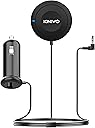
🚗 Elevate your drive with flawless hands-free audio—because your car deserves the upgrade!
The Kinivo BTC450 Bluetooth Car Kit transforms any car stereo with a 3.5mm AUX input into a wireless audio powerhouse. Featuring aptX for CD-quality streaming, a built-in microphone for crystal-clear hands-free calls, and noise suppression technology, it ensures seamless connectivity and superior sound. Easy to install with USB power and auto-reconnection, it’s backed by a two-year warranty and lifetime US-based support—perfect for the modern professional on the move.


| ASIN | B009NLTW60 |
| Additional Features | Noise Suppression Technology, Magnetic Mount, Built-in Microphone, Music Streaming, Bluetooth with EDR , Multi-functional Button, Handsfree Calling, USB Charging, Auto Re-connection, Single Port USB Charger |
| Audio Input | 3.5mm jack |
| Audio Output Mode | 3.5mm input |
| Audio Output Type | Wired 3.5mm input |
| Battery Type | uses non-rechargeable batteries |
| Best Sellers Rank | #38 in Bluetooth Car Kits |
| Bluetooth support? | Yes |
| Brand | Kinivo |
| Color | Black |
| Compatibility Options | All Cars |
| Compatible Devices | Smartphone |
| Compatible with Vehicle Type | Car |
| Connectivity Technology | Bluetooth, USB |
| Connector Type Used on Cable | Auxiliary |
| Control Method | Voice |
| Customer Reviews | 4.3 out of 5 stars 9,836 Reviews |
| Global Trade Identification Number | 00609465954585 |
| Hardware Interface | Bluetooth, USB |
| Human Interface Input | Touchscreen |
| Includes Remote | No |
| Installation Type | Plug In |
| Item Dimensions L x W x H | 5"L x 5"W x 5"H |
| Item Height | 12.7 centimeters |
| Item Weight | 0.07 Pounds |
| Manufacturer | Kinivo |
| Model Name | BTC450 |
| Mounting Type | Dashboard Mount |
| Number of Channels | 2 |
| Number of Ports | 2 |
| Power Source | Corded Electric |
| Product Dimensions | 5"L x 5"W x 5"H |
| Rechargeable Battery Included | No |
| Special Feature | Noise Suppression Technology, Magnetic Mount, Built-in Microphone, Music Streaming, Bluetooth with EDR , Multi-functional Button, Handsfree Calling, USB Charging, Auto Re-connection, Single Port USB Charger Special Feature Noise Suppression Technology, Magnetic Mount, Built-in Microphone, Music Streaming, Bluetooth with EDR , Multi-functional Button, Handsfree Calling, USB Charging, Auto Re-connection, Single Port USB Charger See more |
| Supported Application | Spotify, Apple Music, YouTube Music, MP3, AAC |
| Supported Media Type | MP3, WAV, AAC, FLAC |
| Supported Standards | A2DP, aptX |
| UPC | 609465954585 |
| Warranty Description | Two-year warranty with lifetime US based customer support |
| Wireless Compability | Bluetooth |
S**H
Even works great at home!
I bought this to use in my 2006 Prius, with my Galaxy Note 3 phone (Android). I have 64 gig of mp3's that I stream directly from my phone. It works beautifully, set-up was a snap. I climb into my car and the connection happens automatically, and it starts playing right from where it left off when I got out of the car. Incoming calls pause the music, one touch of the button and I'm on speaker phone, which is very clear from both ends. Touch the button to hang up and the music fades back in, flawless. The only drawback is that (like all the others) there is no way to extend the length of the button cord. The assumption (apparently from every manufacturer) is that the button goes on you dash, the power plug is somewhere below your car stereo, and the stereo has an auxiliary input on it's face. However, in the Prius the power jack and aux input are hidden away in the center arm rest (which is nice), so the button can't be easily placed on the dash as the cord gets in the way. I'll either have to find a place on the arm rest, or try to run the button wire under the carpet. No points off, because it seems all the other manufacturers make the same assumption. By the way, there is a slight hum from ground loops in the Prius, but a cheap isolator fixed that. AND NOW FOR THE FUN PART. I have a workshop at home. I have an old stereo tuner/amp wired to ceiling speakers in my shop. But I have several problems. 1) Reception is terrible even with an external antenna. 2) When my phone rings I seldom hear it over the machines and stereo. 3) I don't want the phone in my pocket, if I run into the corner of a workbench it might shatter the display. 4) If I do hear the phone ring, I have to turn off the stereo, the tool, then wipe the oil off my hands before trying to answer it. So here is the solution: Even though the power adapter is designed to plug into a 12 volt outlet, it can also be run by plugging a USB cord into it, then into a USB wall-wart (transformer) adapter. So I found an extra USB wall-wart, plugged it into the switched outlet on the back of the stereo (or you could just plug it into the wall outlet), and connected it to the car kit USB port. I plugged the audio jack into a stereo mini headphone to RCA adapter cable, and plugged that into the RCA jacks on the back of the stereo. To keep the exposed prongs on the 12 volt adapter from shorting out, I just plugged it into a 1/2" pvc (slip on) end cap. It fits snugly and is dirt cheap. So now when I walk into my shop I just turn on my stereo, and lay my phone on top of it (with the cover closed). It connects automatically and starts playing. I can skip forward or back using the car-kit buttons. If the phone rings, the music fades out, I hear the phone ringing, I push the car-kit button with my oily finger and I have an instant speaker phone, without ever touching my cell phone. And for my s@#$y FM reception, I subscribed to the Sirius internet radio, and now I can also stream hundreds of ad-free radio stations through my phone into my stereo using my free wifi. Heaven!
A**Z
Inexpensive, direct wire-in bluetooth receiver
This device is marketed for hands-free calling and audio, which seems to fulfill both roles pretty well. Been using it for a few weeks now and have a few thoughts. The button/unit itself has a short length of single cord coming from it, about two feet long. It then splits into two separate cords, one for audio and one for the automobile plugin, each one about a foot long. Total is approximately 3 feet for overall cord length, which may be a /little/ bit short for some users. I found it fit the best near the middle of the center stack of my car (Mazda 6 sedan), driver side, close to the audio controls. It left just enough wire to run down along the center console, past the shifter, and to the center-box to keep the 3.5mm audio jack and power plug to hide away. Would be nice if it came with an additional foot of cord for easier placement. Pairing with a phone is extremely simple. When you turn your car on/turn the key to the first position, it automatically starts the unit. Just make sure the bluetooth is enabled for your phone and accept it as a device, paired no problems, no password or special tricks required. Nice to use this unit and not have to fuss with settings. Works reliably, turn car on, pairs with phone, good to go. Audio quality is pretty good, not %100 as good as directly plugged in with an audio cord, but close enough that the difference doesn't bother me. The benefit of this unit is largely convenience, don't need to plug/unplug the audio cable every time you enter/leave your vehicle. Besides that, it has a microphone built into the unit, so you /can/ use it as a hands-free type of unit. The microphone (as reported by my friends and family) is of acceptable quality, the only minor problem being slightly reduced volume. So I tend to need to turn my volume up and speak clearly and a bit more loudly when using this. Not a big deal and not a deal breaker. Might be nice in a revision/different version if they had an AUX input port on the unit, so you could run your own microphone closer to the steering wheel. Doubtful that every user would want to utilize that, but I'd be willing to pay a few bucks more to get an AUX jack for a slightly better microphone option. Not a complain though, /for the money/ this unit does a perfectly acceptable job of playing audio, microphone, and phone calls. 5 out of 5 considering the minor flaws.
D**N
Music output quality
Everything about it is great with how it hooks up, it has a loop insulator to cut out all the humming, it turned my radio into Bluetooth so I can now play my music on my phone, easy to use, easy to install, functions great, great cord length was good for what I need it for! The only thing I noticed was it compromises my sound quality tremendously on my two 10 inch subs and amp. The subs still hit good but not as good as when I’m listening to the radio. However, my music is being played via Bluetooth on auxiliary. The radios output is being played through RCA cables directly connected to my subs. This could very well be the reason for my subs underperforming compared to when I have the radio on, which is why I gave it 4 stars. Overall, I definitely recommend this product! At the end of the day, it did what I wanted which is making my radio Bluetooth capable and that’s why I bought it!
T**A
Simple and affordable solution
I just purchased this because my car does not have built-in bluetooth, and I just got my first iPhone. I didn't really think Bluetooth would matter all that much to me, but for some reason the cable made by Hyundai for iPod/iPhone only comes with a 30-pin connection, and the lightning-30pin adaptors don't seem to work consistently. So if I want to listen to music in my car, I can't use the stereo controls--I have to use my phone to skip songs, shuffle, rewind, etc, which doesn't feel safe when driving. I spend a lot of time in my car for work, so I finally realized I DO need Bluetooth. I didn't want to spend the money to have a whole new stereo with built-in bluetooth installed, and that's when I came across this little item. I was afraid it would be complicated to get it working (since I am new to iPhone, as you can imagine I'm not very tech-savvy yet), but I just plugged it in and turned on the bluetooth on my phone and selected the Kinivo device. Before I knew it, music and phone calls through my car stereo! My only complaint, and it's minor, is that it uses the only cigarette charger in my car, and I like to have my GPS plugged in too, since it gets its traffic and weather updates through a unit on the charging cord. The charger that comes with this unit *does* have a built-in UPS port, but my GPS uses the cigarette lighter. It's possible that the Kinivo doesn't actually need to be plugged in at all times (I haven't played around with it but I remember the instructions saying that we can plug it in to 'charge when necessary'), and worst-case scenario I can always get a splitter so I can have TWO devices charging simultaneously. Bottom line, this is a great little device and a simple fix. Next time I buy a car, I'm going to just go ahead and get built-in bluetooth and navigation, though! ETA: After living with this for a month or so now, I still love it just as much. It works consistently and pairs up with my phone immediately upon starting my car, without any action on my part, which I love. The one down side is that this does NOT work with my car stereo controls after all (except volume of course) so I still have to use my phone to skip a song, shuffle, or fwd/rewind. Oh well, it was pretty affordable so you can't expect perfection.
E**S
Similar to the BTC 455, better than the BTC 480.
I've used Kinivo for 8 years now. They are high quality, provide outstanding performance for most products, and are priced reasonably. My first car set from Kinivo was the BTC 455 that I bought in 2014. I no longer have it because I choose to leave it behind in my old car that I got rid of a couple years ago. It had outstanding audio quality with a superb bass boost that could rattle the car frame despite having a normal stock car stereo. If I recall, you had to engage the bluetooth by pressing once on the car kit and then your phone will start playing right away. This car kit? Functionally similar. I really don't see a difference between the 455 and the 450. You would think the number being lower would have a meaning here. If there is a difference, I don't notice it. Still has great audio, connects with no issue (but still requires the press once to play), and has that guilty pleasure bass boost. Just be careful not to hit the button twice in a row, it'll start calling your most recent phone number in your recent. This is annoying especially if you're used to hitting twice to skip in modern bluetooth devices. Forward and Rewind are instead located as their own buttons on the top of the device, so use those instead. The other downside is that this comes with its own car charger that has one USB slot in it. The jeep I put this into has only one car charger port so this is annoying with multiple people in the car. I won't remove a point here because I don't know if the mandatory car charger has vital hardware that a USB cable by itself couldn't do. I prefer this and the 455 over the 480 due to the bass boost (the 480 just didn't do it right) and (subjectively) better audio quality. The 480 just felt cheap and lame after using the 455/450. Overall, this is a great set if you can remember not to hit to hit the main button twice and if you're fine with the mandatory one usb port.
L**S
Works transparently
Disclaimer: I have no interest in streaming music from my phone to my car radio, so I'm only using this for the phone capabilities. For a long time now I have been using a Jabra Journey in my car and am not really happy with many of its features. This Kinivo bluetooth hands free car kit works extremely simply and does exactly what I want, a much better job than the Jabra. 1) The Jabra is battery operated and therefore you must recharge the battery from time to time or it stops working. The Kinivo is always plugged in so there is no worry about discharging. 2) The Jabra stays connected even after you turn off your car and go some distance away, including in your house. In fact, the Jabra may, silently, remain connected for hours. The Kinivo immediately powers down and disconnects from your phone when you turn off the car, exactly as I want it to. When you turn the car back on, the Kinivo reconnects in about 2 seconds. 3) The Jabra is often giving you annoying, repetitive voice messages: "Power on", "Power off", "Connecting". There is none of that on the Kinivo. 4) The Jabra often gets stuck so that it does not power on with its built-in motion detector. You have to manually push a button or power it off and then on to get it to work. The Kinivo doesn't need this annoying nuisance because it doesn't have to worry about saving battery or disconnecting. 5) The Jabra uses its own internal speaker, which is not as good sounding as my car's stereo speakers. The Kinivo uses the car's speakers. 6) The Jabra does nothing about a loud radio when a call comes in. For the Kinivo, when a call comes in and if your stereo is not already on Aux, you just push the dashboard button to turn your stereo to Aux to be able to connect to the call, and that also turns off any music you were listening to. 7) The Jabra has two buttons close together, one for answering calls and one (I think) for placing calls. I push the wrong button. The Kinivo has one big fat button in the center, impossible to miss. 8) The Jabra clips to your visor and is very visible to anyone looking inside your car for something to steal. The Kinivo can go right next to your car's power outlet in an inconspicuous place. Finally, with regard to the streaming bit, it is easy to stream music, your phone's GPS instructions, or anything else to the Kinivo, and the Kinivo even has separate Prev/Next buttons for changing songs. Basically, it has everything one might want and is very inexpensive. It works instantly with no bluetooth connection problems. It has great sound quality. I love it.
R**P
Love it when it works, but Connectivity is a problem
Feb. 2017 Update: After 5 months I still love it but lowered the rating from 4 to 3 Stars... First, the 3.5mm aux jack problem is still there, but when the squealing starts, I literally just reach into the glovebox and spin the jack in place a few degrees until it stops. This happens 2-3 times per month, and to me it's unfortunate but not a huge deal. What *has* become a huge deal is connectivity, and there are 2 separate issues with that. One of the reasons I bought this was because someone else praised the way it autoconnects. Well, sometimes it does, sometimes it doesn't. There doesn't seem to be any rhyme or reason behind it, but as long as I haven't made or received a phone call (read further), pressing the Big Button manually does the trick. Again, this goes under the "unfortunate, but if that's the only problem with connectivity, I can live with it" umbrella. I started off with an iPhone 5 and upgraded to an SE during the time I've been using the Kinovo. I don't do many voice calls - maybe 2-3 per week - but I've noticed that whether you're connected or not, in the car or away from it, if you take or receive a voice call (using the phone itself, not over Bluetooth), the Kinovo does reconnect but *will not* work the next time you try to use it without rebooting the phone completely. I've tried every combination of everything I could think of: turning on/off Bluetooth, closing/reopening Music, Forgetting the Kinovo then reconnecting to it anew - it says it's working but there is simply no sound until the phone gets rebooted. This is a deal-breaker, and it's a real shame. This thing is aesthetically perfect and when it works, listening to music through it couldn't be better, but the connectivity problem is a real problem. Sept. 2017 Update: I really, really like the design of this thing and decided to fiddle around some more and (mostly) got it working. The bad news is that apparently the problem is either within the device itself or related to its 3.5mm aux jack being manufactured to somewhat low tolerances. The good news is if you twist the plug around clockwise/counterclockwise, there are "sweet spots" where the sound vanishes completely. This could still be a problem if your aux jack is in a spot where it can move and/or something could hit it out of position. Personally, I'm going to continue to use it over the next few weeks and see what happens. Original Post: I just received this today, but sadly will have to return it. Setup is as intuitive and easy as it comes - plug stuff in, push the big button, click to pair on your phone. Music plays perfectly. It looks amazing. Controls are simple and at your fingertips. The problem? Massive amounts of interference/noise from the device itself as soon as it pairs. This isn't ground noise (the engine was off). It's not phone noise (it happens with music on/off). It's an annoyingly loud buzzing/humming that starts the moment it pairs. I found another review that had the same problem, and they surmise it's from bad circuitry that works to convert bluetooth signal to analog sound. Whatever it is, I'm extremely disappointed - was so looking forward to using this.
F**H
It's pretty good...
Hard to compare, since I've never used any other hands-free kits. I wasn't about to pay double the price for the Belkin, and the reviews seemed good so I got one each for both my wife and myself. The first thing is, if you want to control your phone, it's not up to this device - you need to have the right apps installed. If you're ONLY going to use this for phone calls, then that's not an issue. My wife's Samsung phone has better support for impaired users, which works well when you're driving, IMO. The generic problem I have with these kinds of devices - and I believe this applies no matter which one you get, is that you have to keep your car stereo on "Aux" the ENTIRE time you're driving, even if you don't want to listen to music or audio from your phone while driving. I don't see how you can get around that with a generic car kit... most new cars will tend to have something like this built in, and hopefully deal with that issue, but if you're buying this then you probably don't have such a car and there's really nothing you can do... so I can't listen to the local news or talk radio on my commute if I want to be able to answer the phone. Again, this is not just for this device, but any like it... please correct me if I'm wrong. Now, specifically about this device, it works quite well for what I needed it for - hands free mobile phone use. The people I've talked to have said I sounded OK, and so the sound quality was at least adequate. Of course, I haven't actually heard it, since I'm on the speaking side... but multiple people have confirmed that it sounds OK. As far as people complaining about noise cancelling goes, I think they don't understand they are asking for the impossible (like muting out the sound of the car itself). The microphone is picking up all sounds... it doesn't know which ones to cancel, unlike headphones with that technology that cancel anything not coming from your audio device - this can only cancel out the sounds the phone itself is making. I really don't know how to explain it - but it seems to do a fine job of cancelling out any echo for the people you're talking to - there's no way a device like this can filter out road noise using a single microphone. I think the complainers don't understand how noise cancelling works. Beyond talking, I have had limited success with Google Now!, but limitations are limitations of Google Now! and not this device. I don't have a lot of music stored on my phone, I normally use Pandora if I'm going to listen to music. The device contains a couple of extra buttons to help listening to music, including a back/previous button on the top left, and a forward/next button on the top right; the main button in the middle is supposed to pause/continue music (you hold the button for a couple of seconds to actually make a call). I have not been able to confirm any of the buttons actually work in music apps except the "next" button, which is the ONLY button that works with Pandora. The main button will not pause/continue Pandora, and Pandora has no "back" option. Pause/play would have been really nice, though, but I realize it's probably more of a function of the app. If you have the right apps, this would probably work pretty decently for texts, using text to speech and speech to text, but I generally just ignore texts while driving (a good habit, if you ask me). Overall, especially given the much lower price than the alternatives, I think it's a pretty decent option.
Trustpilot
3 weeks ago
2 weeks ago