![8BitDo M30 Bluetooth Wireless GamePad [Controller for SWITCH (wireless/wired)] - Switch [SRPJ2144] 6922621500735](https://m.media-amazon.com/images/I/613PXtnMmJL._AC_SL3840_.jpg)
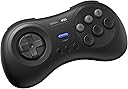


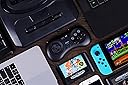


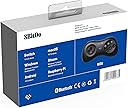
8BitDo M30 Bluetooth Wireless GamePad [Controller for SWITCH (wireless/wired)] - Switch [SRPJ2144] 6922621500735
Product ID: 728181656
🎮6-button classic layout
🔋Rechargeable Bluetooth battery
⚙️Upgradable firmware
Buy anything from 5,000+ international stores. One checkout price. No surprise fees. Join 2M+ shoppers on Desertcart.
Desertcart purchases this item on your behalf and handles shipping, customs, and support to Sri Lanka.
🎮 Level up your retro game with wireless freedom!
The 8Bitdo M30 Bluetooth Gaming Controller is a compact, 6-button gamepad designed for seamless wireless play across multiple platforms including Nintendo Switch, Windows, Android, macOS, Steam, and Raspberry Pi. Featuring a rechargeable battery, turbo function, and upgradable firmware, it delivers authentic SEGA-style gaming with modern convenience.

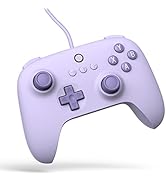


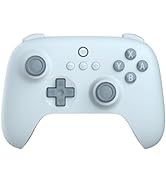


| ASIN | B0C6MW2748 |
| Amazon Bestseller | #434 in Video Games ( See Top 100 in Video Games ) #31 in Nintendo Switch 2 Controllers |
| Batteries | 1 Lithium Polymer batteries required. (included) |
| Country of Origin | China |
| Customer Reviews | 4.1 4.1 out of 5 stars (3,340) |
| Item model number | 6922621504023 |
| Language | English |
| Rated | Suitable for all ages |
も**ん
SFC風でコンパクトで手に馴染む
他の社外品ゲームパッド(ロジクールF310使用)が、カチャカチャうるさく、保持に無駄な力が必要で指が痛くなっていたので買い換えて正解です。 Bluetoothも低遅延で格闘系でも、コマンド入力がしやすいのが◎です。 (上面にボタン×6もポイント) 勿論、USB-Cポートを無駄に取らないためAndroid端末とエミュレータでレトロゲームする人にはマジ推奨します。
A**ー
格ゲー(SF6、VFREVO)、レトロゲーム用途に購入
使ってみた所感: ・Switch2のSF6に利用するため、購入しました。使ってみた感覚はとても使いやすかったです。 ・SteamでFVREVOにも利用しましたが普通に使えて、うん満足 ・レトロアーチでセガサターンのソフトをプレイしたら、コントローラーの形状も相まって、なんだか懐かしい感じがしました。(うれしい誤算) ・現時点(2026年4月)のSwitch2での格ゲー&レトロゲー用途だったらコスパ最強じゃないかな?と思います。(3500円くらいだし) 良かった点: ・安価、軽い、Switch2他多種ハード対応、6ボタン配置、十字キーの操作感 もう一歩な点; ・マニュアル(1つのファイルだと少し読みにくい → 国別に分けてほしい、できれば) ・ファームの更新(私は簡単にできましたが、PCに詳しくない人にはファーム更新操作のハードルが高そう、PC持ってない人は更新できないの?) 要望: もう少し、カラーバリエーションがあるとうれしい&おもしろい ①薄いビンク:サ〇ラ対戦オマージュ ②黒スケルトン:セガサターン限定モデルのクールパッドのオマージュ
ウ**ん
最高。でも、ネット対戦だとボタン配置が変わる。
Switch2のスト6で使う為に購入しました。 手が小さい自分にぴったりのサイズ、動かしやすい十字キーで良かった。 のですが、ネット対戦すると設定したキーコンフィグが変わってしまい問い合わせ。ネットの複数でやるゲームには対応出来てないとの事で返品。 ですがオススメのコントローラーです。対応したらまた買いなおしたいです。
白**流
満足
大体メガドライブゲームを遊んでいるが偶にサターンでも使う。 メガドライブゲームでもサターンゲームでも問題無くて使いやすい。パソコンでもタブレットでもそういうゲーム用に良く合っている。 パソコンはケーブルで使って同時に充電も出来る。
H**U
品質に問題なし。使いやすいかは人による。
東方Project原作(紅魔郷)に使用しました。 PCには問題なく認識され、全てのボタンは正常に反応します。 上部ボタン(L,R)は少し固めでストロークも短い為、押しにくさを感じました。長押しには不向きです。 十字キーはとても良いと思います。 また、手の大きい人は持ちにくいと思います。
P**ー
使いやすいです!
使いやすいです! レトロゲーム、特にセガ系のエミュを遊ぶために購入しました。 PS用のコントローラーで遊んでたのですが、やはりセガにはこの形が使いやすいです! ただ、最初設定がわかりづらく、PC用に設定するのに時間がかかりました。 初期不良を疑ったのですが、説明書と格闘し、無事接続できてからは、普通に使えてます。 バッテリーの持ちも今のところ良好です!
と**郎
スト6にかなりマッチした6ボタン配置パッド
ストリートファイター6用に購入しました。右側が6ボタン配置になっており、直感的に操作しやすいです。特に人差し指をパリィとインパクトにアサインしやすく、反応速度が求められるスト6のシステムとかなり相性が良いと感じました。 また、十字キーが大きめで入力抜けが起きにくく、コマンド入力も安定します。格ゲー用パッドとしてかなり使いやすくおすすめできます。 一点注意点として、右側の左上+左下の同時押し(投げ)を入力する際に、中央下のボタンも押してしまいやすいです。コマンド入力が成立している状態だとOD必殺技が出てしまうことがあります。コマンドが成立していなければ通常通り投げになりますが、この点だけ慣れが必要だと思います。
M**I
初代Switch 格ゲー
SwitchでMARVEL vs. CAPCOM ファイティングコレクション アーケードクラシックスをやりたくって買いました!最初は4ボタンだけのプロコン使ってましたが、使いにくいのでこちらを購入。無事にSwitchで読み取り出来ました。ただボタンの設定やコントローラーの連動に少し面倒で評価はマイナス1。まー少しラグもありますね。腕も鈍ってるwwあとはゲージ使う必殺技も2個同時押ししてもラグがあり、パンチの弱、中でダメだったら弱、強、ダメなら中、強みたいにやっていきました。これはあらかじめ設定しとくと楽かも。それでもなんとかゲームクリアしたので満足!!Switch1だとこんな感じです。出来ないこともない。ただ当時は中々強かったので、、、このゲームでこのコントローラーとSwitch1には正直におすすめはあんまりしません。出来ない事もないだけで本格的な人や完璧求める方にはおすすめはしない。Switch1の初期での感想です。 あとは大きさですかね?私は男性でも小柄なので気持ち小さく感じました。手がでかい人などには不向きかもしれません。ただSwitch2や他のゲーム、ハード、PCの場合は他の方を参考にしてください
L**S
Control de buena calidad
El control es de buena calidad. Los botones tienen buen tacto. Muy buenos materiales y buena manufactura. A pesar de ser bluetooth no tiene lag.
D**O
Why is Mortal Kombat 3 on PC not responding to this Controller?
This star rating is merely out of frustration. Why is this pad none responsive and not working with my Mortal Kombat 3 installed game on my Laptop?? I already purchased the other Nintendo type 8bit SN 30 and it is working well with games like "Gaurdian Legend" and Super Mario Bros 2.
W**L
Bluetooth Version not compatible with Ultimate Software X
The build quality is great, but I wouldn't recommend the Bluetooth version. I have been trying for hours to get the "Ultimate Software X" to even RECOGNISE my device so that I can customise my controller inputs. I have had it plugged in and still says "Please connect an Xbox licensed 8BitDo device" I managed to update the firmware, which seemed to recognise it was plugged in, but not the worthless software they supply? Sorry, but if I am spending money on a controller like this, I think I deserve it to function like all the other products. I found there is another app they have for their higher-end controllers, and that doesn't recognise my device either. I suggest combining the two software and removing the Ultimate Software X from the Microsoft App Store, as it often freezes and fails to launch. It's honestly such a shame. I really wanted to enjoy this controller, but in the current state of the program side of things, I'd say it's best to steer clear of this brand, as I doubt they will last much longer if this is how they handle things.
J**S
Zurück zum Ursprung mit kleinen aber feinen Upgrades!
Dank 8BitDo kommt das Retrofeeling aus den Kinderzimmern zurück in die Wohnzimmer. Nicht jeder ist mit einem Sega Saturn aufgewachsen, aber hatte zumindest Berührungspunkte mit dem Sega Genesis (Megadrive) das Eine oder andere Mal. Daher gleich vorweg - der 8BitDo M30 liegt zwischen Genesis und Saturn, da er eine "ergonomischere" Form an den Tag legt und die vom Saturn bekannten Shoulderbuttons mitbringt, sowie das "6-Button-Layout", was man auf dem Genesis später kennenlernte, wenn nicht zumindest am Saturn. Das D-Pad ist der heimliche Star der Show, da es haptisch unangefochten ist am derzeitigen Konsolenmarkt und sich nicht nur für Sega-Enthusiasten hervorragend eignet, sondern auch für Freunde der Fighting Games eine durchaus attraktive Option darstellt am derzeitigen Fightpad-Markt. Der Controller weißt super Werte auf im Bluetooth/Wireless Betrieb, sowie er kabgelgebunden natürlich an der Speerspitze der ms-Werte liegt, wie man es von 8BitDo und Brook gewohnt ist! Die 8BitDo-typischen Menu-Buttons und extra Buttons finden sich unterhalb des Startknopfs, wodurch man das Pad für diverseste Systeme einsetzen kann, wie zum Beispiel TurboGrafX-16 (auch bekannt als PC Engine) aber auch auf Basis des sehr horizontalen Layouts für Sega Master System oder auch den klassischen NES. Der Controller funktioniert reibungslos auf PC, Switch, mit Wingman auch auf allen Xbox-Plattformen, sowie äußerst hervorragend auf dem MiSTer FPGA. Hier sollte nicht lang überlegt werden, klare Kaufempfehlung für den M30! Preislich unschlagbar und qualitativ, wie gewohnt, ein Top-Produkt!
G**R
Gran mando para emulación
Mando de muy buena calidad para emulación y juegos retro. El mando está inspirado en el mando de 6 botones de Mega Drive (inspirado, que no igual). Es bastante cómodo y trae dos botones superiores L y R aparte de los seis frontales (ABC XYZ), un botón Start y tres botones de función (de izquierda a derecha: turbo, back y home). La conexión bluetooth funciona muy bien y también se puede usar con cable USB-C. Muy importante si se usa por bluetooth: se apaga automáticamente si no está conectado por bluetooth tras 1 minuto de inactividad, o si está conectado, 15 minutos sin usarse. Bien pensado para ahorrar batería. La ergonomía es muy buena y la cruceta es cómoda para cualquier tipo de juego.
Trustpilot
3 weeks ago
1 month ago