💧 Cool your rig, command your style — liquid cooling redefined.
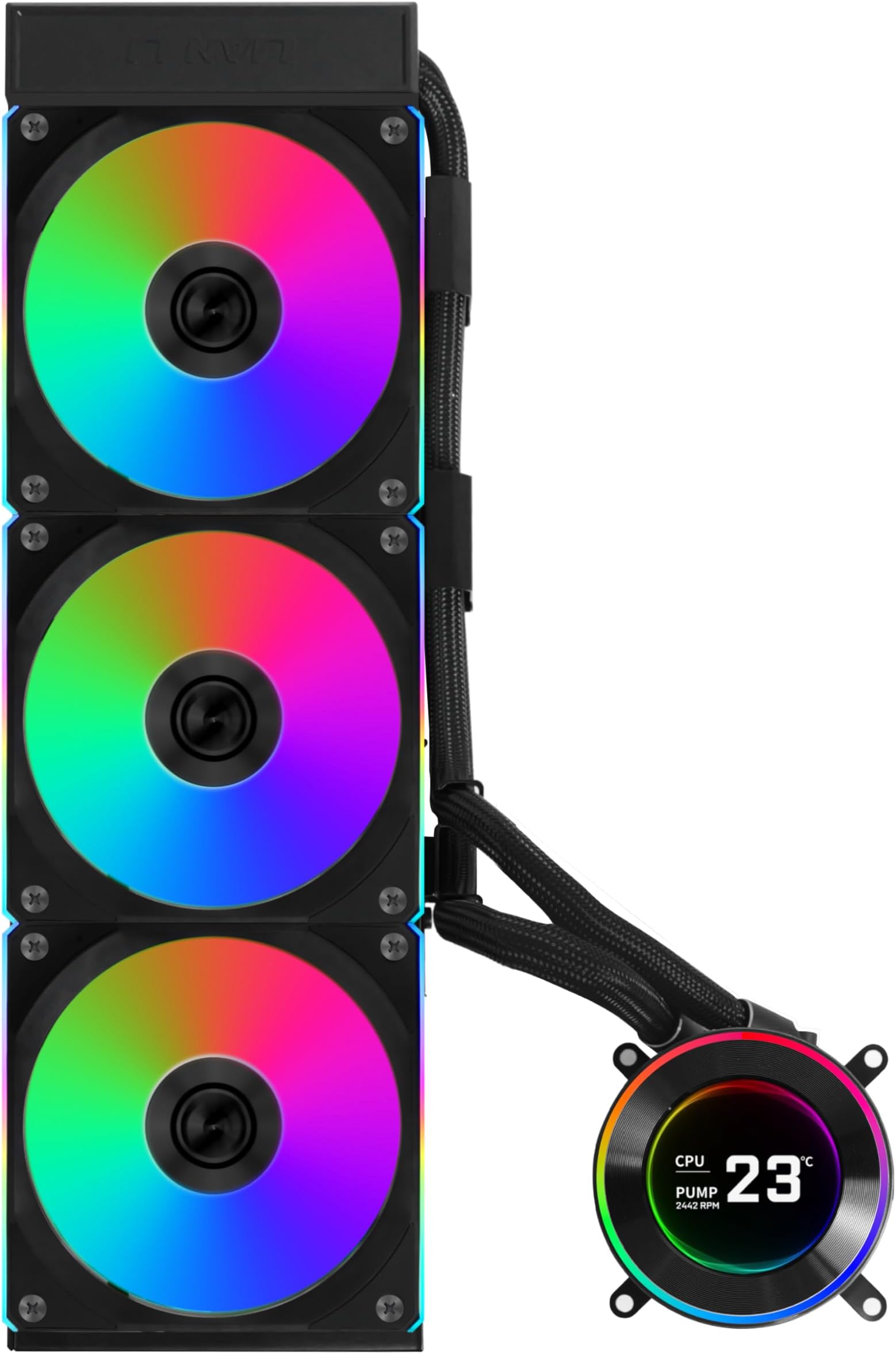
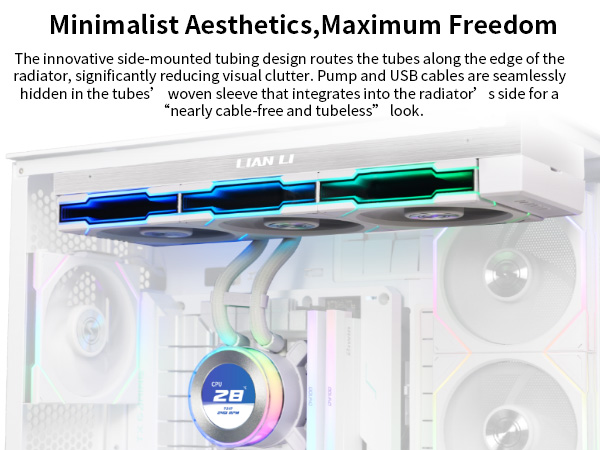
The Lian Li Hydroshift II-C 360CL is a premium 360mm all-in-one liquid CPU cooler featuring three 120mm RGB fans, a vibrant 2.1” IPS LCD display with 480x480 resolution, and three distinct control modes (Offline, Wireless, Streaming). Designed for Intel LGA 1851/1700 and AMD AM5/AM4 sockets, it boasts innovative sliding tube clamps with durable, flexible server-grade tubing for neat installation. Its quiet pump and efficient cooling keep high-end CPUs stable under load, while advanced cable management and daisy-chained RGB simplify setup and elevate aesthetics.


| ASIN | B0F1MGD2HH |
| Best Sellers Rank | #6 in Water Cooling Systems |
| Brand | Lian Li |
| Compatible Devices | Desktop |
| Cooling Method | Water |
| Date First Available | May 28, 2025 |
| Item Weight | 6.29 pounds |
| Item model number | HS2LCD36RB |
| Manufacturer | LIAN LI |
| Material | Aluminum |
| Maximum Rotational Speed | 2400 RPM |
| Noise Level | 31 Decibels |
| Number of Items | 1 |
| Power Connector Type | 4-Pin |
| Product Dimensions | 15.75 x 4.8 x 0.86 inches |
| UPC | 840353048751 |
A**E
BUILDER FRIENDLY
Lian Li has came so far with all of their product lines. First off visually this AIO is stunning. I love the color and lighting lines. the LCD is great and it comes on and off and is powered through some magnetic connectors. The connection seems pretty stable and applies pressure pretty evently. it works with 4 screws and is very very easy to connect. The material of everything feels great overall and the radiator is nice and beefy. The pump is pretty quite and i can only hear it if i try hard enough, the fans are also pretty quite. The support for cable management is what throws this to the next level. Cable management is something I love because i can flex but also annoying cause it can take a while if you are dealing with escessive amounts of RGB. Lian li daisy chain makes it so its only 1 cable from the fans. and the lcd only has the pwm heads for the pump and usb for the rgb etc. the rgb software is very straight forward and works really well. If you go lian li i would try to get as much of nay rgb as possible so you dont have to work a billion didfferent software. I think it still falls behind in software and integration with other products.
A**R
Little Pricey But I’d Buy Again 100%!
Fantastic AIO CPU cooler! The look is absolutely great—clean, modern, and premium—and the customization options really let it fit perfectly into my build. I especially love how simple and clean everything looks once installed. The built-in tube management is very well thought out and makes cable routing easy and tidy. Performance-wise, it’s excellent. It keeps my 9800X3D cool and running smoothly even under load. Overall, this cooler delivers on both aesthetics and performance. I can’t recommend it enough!
E**.
Best AIO for a clean looking build
I have built a few PCs using AIO coolers from different brands and this was easily the best looking and easiest to setup. The Tubes look great due to the brackets that mostly hide them. The cooling is fantastic and keeps the CPU (Ryzen 7 7800x3d) very cool. The LCD screen is also great an my wife loves the ability to customize!
A**D
Amazing Cooling Performance – Even with Overclocked 9800X3D!
I installed the Lian Li HydroShift II-S 360CL in my Lian Li O11 Dynamic EVO XL, and I’m blown away by how well it performs. My CPU is the Ryzen 7 9800X3D, and I’m running a +200 MHz overclock (5.425 GHz). Despite the extra heat, this cooler handles it like a champ. I replaced the stock fans with Lian Li TL fans, and the results are excellent: • Cinebench R23 max temp: 79°C (For an overclocked X3D chip, this is incredibly good.) • In gaming, temps stay much lower and completely stable. • Noise levels are very low even under load. • The cleaner tubing + hidden cable design makes the build look super premium. • Installation was very easy, especially for a 360 mm AIO. The HydroShift II-S 360CL gives both strong thermal performance and top-tier aesthetics. If you want an AIO that can handle an overclocked CPU without sounding like a jet engine, this is the one. Definitely recommended
M**O
Beautiful AIO, Bad Temperatures, Pump Noise
An AIO with a beautiful LCD screen and smart tubing design, but inconsistent cooling, pump noise, and LCD connectivity issues on a Ryzen 7 9800X3D. Pros: - LCD screen is absolutely beautiful, and it abstracts so much of the clutter on a typical motherboard. - The tubing hidden behind the radiator is a genuinely clever design. I’m surprised more companies haven’t attempted something like this before. Visually, it looks excellent—and after using this AIO, traditional exposed tubing in a PC starts to look awkward by comparison. Cons: - CPU temperatures ran hot with inconsistent cooling behavior. - The pump made noticeable noises on startup and would occasionally do so at random afterward (see attached video). - The LCD screen would intermittently lose connection with L-Connect. Resolving this required a full PC reboot. When this happened, the screen would revert to the default out-of-box display, which still looked fine—but the main appeal of the LCD is being able to reliably run a custom display. - The mounting mechanism felt a bit awkward. Sliding the unit in from right to left while working around the standoffs made installation slightly annoying. This isn’t a dealbreaker by itself, but it’s worth noting. My Experience: I initially replaced my Cooler Master AIO (which was using Lian Li P28 fans) with this fanless HS2 pump and installed the same P28 fans onto the radiator. Right away, CPU temperatures were extremely spiky. I would see jumps from ~45 °C to ~62 °C just from opening a browser tab. Running Cinebench pushed temperatures straight to 95 °C. While troubleshooting, I checked the thermal paste application and noticed it appeared slightly uneven (see attached photo). After reapplying the paste, the temperature spikes became noticeably calmer. I also adjusted the fan step-up and step-down timers in the BIOS to reduce constant fan ramping caused by erratic CPU temperature behavior. These changes helped stabilize temperatures, though they still ran somewhat high. Cinebench would now peak around 91–92 °C. At that point, I considered the results acceptable and continued using the system. For a couple of days, everything seemed fine. However, on the third day, while playing Marvel Rivals, CPU temperatures suddenly jumped from the usual ~60 °C range straight to 95 °C. At the same time, my frame rate dropped from ~240 FPS down to 20–25 FPS. Even after closing the game, CPU temperatures remained elevated and did not recover as expected. After all that, decided to put back my Cooler Master AIO back on, and live without the pretty LCD screen (unfortunate). I do miss it, but I can play my games with the peace of mind that my temperatures are in normal operating ranges, no massive spikes, no throttling. See video of noise, picture of the initial "bad" paste application, and the picture of it on my PC. UPDATE: Lian Li did reach out to me to apologize for my experience and offered either a replacement or a refund. I appreciate the attentiveness from them and will definitely try a different product in the future.
L**S
Problematic product. Once connected on the correct ports on the motherboard, which was a comaptible motherboard, the CPU Cooler cables melted.
M**I
جميل
P**E
It's so easy to install, it looks really good and actually keeps CPU temperature quite low. Designing the 2 fluid cables this way is genius and makes for a much cleaner look. The Connect 3 software is superb & easy to use. I am very happy indeed with this product. Lian Li are a future looking company and I'm excited to see what they produce next.
F**A
Not bad...in my country i couldnt buy this liquid cooler and im very happy to get it OEM...thanks seller and early get the item..Hope can keep cool my 9800X3D..im using NZXT kraken 360 but it doesnt help much.. higher recommened...
C**N
Looks good
Trustpilot
2 months ago
3 days ago