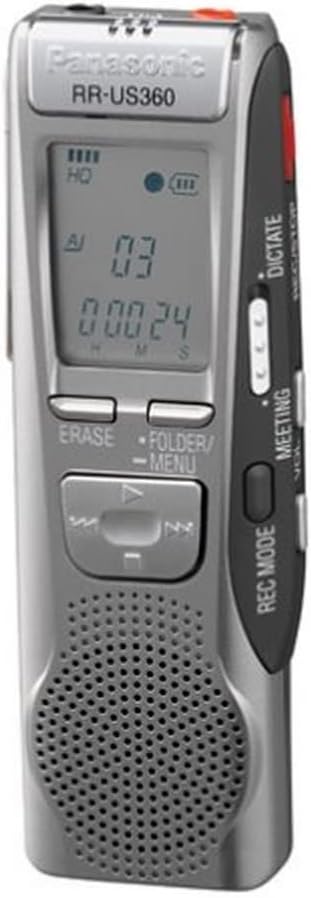
PanasonicRR-US360 Digital Voice Recorder
Product ID: 74570900
⏳8 hours recording
🎤3 quality levels
📁99 files/folder
Desertcart purchases this item on your behalf and handles shipping, customs, and support to Sri Lanka.
🎙️ Capture Every Moment, Effortlessly!
The Panasonic RR-US360 Digital Voice Recorder is a versatile audio recording device that allows you to store up to 99 files in each of its 5 folders, ensuring organized and efficient recording. With three selectable quality levels, a built-in speaker and microphone, and an impressive 8-hour recording capacity, this device is perfect for professionals on the go. Plus, its USB connectivity makes transferring files to your PC a breeze.
P**K
had older one
my first one I had for 10 years and that is why I ordered another because I dropped the first one.It worked even when it broke but I needed a good one for more years.
W**L
Wish they still had these.
This was my all time favorite recorder for years but now I have move up to the Sony ICD-AX412 Digital Flash Memory Voice Recorder.
J**R
This product really, really sucks, and Panasonic does, too.
I typically use a Sony recorder for my job (reporter), but I don't always have access to it. I found this Panasonic at my office and used it for a little while as back-up -- until I discovered how awful it is. The sound quality is murky, saturated with static, and I find myself having to listen to the same ten seconds in an interview over and over again, trying to decipher what the subject said. This isn't helped by the fact that the controls are utterly user-unfriendly. Need to rewind? Watch out! The rewind and fast-forward buttons take you back in one-second increments, then increase to 10-second increments, then increase to 1-minute increments -- in very short order. If you need to jump back 30 seconds, it's REALLY easy to back up all the way to the beginning of the recording. This is the most counter-intuitive control scheme I've ever come across. And if you want to transfer the sound files to your computer -- for instance, to make things more manageable by using Windows Media Player -- and you don't have the software CD that came with the recorder, forget about it! Sony is considerate of their customers: plug in their recorders through a USB port and your computer recognizes them as if they were USB drives; you need no software to navigate or copy anything. Panasonic is apparently a company full of grade-A jerks: you can't even access the recorder's folders without the software. I downloaded a version online, after a LOT of searching -- and it didn't work. So I got on the phone with Panasonic -- no help there. I went through their online chat option: all they did was refer me back to the same useless download I'd already tried. Finally they referred me to a third-party, not Panasonic, who sells the software for about $60. At that point, I threw my hands up in the air.I don't think I've ever had as abysmal an opinion of a company as I have of Panasonic right now. Maybe Bank of America. Maybe.
D**S
The Propriatory Audio Format is BS
That's really all that needs to be said. I bought it assuming it recorded in MP3 format, like most recorders do these days. I bought it specifically for recording ambient samples to be used in my music. Because there is no way to convert it to mp3, and Panasonic refuses to write software that allows that conversion, the product is entirely useless to me.However, if you just use it for class notes or something and don't mind the crappy software that does come with the recorder, you'll be fine.
K**N
Panasonic NOT again!!!
After reading other reviews and shopping around I elected to buy a Panasonic RR US360. I am very happy with the ease of use, size, and clarity. However, I will NOT recommend this item to anyone due to the extreme difficulty I have had trying to download the recordings to my Dell D600 using Win 2000. What you do not learn until you have purchased and possibly used the item is that Win 2000 will not recognize the device and you are told to access it via the VoiceStudio software that comes with the item. Great, except it has not worked and doesn't recognize the USB port, much less the device. I have tried contacting Panasonic help and I strongly recommend anyone thinking of purchasing one of these to call them at 1-800-211-7262 and cycle thru the options (1,4,2,7) as given to me by the 'audio technician' to get help with the US360. The minimum wait time I have encountered is 21 minutes, but have yet to get a resolution and having been told I would be called and left my number, after 2 weeks I have yet to be called, have sent in emails via their web, and have not received any response. Panasonic again, absolutely NOT!!!! Call for yourself before buying and save yourself the frustration later.
R**W
Good digital recorder for professionals
Very good quality sound recorder for professional (but non-jounalistic) use: dictation of ones ideas, taking interviews, recording what people say at trade fairs etc...Takes good enough recordings of very long seminars at low quality settings (up to 8 hours), good meeting recording and interviews at medium setting (4 hours) and excellent recordings at dictation setting. However the latter means only 2h20minutes so you need a portable in the neighbourhood for transferring files so that you can delete and continue recording in this mode. The quality is good without a mic but is even better with a small directional mic that one holds in the direction of the interviewees (especially in noisy environments)The major weak point is the file transfer soft. Voice Studio recently replaced by Voice Editor is a strange software. One has to stay within the program to transfer files to and from the recorder but also between storage devices. Using simple microsoft copy/pasting of files ruins the whole storage system and audio files become unreadable. So one has to make virtual disk-structures to copy onto backup storage devices. The advantage though is that within the Software one can do a lot with the audio file and if the data is sensitive, a common thief cannot do much with a lost/stolen storage diskette since they will need the panasonic software to listen to the content.However manipulating the files within the software is easy and has some neat functions if one has to transcribe interviews: dividing of long recordings (so that they become more easy to transcribe or organise in subject classes), gluing two files together, flags in the files etc. Conversion to WAV is possible so one can copy the recordings to CD and play the interviews again on a walkman device.For non-professionals I find the transmission of audio files to friends via e-mail very awkward: one has to send an replay-exe with the audio files which is a bugger now that everybody has a firewall.
Trustpilot
2 days ago
2 months ago