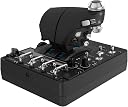
Desertcart purchases this item on your behalf and handles shipping, customs, and support to Sri Lanka.
๐ Own the Skies with Precision and Style
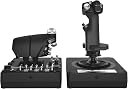
The Logitech G X56 HOTAS is a professional-grade flight simulator controller featuring 16-bit hall-effect sensors, over 189 programmable controls, and 4 adjustable spring force options. Designed for PC and VR gaming, it offers customizable RGB lighting and mini analog sticks for full 6 degrees of freedom control, delivering an immersive and precise piloting experience favored by serious flight sim enthusiasts.


| ASIN | B079P6SSHP |
| Additional Features | Ergonomic |
| Best Sellers Rank | #1,072 in Video Games ( See Top 100 in Video Games ) #7 in PC Game Flight Controls |
| Brand Name | Logitech |
| Button Quantity | 24 |
| Color | Black |
| Compatible Devices | PC, Windows |
| Compatible Video Game Console Models | Kinhank Mini Pc Game Box Chili, Sony PlayStation VR, Sony PlayStation VR2 |
| Connectivity Technology | USB |
| Controller Type | Joystick |
| Customer Reviews | 4.0 4.0 out of 5 stars (2,934) |
| External Testing Certification | Nรฃo aplicรกvel |
| Global Trade Identification Number | 00097855136145 |
| Hardware Platform | PC |
| Included Components | Palm Rest Spacer, User Guide, X56 Stick Base, X56 Stick Handle, X56 Throttle |
| Item Dimensions | 7.28 x 8.86 x 3.54 inches |
| Item Type Name | Logitech G X56 H.O.T.A.S. RGB Throttle and Stick Simulation Controller for VR Gaming (945-000058) |
| Item Weight | 6.9 pounds |
| Manufacturer | Logitech |
| Manufacturer Part Number | 945-000058 |
| Model Name | X56 |
| Model Number | 945-000058 |
| Package Quantity | 1 |
| Power Source | Information Not Available |
| UPC | 097855136145 |
| Warranty Description | Manufacturerโs warranty can be requested from customer service. |
A**N
buy this one to fly its worth it
let bad first the throttle has a little play between the 2 halves left to right ,,,, the rest so far is amazing took a little to get used to the position of the throttle 2 spin knobs top and bottom i use for vert thrust and horz thrust because the x52 has one on its side and that made it make more sense beyond that this is making my gaming so much better I have almost all elite daNGEROUS controls mapped and im only on M1 mode i still have M2 and S1 i could use,, would be extra nice if the throttle stiffness had a little more range between is easy movement and hard it starts at about medium stiff but i have read that will get easier over time so not really a complaint I have rather large hands and it feels nice fit not reaching for anything tiny hands may have a small reach issue but should be manageable ,, each half have 4 corner holes so you can mount it to a dest directly or buy a mount system starting at 59 bucks so not bad at all i used 3.5in wood screws attaches it to 7x9 in x1/2 in wood plates and then attached ttaht to the edge of my desk feels nice and can be moves other controlers have overly complex whole patterns so this is by far easier to mount I opted to follow another review and download g drivers system so i have the option to pre program all my buttons to keybinds this way they would be universal across any game i play but thus far i just mapped them within the game im playing as i learn what feels natural to me PLUG directly into the pc do not use a hub unless its a powered hub and high powered one at that if you cant avoid using a low powered hub go into the g software and make the RGB black or super dark so it draws less power and this will help avoid ghost inputs this is an ISSUE with MANY MANYY rgb devices so I do not fault this one easy plug n play usb and great great value
C**R
Previous Issues Gone
While this HOTAS has a troubled past I can attest to what I received as being awesome. While I have used a x52 pro in the past and its issues are well documented, I was nicely surprised by its updated system. I was a bit scared when reading some of the other reviews of this HOTAS here. But the X56 has more than enough buttons on the stick and throttle and two very needed joystick type sticks that really set this thing apart. Yes it is of plastic construction, and I could see someone with small hands having issues with accessing all the hat switches, dials and buttons. I have large hands so that doesnt apply to me. Its a Logitech product now and it seems all the issues from its predecessor Saitek are gone. While first plugging it in I did have an issue with one of the C sticks (joystick type, mouse emulation) drifting just like the X52 pro I have. I was like oh no, its happening again. However i took the grip off the base and reapplied it and screwed it very carefully. Thankfully that fixed the issue. On the positive side this thing has a ton of button and switches. I can see if you are looking for replicas of a certain aircraft (like the a10) then this is not in that vein of aesthetics. I played around for almost and hour within the software (which you will have to download) and found it complex, but anyone with experience with the programming software of the x52 pretty easy to get the hang of. Also on a positive note the stick itself comes with 3 other springs for those like me that like some resistance and it does not flop around like my x52 does. So precise moment is easy to obtain. The RGB lighting can be bright or subtle thanks to the software, so you can do really bright or turn it off completely. The stick itself is very subdued and I like the back lighting on the buttons. I been eyeing other higher price joystick as an upgrade to my 5 year old x52 and I must say, I like this X56 system. I dare say that for the price this thing compete with higher end HOTAS systems. I have had it for a day now and have put in nearly 12 hours in DCS. Also I suspect that the stick needs a good amount of power so I would highly recommend pluging the system directly into the back of your computer and not a hub. Things I do not like: 1. no 2 stage trigger. I was used to using the first stage for comms, but I was able to adjust to the side button for teamspeak and SRS. 2. the mode switch is really stiff, I dont know if its because it is new but it takes some effort. 3. The pinky two way switch on the throttle is uncomfortable. The button has a sharp ridge to the plastic and makes it a bit uncomfortable. If it had been rotated 90 degrees your pinky would fit nicely in the groove. Things I love: the inclusion of 2 joystick type switches. This makes slewing target sensors a snap and it has a push down button adding even more true hands on. They where a bit scary when i first plugged it in do the noticeable drift. This was fixed though by unplugging the stick, unscrewing the stick handle, carefully screwing it back into the base. MORE than enough hats, buttons and switched for advanced sims like the A10c and Hornet.
J**K
Good for the price
Overall, its good for the price when comparing to the more real like setups out there. The throttle will need to be plugged into a very powerful hub or on a hub by its self. I have a 10 port HUB that I had the throttle, stick, mouse and keyboard plugged into and the throttle would get horrible ghost inputs. Plugged into the computer directly solved those problems. Stick is nice and moved smoothly. Over all 4 stars. I am using the spring that came on it for now but I like it. There are complaints about trying to use the stick to make small inputs but I really don't see an issue. All the buttons work great. The entire thing does feel cheap but some how hasn't broken yet. Only downside of the stick is that its huge. I have pretty large hands and still have to move my hand around the stick to be able to hit all the buttons. I worked fighter aircraft in the military and those sticks you could hit every button or switch without moving your hand or reaching for the button. The X56, if I want to use the pinky switch, I have to slide my hand down the stick, once done I have to slide back up to use those switches on top. The throttle is over all 3 stars. Its nice to have the dual throttle and all the buttons. My concerns are that the friction on the throttle is janky. Out of the box, the right throttle could click as you moved it forward and back. I had to loosen the friction all the way to make the clicking go away. With the friction knob all the way loose, the left throttle is still hard to move and the right throttle will move on its own. The slide switch is sticky. When I had the X45, I would use that switch for speed brakes but with how sticky this one is, I had to use another one. I did have the slide as ejection but with ghost inputs, I would randomly eject and that was not going to work. Now the switch doesn't do anything. I got this stick because I needed one with Yaw axis since I don't use rudder pedals right now due to room restrictions. One thing I wish this did have was a pressure sensitive button for brakes. Right now when I apply brakes using pinky switch, its just full brakes being applied and not gradual braking. Again, its good for the price if wanting something cheap to fool around with. If you're serious about flight sims, this might not be the one for you.
G**F
Unmitigated Garbage
I bought two of these after reading reviews and I regret it. Needless to say, I'll be passing these along in the second-hand market for cheap. The story: The material quality and engineering is the worst I've ever seen in a joystick and HOTAS combo. I've had a few from decades past that did the job fine, but after having not played simulators since the early 00's, I went with Logitech because the sticks I had long ago were from a company they acquired, Saitek, and I remembered them being alright. That's a mistaken assumption. Apparently, Saitek / Logitech just can't make a good or even half-way decent joystick anymore. Before these, I had a simple Thrustmaster throttle that I thought had pretty bad build quality, with a squeaky plastic throttle lever and rudder flaps that refused to center due to worn down plastic after light use for a week, but it at least functioned properly. This Logitech set is trash by comparison to even that. The problems: Two new sets straight from Amazon arrived at the same time, one for me the other for a friend. I opened mine, and found the analog thumb sticks on both the throttle unit and joystick wouldn't center properly and one axis on the throttle's would physically stick and required manual re-centering. Off to a good start right out of the box. The joystick wouldn't center properly either, and the deadzone was insane in the software testing suite. I've used old N64 analog sticks after years of Mario Party abuse back in the day, and they weren't this bad. All buttons except the primary fire trigger on the joystick were spongy, inconsistent, and would randomly trigger while you're using any axis. For example, I was sitting in my ship in Elite:Dangerous, testing the new control setup, and I decided to try the throttle. I pushed it forward to accelerate and when I reached the mid-point, all the buttons and hats sent random inputs simultaneously. Since I bound those already, my camera was rapidly switching between UI panels and I went into supercruise with flight assist off and jettisoned all my limpets into local station space while throwing chaff and heatsink confetti everywhere. Besides things like that, the throttle axes don't properly report values to Elite:Dangerous, so setting it to max gets you a notch or two below top speed, while setting it to minimum will set your throttle to reverse by about one notch. I haven't tried it in other simulators, but that wasn't a problem with the Thrustmaster (and the random inputs from before already assured me what quality I was dealing with), so experiments with that set stopped there. This was all just unforgivable already, but I considered the possibility that it's merely a defective set. So I opened the one I bought for my friend, and the same random input issues persisted with a whole slew of other problems relating to mushy buttons and stuck analog sticks. Besides the analog thumb stick on the throttle giving only one axis of input, one of the hats on the joystick was stuck straight up, it wouldn't budge. I emailed Logitech customer support about it and they sent me a replacement pro bono with very little hassle. I feel I have to mention here that their customer service is second-to-none in the computer peripheral market, and that's not sarcasm (I still use their mice and keyboards, which are divine). The replacement arrived and upon opening the box, I could tell I had another winner - one of the joystick's hats was installed slightly twisted, so instead of making a '+', it made an 'x'. Regardless of the quirk, I had the same problems, some to a lesser degree. The analog thumb sticks actually felt alright and would physically function as expected, but had unusable deadzones. 3 out of 3 bad sets, all new. Stay FAR away from any Saitek or Logitech joystick. They're worse than MadCatz.
S**T
If you are looking at this HOTAS read my review it is made for those of you wondering.
I normally don't write reviews but I thought it was important to write this one because like me I am sure many other people are looking at this HOTAS and wondering if this is the one for you. You are also probably looking at the x52 and x52 professional. I opted for this HOTAS (playing Elite Dangerous & X4 and various others). This one while being the most expensive option was also the most available at the time and looked the most sturdy as well. THIS IS A SAITEK PRODUCT that Logitech acquired and then branded their own. That's ok, it still works with the proper software driver download (we will get to that later in review). First off this HOTAS is rather large, but keep in mind there are also a LOT OF BUTTONS which require it to be so. Some people with smaller hands might find this to be to big for them. My hands are fairly large and this is at just about the maximum size I can comfortably control. Some reviews complain of poor button placement, well you have a million buttons they all have to go somewhere so nothing is going to be perfect. You just have to adapt to the layout of the HOTAS. The Stick: Solid feeling with the look and feel of a fighter stick, (this is not a Cessna stick here this is a space ship/fighter jet stick). You can still fly a Cessna with this but you also can fly a Boeing 747 or a space shuttle, its up to you. There are multiple HAT controls just on the stick including a smooth move all direction hat that is in fact like a miniature joystick on your joystick. What would you use something like that for? Well for example in Elite dangerous I use the smooth move hat (black to the left of the stick half way down) for which direction I want to "look". This way I can control the direction of the ship with the Stick itself while using the little HAT control to look around which has replaced the mouse for looking around. Very handy, You can effectively remove all keyboard and mouse input with these types of controls and setups. The Stick and Throttle are both coated in that nice feeling smooth PTFE feeling rubber. This makes for a comfy grip not so much of a plastic like feeling like my old Logitech Extreme 3d Pro which I upgraded from. (Had the 3d pro for 15 years excellent entry level joystick and you can still buy it!) The Throttle: This took some getting used to but in the end I am learning to really like the throttle. First off yes you are looking at a split control throttle. Either side can move independently of one another like a real plane. There is a locking mechanism to lock them both together which is how mine will always stay because none of the games I play require independent thrust input to one side of the engine or the other. You will feel that seam in the middle when moving the throttle BUT you will get used to it. Like other reviews the throttle is in fact STIFF, why? because a real throttle is also stiff. If it wasn't than when a stewardess brings the pilots their coffee and sneezes the plane would crash. You have a knob to turn to affect the tension of the throttle, even turned all the way to lowest setting the throttle will feel stiff to push but it is mimicking real life. If you are buying this thinking you are going to be able to just SLAM THE THROTTLE open, you will break this thing like a few review pictures will show. In the games I play you aren't accelerating faster then you can push the throttle so this is a non issue. In fact once again this makes it feel far more real and less chincy than other throttle designs. (for reference I wield chainsaws and buck hay all day my hand strength is above average). YES YOU HAVE A BOATLOAD OF BUTTONS ON THE THROTTLE. Once again you have to ask yourself, if you are getting this many button monster are you gonna be upset at the button placement? Or are you going to adapt (this is the correct answer ADAPTING). The metal toggle switches I would like to point out are not ON/OFF switches. They return to center after you push them up or down. So basically you have 2 buttons for every metal toggle but they still feel ultra satisfying to push and flick. .....So many buttons, if you aren't playing an actual flight sim you will be hard pressed to utilize all your button options. That's ok, better to have more options than less but then again that's why you are going to buy this monster you want them buttons don't ya? The Important: Ok I would like to address a few issues here related to some minor details and specifics I had to figure out for myself when installing this monster. PAY ATTENTION TO THIS I HOPE TO SAVE YOU TIME and maybe even help others who have bought this thing but couldn't get it to work properly. For reference I am running Windows 10 on a computer that is NOT A POTATO. OK here we go...... YOU WILL NEED TO GET THE DRIVER TO MAKE THIS THING WORK PROPERLY AND UTILIZE YOUR PRETTY COLOR FUNCTIONS. This HOTAS is not really plug and play and it is not recognized in GHUB. Listen carefully because you also get ZERO instructions with this thing but I am going to tell you right now what to do. 1. Open box and marvel at the beast you just purchased. (DO NOT PLUG IT IN YET) 2. Go to Logitechs website and go to downloads and look up this product for drivers. 3. You will have a list of about 7 or 8 drivers, go to the one on the BOTTOM not the top. (bottom newest driver circa 2018 lol) 4. If you are running 32 bit choose the driver immediately above (I am 64 bit so I believe my driver was the last one in list) 5. (DO NOT PLUG IT IN YET!) Run the driver you just downloaded. 6. You will see a screen come up that has a picture of joystick then a small picture of a USB WITH A RED X over it and then a picture of a computer. (The red X is telling you NOT TO PLUG IT IN YET there are no instructions past this I had to learn all this by rote and trial and error) 7. Click "Next" the driver will start installing ( DO NOT PLUG THINGS IN YOU BETTER NOT HAVE EM PLUGGED IN!) 8. When the first half of the install is done you will see now the image you first saw except the USB icon at center no longer has a red X over it. This is the 2018 program telling you to PLUG IN THE JOYSTICK AND THROTTLE. 9. NOW you PLUG IN THE JOYSTICK AND THROTTLE. (be advised I am very certain this requires USB 2.0 or higher not basic USB). 10. After you have plugged them both in you may now click next on the install window. 11. After the install is finished the button will now say restart. CLICK RESTART. 12. Upon desktop load you will now have a new Icon for X56 HOTAS, this is your joysticks program this is where you change the color of the lighting and also to do programming button binding etc (this is advanced button binding outside of game controls). If you are playing a game like Elite dangerous or X4 do all your binding IN GAME. Yes I had to learn all this on my own but I have shared it with you and now you know how to set this up dear god I hope this helps at least one soul. Changing the spring on the Stick: Go to Youtube, search "how to change X56 Hotas Springs" WATCH THE VIDEO! I changed to the highest spring, it was tricky but it worked I was a little spooked about breaking something make sure you watch a video on this so you understand what exactly you are doing. Once again let me remind you there is no instruction booklet on this thing in the box, you are either using the internet or reading this review or hopefully BOTH. OVERALL: I am very satisfied with the quality of construction and feel of this $250 sink of my hard earned American currency. Plays Elite Dangerous like you were IN THE SHIP ITSELF and I can't wait to try it on other games like X4 or maybe a real flight sim. Buy this product. Take the time to set it up right. Put on a pot of coffee and spend all night binding 486 gorillion buttons. Have Lots Of Fun After. I truly hope this helps clarify some things for wondering folks and helps for you to make a more informed decision on whether this is the right HOTAS for you. ::This review may be updated in the future, First draft 1/25/2025
G**E
Good but could be better.
This HOTAS is great with the many, many different switches and buttons. It isnโt cheap and the quality isnโt the best as this is my third one. The joystick hasnโt had any problems but the throttle has. Unfortunately you cannot just replace the throttle you have to purchase both.
G**G
Not impressed
A number of issues so far: First off, as has been typical with every Saitek/Logitech X series HOTAS I have owned, there is the usual slop in the stick's yaw axis. Ergononmically, many of the controls are poorly placed. It feels like the stick and throttle are designed for someone with an extremely wide hand with really thin fingers. The throttle especially requires constant changing of hand placement to reach vairous controls. The thumbstick and lower hat switch on the throttle are placed so low that your thumb hits the rotary dials and toggle switches when using them. The upper hat switch on the throttle is too close to the lower roatary dial so my thumb runs into it trying to operate the hat. Then having to reach my thumb around all of the hat switches to push then button on the lower rotary dial puts my hand in a really uncofortable position. On the stick, the pair of hat switches are placed too close together and the conical shape of the top one makes it had to operate reaching my thumb across then nicely shaped lower one. Trying to grip the stick solidly to use the yaw twist without deflecting the thumbstick again just doesn't feel right. One feature the X-52 stick has the the X-56 lacks is an adjustable palm rest. I had to add !/4" of foam padding to bring my hand up to where my thumb rests on the pov hat and reaches the button at the top of the stick, but the button at the bottom of the stick is then hard to press. The pinky switch is placed too far out and hard to reach. Power requirements are rather high for devices that are solely USB powered. A high-output USB hub is required to prevent glitches. After a bit of troubleshooting, what I eventually found watching in the joystick control panel is the controllers reset after a low power state and send a set of test button push signals to the software, which it ignores as normal operation. However, in-game these manifest as sporadic inputs that caused problems. In X-plane just minor things like landing gear raising and lowering on it's own, but in Elite Dangerous the manifestations made the game unplayable. In-game configuration is problematic as well other than X-plane. There is no consistancy between games as to which button is assigned a label. Some recognize the controllers as a set and therefore sequentially number the buttons as a pair, while some assign numbers individually. Very problematic when they just tell you to hit Joy3 as it has nothing to do with how the stick or throttle are labeled or even which of the two it is referring to. The only exception was X-plane which graphically shows which button in the setup screen, but still doesn't always use the manufactuters label. MSFS does have a graphic representation that can be brought up in flight, but that doesn't help when looking at the configuration screen. The instructions for changing the tension springs on the stick are a joke. the box for the springs shows to unplug the stick, place a spring, and plug in the stick. No instruction on how to remove the collar holding the spring. Actual retention methond for the spring is rather suspect in terms of durablity as the is a collar that snaps over a 2 piece collar that retains the spring. Probably best not to change the spring out to many times to avoid breaking the snap tabs on the one piece collar. Price wise, it is the only HOTAS with this many controls that won't cost you an arm and a leg, but it also will never be the most comfortable to use, and after only 2 days I don't know if it will hold up better than the previous HOTAS's I have gotten from this manufacturer.
S**N
Great HOTAS for Flight Sims
Bought to replace an X52 after frustrations with that throttle. Both of these controls have some quirks, but overall I love them. The stick is surprisingly sensitive. I fly IL2 and do a good bit of formation work, and the stick is sufficiently sensitive to work this with no deadzones. I put in the second to lightest included spring after the standard on lightest both weren't quite right for me. The buttons are solid adn the hats are great. A few other pros/cons: Pros: - Literally more hats than I can use. I have one on the stick and one on the throttle that are essentially unused in IL2. - Overall build quality and precision is very good on the stick and superb on the throttle. - Love the split option on the throttle for multi-engine. - Bought rudder pedals when I got this, but actually prefer the twist-stick for rudder. Works great (wish I could adjust the tension, but can't have everything). - Throttle rotary controls both incorporate a button push and a center of rotation detent. Great control which I use for mixture/prop, boost/airbrakes. - Overall quality is less than Warthog or high-end EU stuff, but falls in 'just right' category for me. Plugnplay w/ Win10 and key mapping is seamless within the game. Cons: - Lacks the two stage trigger from my old X52 - why??? That was a great feature! - Throttle is naturally VERY high friction. Literally impossible to rapidly slam it to the stops. I imagine this will make it last longer, but be ready to adapt your control style. I cannot imagine many people using ANY of the included friction lock until they've had it a LONG time. - I love the toggle switches on the throttle, rather than on base of the stick like on the X52. However, despite the sidebars, switches 1-6 sit directly under your wrist as it rests on the throttle. This has led to a few inadvertent activations of these switches in-sim while flying. Needless to say, I remapped Ctrl-E to a different toggle! Its uncomfortable too. Relocating and incorporating a smooth wrist rest would be better. - The two way pinkie slide on the front of the throttle has some issues and no longer returns to center after just a few months. I use this for flaps so makes me check the control position any time I deploy them. - Both the stick and throttle incorporate a mouse-stick type control that I cannot utilize effectively. No real need in my current games, and sensitivity would need a lot of tweaking. I would really have preferred a thumb button where the mouse-stick is on the stick. Bottom Line: If it breaks, I'll get it fixed and keep using it, not replace with Warthog or other. Sufficient for my use in IL2 and likely DCS and other sims as well. I don't do Elite or space sims, but I imagine that it would be great there too.
O**D
Dรผลรผk Kalite
รrรผnรผn malzeme kalitesi inanฤฑlmaz ucuz hissettiriyor. รok รงok basit bir plastik. Bundan kaynaklฤฑ รผrรผnรผn aฤฤฑrlฤฑฤฤฑ da รงok hafif. Kesinlikle ben buna mฤฑ para verdim dedirten bi yapฤฑya sahip. Fonksiyonel olarak iลini yerine getiriyor o konuda fazlasฤฑyla iyi. Fakat joystick รผzerinde รงok kรผรงรผk de olsa bir deadzone mevcut. Bu fiyatta bir รผrรผn iรงin olmamasฤฑ gerekirdi. Bรผtรงenizi biraz daha yukarฤฑ รงekip rakip รผrรผnlerini deฤerlendirmenizi รถneririm.
ุณ**ู
Very good
Very good quality and fast shipping
C**S
H.O.T.A.S. RGB Throttle and Stick Controller X56 โ Excellent Control for Flight Sim Enthusiasts
The H.O.T.A.S. RGB Throttle and Stick Controller X56 is a game-changer for flight simulation. The build quality is top-notch, and the controls feel incredibly responsive. The RGB lighting adds a cool touch, but itโs the customizable buttons and precise throttle control that really stand out. Itโs perfect for serious simmers who want realistic, immersive controls. Setup was easy, and it works flawlessly with most flight sims. Definitely worth the investment for anyone serious about their flying experience!
S**A
Genial sistema
Para el dinero que pague, es un item increible y perfecto para jugar, tiene algunos detalles que se tienen que tomar en cuenta, principalmente la colocacion de algunos botones, en especial el cambio del C, en lugar de ser boton es palanca y puede ser incomodo al inicio, pero es cuestion de que tomes el joytick de otra forma, realmente lo recomiendo
A**R
Absolutely fantastic. One small downside.
Everything, honestly, everything is fantastic. No fatigue from prolonged use. Software works great, had issues programming macros but figured it out within 30 minutes. I wear medium gloves, number 8, as a hand size reference. You might have issues with comfort with smaller hands, but you will be more comfortable with bigger hands. I use this to play elite dangerous. The price might seem a little high, but if you plan on playing hundreds of hours then it's well worth it. The only negative would be the throttle's dear zone, which is very small and sensitive. It causes issues when landing or leaving a station. You'll bump your ship a lot, bad when running without Shields.
Trustpilot
2 months ago
3 weeks ago