🎯 Elevate your game and workflow with the keyboard that adapts to you.
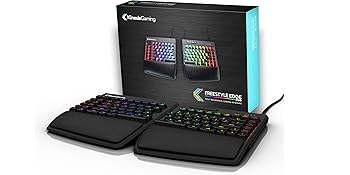
The KINESIS Freestyle Edge RGB is a premium ergonomic split mechanical keyboard featuring genuine Cherry MX Red linear switches for professional-grade responsiveness and durability. Its modular design allows up to 20 inches of separation and tenting options to optimize comfort and precision. Fully programmable with 95 keys, onboard memory, and immersive per-key RGB lighting, it supports Windows, Mac, Linux, and Chrome OS plug-and-play compatibility. Detachable cushioned palm supports and a SmartSet app enhance customization and reduce strain, making it a top-tier choice for gamers and professionals seeking ergonomic excellence.






| ASIN | B07STXYG5T |
| Best Sellers Rank | #10,096 in Video Games ( See Top 100 in Video Games ) #366 in Mac Games & Accessories #713 in PC Gaming Keyboards |
| Customer Reviews | 4.2 4.2 out of 5 stars (1,385) |
| Date First Available | July 30, 2019 |
| Item Weight | 2.8 pounds |
| Item model number | KB975-RED |
| Manufacturer | Kinesis Gaming |
| Product Dimensions | 15.5 x 10.3 x 1.3 inches |
P**)
The best ergonomic keyboard. Period.
Let's get this straight: Right now, the Kinesis Freestyle Edge is the best relatively-conventional ergonomic keyboard you can buy. No exceptions. Yes, it's expensive, as keyboards go. But it is tentable, adjustable, programmable, comes with your choice of three types of Cherry mechanical keyswitches (not cheap Chinese knock-offs) and actually useful palm rests. It's solidly constructed and has the good key feel you'd naturally expect from Cherry switches. It is customizable in many ways, almost all of which can be done right on the keyboard itself, but if you prefer to do it from a configuration application, Kinesis has you covered there as well. (The Smartset app, available for MacOS or Windows, does everything you can do directly from the keyboard as well as a few things that you can't.) The Edge RGB adds fully addressable RGB backlighting, for the loss only of the Scroll Lock key which honestly NOTHING EVER USES ANY MORE ANYWAY. Like the Caps Lock key, I don't know why it still even exists on modern computer keyboards. It's no longer relevant, and it's no pain whatsoever to lose it. I mentioned MacOS above. Yes, you can use this keyboard with your Mac. To do that, you'll need to do two things: 1. You'll need to order and install https://smile.amazon.com/gp/product/B085PWG291/, a set of four replacement keycaps for MacOS. 2. To make the keyboard's actions match the new key caps, you'll have to remap four keys, swapping the left and right Windows keys with the left and right Alt keys. ALT on the PC and ALT/OPTION on the Mac send the same key code, and WIN on the PC sends the same key code as the Mac's COMMAND key, but their positions on the keyboard are swapped. Remap each WIN to ALT and likewise each ALT to WIN, and you're good to go. (This is easier and less confusing to do from the Smartset app.) Every time you run it, the Smartset app will also check to see if your keyboard needs any firmware updates. YES, THIS KEYBOARD GETS FIRMWARE UPDATES. Updating firmware is simplicity itself: Copy the update to the keyboard's firmware folder, unplug the keyboard, plug it back in, and that's it. DONE. Your grandmother could do it, after you show her how the first time. So what makes this better than all of those $20-$60 "ergonomic" keyboards? Well, bluntly, they're all cheap, dumb crap with no adjustment, no programmability, and with cheap, bad membrane switches (and usually with even cheaper screen-printed keycaps). They'll wear out quickly under heavy use, and they'll never approach the key feel or tactile feedback of a proper mechanical key switch. Why is tactile feedback important? Because it prevents you from damaging your hands by hitting the keys harder than you need to. So if you have any semblance at all of RSI issues, and you want to protect your hands and wrists, buy this keyboard. Seriously. I'm not kidding here. Your hands and wrists will thank you forever. UPDATE ====== Since writing the above I've bought a third of these, for use with a work-issued Mac. If you've ever typed on a recent Mac keyboard, you know why. The first two are original-version Edges, one with Red switches, one with Brown. For the RGB I went back to the Reds because I think I slightly prefer them. All three have silicone damper rings installed. I personally give the RGB color control on the Edge RGB a resounding "meh". I do NOT like the changes to the keycaps; shifted keys are "upside down", which is to say, the shifted character is BELOW the unshifted character, not above it or to its right. This can be confusing. I have never seen any other keyboard do this, EVER, and it is a BAD IDEA. It doesn't even work well with the illumination, as the light is mostly blocked from the shifted character. Kinesis should change it back. Since they are standard Cherry keycaps, you could of course work around this by replacing the keycaps with a more conventional set of backlight-compatible Cherry keycaps. But on a $200 keyboard, you shouldn't HAVE to.
W**E
Excellent High-Quality Ergonomic Option!
Due to significant pain in my wrists, forearms, and discomfort in my shoulders after typing and working on my computer for even short periods of time, I decided to bite the bullet and invest in some type of ergonomic input tool(s). I researched mechanical keyboards incl. "Alice" layouts, straight split boards like the Keychron Q11 and tentable boards from Kinesis, Dygma, ZSA, etc. My two biggest goals in being a newbie was finding something that would provide a high degree of relief without a lengthy adjustment period and something that didn't cost an arm and a leg. I decided my best choice would be a true split keyboard with tenting. This Kinesis Freestyle Edge RGB (KB975), with the lift kit (AC910), turned out to be the perfect choice! I'm a 72 year old who learned how to touch-type in high school on old manual typewriters and have only used staggered QWERTY keyboards my whole life so expected I should be comfortable moving to any keyboard with a similar layout, like this Kinesis. That immediately eliminated the columnar or ortho-linear designed keyboards, which also seem to be the most expensive. And indeed, transitioning to this keyboard has been absolutely painless. I've had virtually NO adjustment period, regardless of the tenting angle I try, and was typing at my maximum wpm the very first day! What a great choice! I much prefer mechanical keys and have experimented with a few mechanical boards (two Keychron and a LowFree Flow Light) and switch types and have found the switch type that best prevents me from erroneous mis-strikes are higher initial force tactile switches so, of the options available, the blue clicky switches have turned out to be perfect. I wish they were hot-swappable because I would likely lube them somewhat but, as far as stock Cherry Blues go, they are absolutely acceptable and help keep costs down. I could get hot-swappable switches if I wanted to pay hundreds more for a Dygma or ZSA board but I would also have fewer keys and they, like most other brands like Corne, etc. "require the user" to deal with multiple layers, not something I relish the thought of doing. Though this keyboard takes up more real estate than some of those, I have no issue with it's size. Especially because I really like the layout and number of keys on this Kinesis and, though I don't want to be forced to deal with layers and customization, I love that this keyboard allows for that should I choose. I'm using WIN 11 Home and have found the SmartSet App to be quite different from using QMK/VIA, etc. but it's pretty straight forward and easy to use and the configuration(s) are saved to the keyboard's internal memory. The keyboard is plastic but solidly built and with a nice heft. The included wrist rests are sturdy and comfortable, as well as easily removeable. I have no issue with the fact the power/control cables are not removeable and, though I've used 2.4 GHz dongles & Bluetooth with other boards, I have no problem using a wired only keyboard. This keyboard uses good quality braided cables and, though it can be fed out from it's storage area to enable up to a 20" separation between the halves, I've found the 9" "out of the box" length to be perfect for me. The RGB looks great, and there are a number of stock animations or the user can easily configure it per key if desired. I purchased the Lift Kit for use with wrist rests to get tenting. After having tried all three tenting levels, I find tenting adds enough benefit to be worth-while. I initially felt the Lift Kit seemed a bit pricey but if I consider the benefit added by tenting, the ability to easily switch between tenting levels while using the wrist rests, the ability to easily install and remove them and the sturdy support they provide during use, I feel they are worth the money spent. After a week of heavy use, I can say this Kinesis FreeStyle Edge RGB was absolutely the right choice! I'm really enjoying the comfort it's providing and can't get over the ease of transition from using standard keyboards. It meets my wants & needs perfectly and only hope it will serve me well for many years. In addition to purchasing this keyboard I purchased a new Logitech MX ERGO Plus mouse and, though I hadn't used a trackball in many many years, found it to be as easy to adjust to as the keyboard and, by adding both the mouse and the keyboard, I have drastically improved my ability to now spend hours comfortably working at my computer. Money very well spent!
S**E
Courbe d'adaptation requises. Bonne qualité.
S**K
So far it's my best keyboard. There is no better on the market. Next one will be DIY. A little noise, it doesn't make click noise, but when you hit button it reaches bottom at some point and that makes noise. Cable between left and right parts is extensible. btw must notice that cover on cable holder is so loosy, if I'm trying to move my keyboard up on table by holding keyboard from top, it's just opens. Functionality is great! rgb is nice, fully customizable, could set it to soft dim light and different colors for FN layer. It doesn't have lifts, unbelievable, so expensive keyboard and I have to buy a separate lifts to adjust angle of the keyboard on the table.
B**E
Great build quality and switches. Uncompromising. Hard switch for turning off the rgb lights. Fits comfortably on either side of a laptop. I hope it lasts!
C**Z
No se si solo sea a mi, pero después de unos meses de tenerlo, dejó de prender el led del teclado. hable a garantía y me dicen que tenía que enviarlo para poder hacerlo válido, la verdad no lo envíe porque me salé al mismo costo como si comprara otro nuevo... después de falla estaba ahora en ciertas teclas pero el led ya prendía, y ahora nuevamente fallan las teclas y el led no prende
J**N
Hands down my favourite keyboard so far
Trustpilot
3 weeks ago
1 month ago