🤖 The smartest vacuum that cleans itself—because your time is priceless.
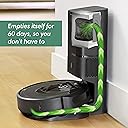
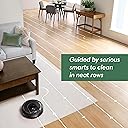
The iRobot Roomba i7+ (7550) is a Wi-Fi connected robotic vacuum featuring advanced Smart Mapping technology, 10x Power-Lifting suction, and a self-emptying Clean Base that holds up to 60 days of dirt. Compatible with Alexa and Google Assistant, it offers personalized, voice-controlled cleaning schedules ideal for pet owners and busy professionals seeking a hands-free, thorough clean on carpets and hard floors.


| ASIN | B07GNPDMRP |
| Battery Life | 75 minutes |
| Battery Type | Lithium Ion |
| Best Sellers Rank | #549,016 in Home & Kitchen ( See Top 100 in Home & Kitchen ) #278 in Robotic Vacuums |
| Brand | iRobot |
| Brand Name | iRobot |
| Color | Matte Black |
| Compatible Devices | Amazon Echo, Google Home |
| Control Method | Voice |
| Controller Type | amazon_alexa, google_assistant, vera |
| Customer Reviews | 4.3 out of 5 stars 13,222 Reviews |
| Filter Type | High-Efficiency Filter |
| Form Factor | Robotic |
| Global Trade Identification Number | 00885155015709 |
| Included Components | 1 Clean Base™ Automatic Dirt Disposal, 1 North American Line Cord, 1 Roomba® i7+ Robot Vacuum, Dirt Disposal Bag, Filter, Side Brush |
| Indoor Outdoor Usage | Indoor |
| Item Dimensions L x W x H | 13.34"L x 13.34"W x 3.63"H |
| Item Type Name | iRobot Roomba i7+ (7550) Robot Vacuum with Automatic Dirt Disposal- Empties itself, Wi-Fi Connected, Smart Mapping, Works with Alexa, Ideal for Pet Hair, Carpets, Hard Floors |
| Item Weight | 3.38 kg |
| Manufacturer | iRobot |
| Manufacturer Part Number | i755020 |
| Manufacturer Warranty Description | 1 year limited. |
| Model Name | Roomba i7+ |
| Model Number | i755020 |
| Number of Items | 1 |
| Number of Power Levels | 3 |
| Number of Speeds | 3 |
| Number of Wheels | 2 |
| Other Special Features of the Product | 10x Suction, Smart Mapping, Powerful Suction, Ideal for Pet Hair, Wi-Fi Connected, Works with Alexa, Carpets & Hard Floors, Recharges & Resumes |
| Power Source | Battery Powered |
| Product Dimensions | 13.34"L x 13.34"W x 3.63"H |
| Recommended Uses For Product | pet hair removal, carpet cleaning, hard floor cleaning, kitchen cleaning, living room cleaning, daytime use, nighttime use |
| Special Feature | 10x Suction, Smart Mapping, Powerful Suction, Ideal for Pet Hair, Wi-Fi Connected, Works with Alexa, Carpets & Hard Floors, Recharges & Resumes Special Feature 10x Suction, Smart Mapping, Powerful Suction, Ideal for Pet Hair, Wi-Fi Connected, Works with Alexa, Carpets & Hard Floors, Recharges & Resumes See more |
| Style Name | I7+G |
| Surface Recommendation | Carpet, Hard Floor, Tile, Wood, Laminate, Vinyl, Marble |
| UPC | 885155015709 |
| Voltage | 14.4 volts |
M**E
Overall very satisfied with it
Setup: Setup was straightforward. Plug the base into the wall, and put the Roomba on the base. Download the irobot app and just follow the instructions. First clean: The very first run through the house, it didn't pick up my dogs fur very well from the carpet. It left it in clumps but wouldn't suction it up. Initially I was worried I spent $700 on something that couldn't even pick up the dog fur. But I ran it through the house 1 or 2 more times and gradually it picked up all the clumps. I think I just had so much fur at the beginning it couldn't pick it all up well. Once that initial clean up was done, it seems to pick up the fur really well. I also have long hair myself, and the Roomba will sometimes have my hair catch in the rollers. But it is very easy to remove the rollers and slide my hair off. House Mapping: After 2 or 3 cleans and 2 more "practice runs" (letting the Roomba run around without suctioning to make it map faster) it mapped my house and I was able to designate rooms and establish "keep out" areas. I have 1 keep out area in the hallway where the dog food dishes are. When I specifically tell the Roomba to clean the bathroom it avoids the keep out area well. However if I do a full clean all it seems to ignore the keep out and ran into the water bowl. The Roomba comes with a little area sensor you can place to keep it out of certain areas and luckily I only have 1 area because it only comes with 1 sensor. Battery: My house is a 1 bedroom 1 bath approximately 550 sqft. And about 60% of the floor is carpet. It will clean maybe half of the house before it needs to recharge for 1hr:30min to continue again. It finishes cleaning the whole house after charging once. It's not that big of a deal because it will resume automatically on is own after it's done charging. To clean the entire house with that hour and a half charging period is about 2.5 hours. Scheduling: Because I'm worried my doggo will leave poop surprises I don't use the scheduling feature. I like to look at the floor, make sure I don't smell any surprises, and then have google tell the Roomba clean the house. Noise: As the Roomba runs around the house it's not excessively loud though it is noticable especially in a quiet house. When it empties itself to the home base disposal it is very loud. But only lasts for a few seconds. Suction: After that initial run it sucks up everything very well. Dust, fur, and hair. I didn't even realize how gross my carpet was till I looked inside the vaccum bag. Sometimes fur or hair will get stuck in the rollers but they're very easy to remove, clean, and put back Overall: Overall I'm very satisfied with the Roomba. It required some modifications to my house (moving things and wires around to accommodate the Roomba path) but I think it was well worth it for the 0 effort vacuuming. Nothing malfunctioned or didn't work as advertised. Initially I was worried because there seemed to be so many comments about malfunctions but my friend had bought one and was happy with it so 8 decided to as well. Lucky for me it runs, returns, and empties itself with no bugs.
T**R
The best of the best!
This review will cover the i7 as well as another top contender I tried, the Deebot N8+. If you just want to read about the i7 please skip to that part. If you've done your homework, watched Vacuum Wars videos on YouTube and compared all available options right now, you may have landed on these 2 as your top contenders. The S9 looks nice but it's way too expensive and the reviews just aren't good enough. Roborock looks promising but their top end model is relatively expensive and doesn't have an auto-empty bin as of the date of this review. There is no "perfect" robot in existence right now, in my view. I'm a 5 year owner of a Roomba 960 that had to be returned 3 times initially and repaired once out of warranty before it reached a stable state for me. I figured it was time for an upgrade. I was not optimistic about the i7 at all due to previous 960 issues and for that reason purchased the Deebot first as an extremely impressive option full of advanced tech. I'll give you my experience with both and why, much to my surprise, I landed on the i7 as the robot I will keep. First up, the N8 Pro+ which boasts variable suction levels that auto-switch depending on the floor type, low noise levels, laser 3D LiDAR tech for navigation, object avoidance camera, dual rotating brushes, built in mopping capability and a physically thinner footprint so it can get under my kitchen cabinets where my 960 gets stuck, daily. The functionality of the Ecovacs app is all there but my gripes are mainly around the layout, button naming and settings menus. I didn't find it very intuitive at all but all the key features are there: house mapping and virtual keep out zones being my top priorities. I did have some trouble with the initial configuration of the keep-out zones but got there eventually. The robot functions very well in general and is a very good vacuum, all told. The downsides that I experienced, however, were enough for me to return it. The key cons here are battery life, recharge time, the auto-empty base and getting stuck. Your first step with the N8 is the initial mapping of your floorplan which must be completed fully before you can do anything, I mean anything. It runs the vacuum during this mapping so battery consumption will be high. The i7 by comparison can do mapping runs with the vacuum turned off making it a much more streamlined process. I found the battery life to be much lower than the advertised 110 minutes netting a maximum of 75 minutes. The bigger problem is that it takes HOURS to recharge, so depending on when you start your cleaning run, this thing could quite literally run all day. For example in my situation, 635 square feet cleaned took 110 minutes of total run time with a required charge in the middle. This netted a total of nearly 6 hours to complete! Unacceptable. Also important to note is that the N8 will want to recharge at 15% battery, so the most you ever really get out of this thing is 85%. The next big problem for me was the design of the auto-empty base. They opted to use a dual port discharge method that sucks from 2 doors in the dust bin simultaneously. If you have pet hair to deal with, like I do, it was unable to suck out any of it, just leaving stranded clumps hanging from each port in the dust bin. The final nail in the coffin was that despite all the advanced tech in the N8, cameras, lasers, etc, it STILL got stuck under the dining room table/ chairs just like my 960 does. Too many concessions so I sent it back and tried my luck with the i7+. N8 Pros: -Competitive price (usually on sale) -Premium look and feel -Advanced tech (cameras, lasers...) -Powerful variable suction -Systematic cleaning pattern -Free in-box extras (bags, mop pads) -Awesome low noise levels -Lower physical profile so glides under kitchen cabinets N8 Cons: -Initial mapping will take a VERY long time and must be fully completed -Even with Lidar, mapping, sensing etc it still gets stuck -Battery life is terrible (more like 75 minutes at best) vs 110, charging time is worse (1 cleaning + charge cycle = 5 hours!) -85% max usable battery is abysmal, Roomba will drain itself to nothing -Dual port self-empty in the base creates problems, especially for pet hair With the N8 returned I found the i7 on sale for the same price and pulled the trigger to give iRobot yet another chance. Much less advanced overall tech here, the same "crash into everything" sensor mode as the old Roomba models, no fancy lasers here but the camera does use iAdapt to map out objects. This camera needs light, mind you. Out of the box is a very simple setup just plug in the base, set the robot in it, add the robot to the app. I was prompted with a firmware update right away so let that run and waited until the next day to do the initial mapping run. Being able to just wander around without the vacuum running is such a simple but meaningful feature here. One battery charge and you should have a map of your floorplan, vs 2 runs + 1 charge on my N8. The completed map was excellent and they even attempt to add room dividers so you can partition areas of your house for more granularity. This is really cool and allows you to choose certain areas to clean on certain days or times if you want. No-go zones and room labels are also easily applied here. VERY intuitive app layout, button naming scheme, settings menus. You can tell iRobot put a lot of effort into this. So I did the mapping run then followed with a "vacuum everywhere" run, no virtual barriers yet. Not only was the robot able to navigate my entire floor cleaning everything, it didn't get stuck once, even under the kitchen cabinets or dining room chairs, truly impressive. It did need a charge in the middle but at an hour or so to top up, the cleaning process completes in a much more reasonable time period. The rubber brush rolls are great for hair of all kinds and manage to pass it to the dust bin without tangles. i7 triggers the auto-empty base which is LOUD like a jet taking off but wow is it effective, nothing left in the dust bin after, not a strand of long cat hair. iRobot used a single port suction method for the base which works much better than the dual port design the N8 uses, so no problem with stuck pet hair. For comparison, the i7 cleaned 658 sq ft in 133 mins of cleaning plus a 75 minute charge. Half the total time of the N8. Cool! As for the downsides, there are a few but minor considering the system actually works well. First is the bump sensor design. I know the i7 first came out 3 years ago and once the robot learns your house it should be more gentle, as they claim, but this just feels like ancient tech at this point. Not only that, the RCON sensor, which is the protruding eye in the middle above the bumper, takes plenty of direct hits as it activates the bumper it sits on. This is the part I needed repaired on my 960 as one day it actually broke off due to years of repeated impact. iRobot should do like the others in this space and move it somewhere else safer! The unit itself is thicker than the N8 so doesn't glide under my cabinets but so far has managed to avoid getting stuck. The single rotating brush isn't as effective as the dual brushes on the N8 and you would need to buy a separate mopping robot, if you care about that. The other thing to keep in mind is that the Roomba can't see well in the dark, it needs light to do its thing. Overall I'm very pleased with the i7 and intend to keep it. All the areas the N8 falls short work as intended or better on the i7, despite being lower tech. And this is after I was almost positive I wouldn't buy another Roomba! i7 Pros: -Competitive price -Premium look and feel -Systematic cleaning pattern -Free in-box extras (1 bag, filter, rotating brush) -Excellent battery and charging performance -Excellent auto-empty base -ZERO issue with long pet hair -Intuitive and granular control via the app (clean zones, no go zones, defined rooms that can be scheduled) -Smart Maps works really well i7 Cons: -Old school vSLAM bump sensor tech that will mar the more stuff it bumps into -RCON sensor sits in harms way atop the bumper -Single rotating brush could be improved -Room lighting is required, this thing doesn't do well in the dark -No variable speed motor = higher noise, about the same as my 960
J**N
So far, exceptional bot & very happy with the cleaning job its doing
I'll just start with acknowledging that the Roomba app is worlds better than the Shark app on my previous vacuum. There's some quality of life features I'm getting used to fast such as the isometric 3d view & the ability to order cleaning around specific furniture on the map rather than the entire room. The timeline that shows you everything it's done for the run & everything it plans to do is useful info. I have a huge 2-level house with lots of tile & cheap carpet, plus a few big carpets. I was looking specifically for something that could mop the kitchen multiple times a day, had heated mop wash AND heated dry, & had decent obstacle handling. I'm coming from a Shark XL (vacuum only, 90 day dock capacity, suspension like an offroading 4x4 to make up for the sensing suite). I liked the Shark, but there's just no comparison whatsoever to the 705X. For starters, the obstacle detection / handling / avoidance that's camera based on this one is waaay more reliable than the prior LIDAR-only bot I had. Comparatively the 705X has much more limited suspension & is heavy, but the beefy suspension isn't needed because it's powerful/large enough to climb carpet ledges & the obstacle avoidance keeps it from climbing stuff it shouldn't like TV tray bases. Having an automated mop that gets hot-cleaned has utterly demolished the house fly population in my house & left my tile floors with a finish cleaner than I've seen them even running my hand vacmop. The first-pass dirty water tank was totally disgusting (as it should be) & clearly removed a lot of nasty stuff from my house. Cons: The only real con I've identified so far is it's LOUD. I kind of expected that though, since this is the "more suction" model, and more suction usually means more powerful motors/fans; and thus more noise. I may open up the dock to add some noise reduction foam eventually; that's a small price to pay for how good a job this does as both a vacuum and a mop. We will see how well it holds up over time. Amazon encourages reviews to talk about appearance. I don't care as much about that in a droid but I will say the "brown woodpanel" pictured on the dock is much closer to a very dark gray than a brown. My bot gets its own private little corner between a short wall & a couch though, so I don't really care what the dock looks like. This also brings up an important point: the little wall the dock is behind often trips up mapping software on bots, but the 705X hasn't had a problem finding its dock even once. The mapping software is simply excellent. The one gripe I'd have with the mapping software is simply that I can't set mop or keepout zones close to the dock even if they're on the other side of a wall (& thus very far from the dock in terms of bot drive time). I have a big rug with tassles, which is a torture test for vacuums; so far it's only been stuck once in a week or 2 of operation (which is way better than prior vacs that had to have a keepout zone over that entire rug. We'll see how it holds up over the next couple years, but I'd say, as of this bot, iRobot is back to being good.
I**I
Great Mop, Average Vacuum
Overall, this robot vacuum and mop delivers excellent mopping performance, but the vacuuming results fall short of expectations for a premium-priced machine. The mopping function works very well, leaving floors clean and handling edge cleaning effectively. Automatic mapping is also accurate and reliable, making setup and navigation easy. However, after observing several cleaning cycles, the vacuum performance has been less than satisfactory. Debris pickup is inconsistent, especially considering this is positioned as a high-end product. Another drawback is the maintenance required for the docking station. Even though the roller is automatically washed, dirt and debris tend to accumulate around the wash area, requiring frequent manual cleaning. Pros Excellent mopping performance Effective edge cleaning Mop roller lift for carpet works great leaving carpet dry Accurate automatic mapping Cons Underwhelming vacuum performance for a premium machine Frequent dock station cleanup required Rating: 3.5/5
P**3
The iRobot I7+; the Good and Bad
Well, it's been about 18 months since I bought the iRobot i7+ and so far things are going fine; no problems with it so far. I did do a good cleaning recently and, after looking at instructions on various YouTube site I found how easy it was to clean around wheels, clean single wheel in front of iRobot, to remove strings etc. I started off without researching and was struggling but after finding out how to really do the job it was a piece of cake. The iRobot designers really too all this cleaning into consideration when designing the product. So far, maintains 5 star rating. The following is a summary of my experience with my new iRobot I7+ I bought this vacuum to replace my Neato Connected which was very good at cleaning but left a lot as far as reliability; in less than 5 years I had to have it repaired 3 times at a cost of almost $400. This for a relatively expensive robot. When the battery failed ($70.00) and the robot started not knowing where it was I decided enough is enough. When I got the iRobot I followed installation instructions which were pretty straight forward, updated the software (again very easy), and then waited for it to fully charge. I then sent it out to clean my whole house (about 2200 sq ft). It ran for about a hour and then went back to base to recharge. I started up after charging and ran for another 10 minutes when it stopped with error message saying problem with dust bin on robot (not dustbin in base). One of nice things is that error message is displayed in iPhone app which also has a "Learn more" button which brings you to a little tutorial on how to resolve the problem. Followed instructions and cleaned the dust bin in the robot. Kind of a nice feature. Turned it back on and 5 minutes later same message. Did this several times and was about to just send it back but decided to give YouTube a try. Entered message text and got to video showing same stuff as Learn More but also said to take out the two brushes and clear anything there. Sure enough, there was a paper clip there which was stopping the brushes. Cleared the paper clip and it's been fine. Fault was with Learn More. With what appears to be a very user friendly function, I expected that anything there would tell me about ALL sources and resolutions regarding the problem so this was just an incomplete implementation of the facility. Sent the iRobot to to clean my whole house a 3-4 times and it was still not able to put together a full view of the house so that I could use the map to tell it t clean just one area. After looking around a while a found an option in the iPhone app that says "Just go out an map the house without doing any actual cleaning" which allows the whole house to be mapped on one charge. Once that was completed I was able to see my house map and label rooms, adjust walls, etc. Once I had my house mapped I was able to: 1) name rooms 2) adjust walls between open rooms 3) create "cleaning areas" consisting of one or more rooms. Really a nice feature worth the upgrade from I3 to I7. Just sent the robot out to clean just my bedroom and it started fine, went directly to bedroom, cleaned whole room, and then returned to base and emptied it's dust bin -- just as expected. Oher things to watch out for: 1) Robot picked up small piece of paper (1.5"x2") and sucked it into it's bin. But when it went to base to be emptied the paper blocked the opening in robot which allows debris to be drawn into base. Robot threw another message and I was able to see the problem. Removed paper and all OK. 2) Regarding self-emptying...works good but VERY VERY load for 15-30 seconds while debris from robot into base is being processed. Would not recommend running this during the night; the noise will surely wake you up. 3) Dust bin in robot is very small compared to my previous Neato vacuum. If you do not get the I7+ with self-emptying base, depending on size of your house, you may have to empty bin multiple times. Of course, my Neato died a couple months ago so there was some accumulated dust and debris picked up in this first cleaning. That's it for day one and two. Once past the "problems" the I7+ does a good job cleaning, is pretty quiet while running, and has some nice features in the iPhone app. Assuming I run into no further problems I'd recommend get the i7+ (no s much the I7 due to size of dust bin). Day 2-7; no problems and my house is staying a lot cleaner than depending on me to sweep and dust. Couple months later ... Had some problems with robot that were addressed via conversations with support team over three days -- who very very nice. After factory reset and full mapping run problems went away. One suggestion ... I was having t he robot clean the while house (2200 sq ft) in one pass which required a few stops for recharging. The result was that it sometimes did not make it back to charger or forgot where it left off. My solution was to have it clean 1/4 of the house each day for 4 days. Since doing that I've had no problems.
E**I
Worked great for 2 years then died
I am very particular about my stuff and take care of everything I have. Especially when I spent a lot of money on something. My point is I dont destroy my stuff and I took very good care of this device. I always follow manufacturer advice on care and maintenance. These vacuums are expensive and you spend a lot of money on filters, bags, rollers etc. which I am okay with that when a product functions as advertised. This robot did amazing at first and I loved it. I started having issues several months ago. It was having severe navigation problems. Getting stuck every time it did a job. It couldnt find its way home and would do jobs I didn’t tell it to and would not follow the schedule I built. Then it was building a map that looked like really long hallways and it was trying to tell me I had new space when I didn’t. I first tried factory resetting it….didn’t work. I tried reaching out to iRobot and they had me reset it again. I did and it didn’t fix it. They had me open it up, remove the battery and factory reset AGAIN. I did all that, it it didn’t work. Not to mention that every time I reset it, my robot would have to rebuild my map. I tried contacting iRobot again and they wanted my to do all that’s again and try relocating my docking station. I did all that and no resolution. I contacted them again and they wanted me to open the device air blow it out and remove and replace the battery. I always blow out the device when I replace rollers and filters but I did what they requested. No fix…they asked for pics of my device and pics of my docking station. I did all that. They came to the conclusion that it is having a software problem (navigation issue) and said my warranty expired and refused to help. I understand warranties and companies can’t support them forever but let’s be honest, between buying a $800 machine and spending so much extra (hundreds of dollar) on parts to care for it as they expect and to have it die at after 2 yrs of use is ridiculous. Especially when it’s a software/navigation issue that I would have zero control over to maintain. Horrible support from iRobot. Everyone I talked to has me start the process of troubleshooting over again from the beginning and its frustrating. The only help they will offer is a trade in. I would have to buy and brand new item and send mine in to get a trade in value? Are you kidding me? I have no idea what that value would be until after I purchase a new device. I am expected to trust the company after all this BS. So unhappy!!!
R**3
Worth the asking price
The Roomba i7+ is quite pricey but I think it's worth it. I've had the Roomba 675 and e5 robot vacuums before this one, as well as the Shark IQ robot. I can tell you that the price difference for the Roomba i7+ is reflected in the quality you get. The self-emptying Clean Base itself is a huge upgrade to the daily cleaning experience. iRobot even includes a virtual wall barrier in the package, something they rarely do with their lower-end models these days. Compared to the lower-end Roombas: The navigation of the i7- runs circles (of Spot Cleaning) around the 675 and e5. While at first the i7+ robot will seem pretty dumb, once it has learned your home (after three or four full runs), the difference will be night and day. The i7+ will clean every room of your home in a systematic manner. You will be able to predict where the vacuum will go next. While the random navigation of the Roomba 675 and e5 made them clean my apartment in between 58 and 72 minutes, the Roomba i7+ is done in between 30 and 32 minutes! Another huge improvement is in collision handling. Whereas the lower-end Roombas literally crash onto obstacles, the Roomba i7+ barely touches them -- you will see and hear the difference. Unlike the Roomba e5, which will try to climb onto pretty much everything, and frequently get stuck because of it, the Roomba i7+ does a better job of figuring out what can be climbed and what can't; it is not perfect but close. Compared to the Shark IQ The navigation of the Roomba i7+ is actually smart. The Shark IQ moves in straight lines, which is better than the robot vacuums that bounce randomly like a pinball, but the Roomba actually knows to stay in one room until it is done cleaning it before going into the next room, whereas the Shark IQ will follow straight lines even it they lead to bouncing back and forth between two rooms. One downside however, is that the Auto-Emptying base of the Shark IQ doesn't require extra bags whereas the Clean Base for the i7+ does require recurrent spending on proprietary bags -- they include two bags to get your started (good for a couple of months) but after that you are on your own. In all, I do recommend the Roomba i7+. I finally found my robot.
L**N
Best roomba so far! Do not buy a Roomba if you don't want to learn to repair it!!
I've owned 3 roombas, and my wife's employer has a fleet of 6. The bottom line, owning a robot that cleans the floor means owning tools and the skills to use them. Do NOT buy a roomba if you can't learn to fix it. It WILL break when it consumes a damaging object, and having it serviced when something goes wrong SHOULD cost ~$250 in terms of labor if you prefer not to fix it yourself. This is not a vacuum machine operated by a human. You or your children/pets WILL leave things on the floor that will damage the roomba. If you can't fix it, or don't want big repair bills, you should stick to the human powered vacuum. This Roomba is the best one so far. Roomba is NOT a vacuum cleaner! This bears repeating! All roombas can sweep up pet hair and dry dirt from a hard floor. While the roomba does have a vacuum to suck the dirt in, it is NOT a vacuum cleaner, and never will be. It cannot deep clean a carpet. It CAN sweep the top of the carpet and pick up small objects from the surface of the carpet. If you have carpet, you really need to clean it with a human operated vacuum cleaner. I DO NOT recommend the roomba for carpet cleaning. I also DO NOT recommend carpet. Carpet is cheap, and nothing ever cleans it properly. A $2000 vacuum and a $500 steam cleaner will leave your carpet full of dirt that goes airborne when you walk across it. The only clean carpet is one freshly installed. Seriously. Did I mention Roomba is NOT a vacuum cleaner? So as long as you don't own a carpeted floor, and as long as you know you own the job of repairing the roomba when it tries to eat your car keys, I recommend the roomba for you. If you have carpet, or don't want to own the job or repairing the roomba every time it eats a childs toy or a fork, do not buy a roomba. If you tinker with things, own or are willing to buy tools, and understand the concept of needing to maintain a robot, the roomba is for you! This is the best roomba ever. It has eyes, and can navigate your house! You can map your house out, divide it into cleaning and stay out zones, and you can give the robot tasks to accomplish. Making tortillas in the kitchen and get flour on the floor? Tell it to clean the kitchen. See that a pet has shredded some paper in the living room, tell your robot to do it's thing. Tell it to clean the cat litter from around the cat box, done in a couple minutes. Kids left a path of sand from the back door to their room, pick the 3 or 4 cleaning zones affected, and tell it to go. The first roomba was good... Then they had the one with the remote that never worked... They also had the exclusion towers for those early models... All ok, never great. Now I can put exclusion zones on the map of the house, label the cleaning zones, and give my roomba a chores list as needed. You can do a schedule, and you can do on demand. Pretty darned good! And yes, you will get to fix it when it gets stuck trying to swallow a cat toy, a power cord, or whatever else you leave on the floor you shouldn't. Perhaps the next version will steer clear of damaging objects, wouldn't that be clever? That will be in the next version I'm sure... Oh, my new roomba learned a new trick.... I had an old roomba charging base tucked away under a china cabinet that I haven't removed yet. Last night the GFCI for the power port of the new base unit was tripped (a problem unrelated to the roomba). When the roomba finished it's clean the kitchen job, it went and parked at the old charging base. I did some testing to explore this feature, and here is what I found: If the roomba is parked at the base, and looses power, it will complain of having a charging error if you launch a job. To launch a job, the base it is on must have power, even if the roomba is fully charged. If the base looses power when the roomba is cleaning, upon return the roomba will drive back and forth in front of the base, looking for the parking beam, after three passes, it will go to the alternative base. If both bases loose power during cleaning, a home command will first send it to the vacuum base, and if that has no power it goes to the secondary base, and will pace back and forth in front of the secondary base, and will start mapping the edges of the room as if to make sure it is where it thinks it is... Interesting behavior. Further home commands will not making it go back to the vacuum base, it will keep trying the secondary base. At this point it must park at the secondary base, it will not make any further attempts to go to the primary. On the next cleaning job, it WILL attempt to first seek out the primary base.
L**S
No lo tecomiendo
Desde que lo recibí solo trabajo unos minutos, después empezó a marcar error 26 y ya no quiso, lo compré pensando en que ere de las mejores marcas pero me equivoqué, no lo recomiendo en absoluto.
D**R
Worked much better than my older iRobot; self-emptying system works well!
Over the years I have had about a half dozen robot vacs, from four different manufacturers. The early ones were lacking in power and battery, but they worked well enough until they croaked after two years each. I bought an iRobot (a lower-priced vac than this one) a couple of years ago, and since then it's been busily cleaning my bedrooms and offices effectively. It's worked almost flawlessly, as long as I clean it properly, replace the replaceable bits at intervals, and my only complaint is it's a bit noisy. I've been looking at this i7+ for a while now, and finally clicked Buy. The goal was to install it at my second house, where I visit every couple of weeks, and let it keep the dust and pet hair under control while I'm not in the house, replacing the vac bag when I do visit. To be honest, I wasn't optimistic things would go well, but I have been pleasantly surprised. A few things stand out right away compared to the older iRobot I use in my office. To start, the noise of the vac is a lot less...it's more than a buzz, but it's not sounding like industrial cleaning devices on my floors! Second, the battery seems to last longer; I can get almost an hour out of the i7+ while my older iRobot complains after about 20 minutes. Third, this one is a lot smarter: it remembers where it's cleaned and continues where it leaves off while running back to the base station to empty and recharge. Fourth, my older one keeps getting stuck hanging off a stair or wedged in a corner between furniture; this i7+ has not hung up on a step yet, and has managed to extricate itself from several tight spots. Lots of improvements! As for the auto dirt disposal system, so far it's worked fantastically. Either under control of the app or the robot, the vac snuggles in to the charging station and a vacuum starts up (quite noisy compared to the robot...about the same as a regular vac) and sucks all the dirt from the robot dirt container into the bag in the upright unit. It takes about 15 seconds, and a quick inspection shows it does a really nice job of emptying the robot. every now and again you still need to go in and give the rollers a clean (especially if you have pets, like I do) and wash out the dirt bin, but I am doing that once every two to four weeks, which is fine. As for the dust bin in the receptacle, it tends to last about four weeks (the first house cleaning it filled in two days, but four dogs and a cat were the reason). I suspect without pets I would only replace the bag every month of two. The bag itself is a clever design with a sliding door to ensure you don't spray dirt all over when you remove the bag. I've been really impressed with this i7+. Its' not caused one issue so far, and while that's too good to last, I'm delighted with the system. So much so that I'm considering a second for the other floor of the house. This isn't inexpensive, but when I think I pay office cleaning staff to do the same job vacuuming the floor, this pays for itself in a month! I've read lots of negative comments in posts here and elsewhere, but so far, I have zero to complain about. Update: After two years, these i7s are still working perfectly. I have several s9+ too, and they are a pain to work with; they always jam, stop working, and report dirty sensors every day. The i7s just work, perfectly. I will be replacing my s9s with i7s. I can't recommend the i7+ enough!
M**.
From skeptic to believer
I ordered this product (i7+) with the intention of trying it out once or twice and, considering the price tag, likely returning it unless it exceeded expectations. I had a roomba years ago and I was interested in seeing how far things had come. I was not disappointed. I have now owned the product for a couple of weeks and will not be returning it. I have nothing but positive things to say. The battery life is impressive - it has done up to 90 minutes before returning to base to charge. The initial few times of vacuuming our main floor took quite a while as it was still learning the area. Now, if I send it to the Kitchen it can be done in 10-15 minutes. One does not need to look further than inside the brilliantly designed vacuum bag after a few rounds of cleaning to see this product is worth its weight in gold. It pulls up SO much dirt! This brings me to the app, which I use on iOS. I am the kind of person who is highly critical and believes the vast majority of apps available today, especially those relating to "smart XXXXXX", are utter crap. I was so pleased to see that the iRobot app is not only not utter crap, it is an absolute joy to use. From setting up a schedule, to working with the map - adding dividers, rooms, and 'no go' areas, it's all worked flawlessly and intuitively. We have become so accustomed to needing to try things repeatedly or wait for spinning circles due to connectivity issues etc., well, not with this device. It's amazing that if you press pause on the app, the vacuum almost instantaneously emits a sound and stops dead in its tracks. I want to provide a fair review, so the only thing I will be critical of is the noise level. Yes, it's kinda loud, which means we can't run it in the middle of the night due to having tenants downstairs. The loudest part of the ordeal is when it docks with its home base and empties itself. But honestly, it's a damn vacuum people, what did you expect? And to be honest, the insanely powerful sounding transfer is kind of exciting because you can hear in the cacophony of it all the crazy amount of dirt it's just saved you from vacuuming yourself.
P**O
Un problema hacer valida la garantía, esta falkando y no me resuelven quien lo arregla
Garantía de servicio un problema no me la hace valida irobot mexico
R**K
Good vacuum robot for home with pets
If you have pets and don't have a vacuum robot, this is a great buy. Roomba does save me a lot of efforts in cleaning my home with cats shedding hairs and litter tracking everyday. But IMO it's only worth the money when it's on sale. Pros: 1. It does the job!!!! Although not perfect, it definitely does the job you would expect a robot to do. 2. It comes with the dirt disposal bin, which I believe is a must for every vacuum robot. 3. The app is simple and intuitive. It's easy to customize room, cleaning zones and no-go zones. 4. It's easy to find parts. Cons: 1. Too expensive. It Roborock is available in Canada and comes with a disposal bin, I'll get that one, which performs a lot better in hard wood floor and quieter but almost the same in price. 2. No lidar technology, which helps robot navigate better and work in dark room. 3. Loud on hard wood floor. Just OK (Not pros nor cons): 1. Performance is just OK on hard wood floor. I need to use my Dyson sometimes since the robot doesn't pick up all dirts. It's acceptable but I expect it to pick up more at its current price. 2. Navigation is just OK. It gets stuck under my chairs for a lot of times but overall it does most jobs. 3. The maps is not accurate and will not change if there's no significant changes to your room, such as if you just move your furniture a bit. Although it may not affect robot performance, it makes you crazy if you have OCD.
Trustpilot
2 months ago
2 weeks ago