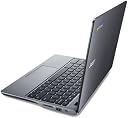
🚀 Power your day, anywhere — the sleek cloud companion for the modern millennial manager!
The Acer C720-2420 is a lightweight 11.6-inch Chromebook featuring an Intel Celeron 2955U 1.4 GHz processor, 2GB DDR3L RAM, and a 32GB SSD. Running Chrome OS, it offers up to 8.5 hours of battery life, fast boot times, and versatile connectivity including USB 3.0, HDMI, and Bluetooth 4.0. Designed for cloud-centric productivity, it delivers reliable performance and portability ideal for professionals on the move.


| ASIN | B00GZ1GV3I |
| Audio Output Type | internal |
| Automatic Backup Software Included | Webcam |
| Battery Average Life Standby | 8.5 hours |
| Battery Cell Type | Lithium Polymer |
| Battery Life | 8.5 hours |
| Best Sellers Rank | #191,666 in Computers & Accessories ( See Top 100 in Computers & Accessories ) #36,778 in Traditional Laptop Computers |
| Bluetooth Version | 4 |
| Brand | Acer |
| Built-In Media | USB 3.0 port, USB 2.0 port, HDMI port, Built-In HD Webcam |
| CPU Codename | Haswell |
| CPU Model | Celeron |
| CPU Model Generation | 2 |
| CPU Model Number | Celeron 2955U |
| CPU Model Speed Maximum | 1.4 GHz |
| Cache Memory Installed Size | 2 |
| Camera Description | Built-In HD Webcam |
| Color | Granite Gray |
| Compatible Devices | External displays, keyboards, mice, storage devices, printers, and other USB, HDMI, or Bluetooth-enabled accessories |
| Connectivity Technology | Wireless |
| Control Method | Touch |
| Customer Reviews | 4.2 out of 5 stars 545 Reviews |
| Display Resolution Maximum | 1366x768 pixels |
| Display Technology | LED |
| Display Type | LED |
| Form Factor | Chromebook |
| Graphics Card Ram | 128 MB |
| Graphics Coprocessor | Intel HD Graphics |
| Graphics Description | Integrated |
| Graphics Ram Type | DDR3 SDRAM |
| Hard Disk Description | SSD |
| Hard Disk Interface | Solid State |
| Hardware Interface | HDMI, Solid State Drive |
| Human-Interface Input | Touch Pad |
| Item Weight | 2.8 pounds |
| Keyboard Description | QWERTY |
| Keyboard Layout | QWERTY |
| Lithium-Battery Energy Content | 39 watt-hours |
| Manufacturer | Acer America Corporation |
| Memory Clock Speed | 2400 MHz |
| Memory Slots Available | 1 |
| Model Name | C720 |
| Model Number | C720-2420 |
| Model Year | 2014 |
| Native Resolution | 1366 x 768 pixels |
| Notebook Pointing Device Description | touchpad |
| Number Of Cells | 3 |
| Number of Ports | 1 |
| Operating System | Chrome OS |
| Optical Storage Device | No |
| Other Special Features of the Product | Webcam, Wifi, Portable |
| Power Device | AC adapter with lithium-polymer battery |
| Processor Brand | Intel |
| Processor Count | 2 |
| Processor Series | Celeron |
| Processor Speed | 1.4 GHz |
| RAM Memory Installed | 2 GB |
| RAM Memory Slot Total Count | 1 |
| RAM Memory Technology | DDR3L SDRAM |
| RAM Type | DDR3 SDRAM |
| Ram Memory Installed Size | 2 GB |
| Ram Memory Maximum Size | 16 GB |
| Resolution | 1366 x 768 pixels |
| Screen Finish | smooth, glossy |
| Screen Size | 11.6 inches |
| Speaker Description | Basic laptop speakers |
| Specific Uses For Product | Personal |
| Supported Monitor Maximum Quantity | 1 |
| Total Number of HDMI Ports | 1 |
| Total Usb Ports | 1 |
| Touch Screen Type | capacitive |
| Touchpad Feature | True |
| UPC | 887899402517 |
| Video Output | HDMI |
| Video Processor | Intel |
| Warranty Description | One-year International Travelers Limited Warranty (ITW) |
| Warranty Type | Limited |
| Wireless Compability | 802.11bgn |
| Wireless Technology | Bluetooth |
B**P
Detailed review of probably the best Chromebook on the market today
To start, this Chromebook is the best one I have ever owned. I read the reviews before buying and like many of us, was still a little skeptical because of how affordable it was ($239 at the time I purchased it.) So far, this is what I have used it for and following is a list of pros and cons I've noticed in the month I've had it: I'm a nursing student and use this for taking notes of lectures in Google Docs 80% of the time. Because I'm in an accelerated program, I sometimes have 4 or more classes per day which requires me to be running multiple tabs at the same time, searching through folders, streaming video, downloading things from Google Drive, changing and adding classes and tests to Calendar, and so forth. This Chromebook never misses a beat. It can handle as many tabs open as you could possibly ever need. For college, I really don't think you could possibly need anything more powerful or anything Windows or Mac based... in short, this thing just works. Now here's the pros and cons: PROS: - It's lightweight yet still feels pretty sturdy even though the case is plastic. - The battery life is AMAZING. I can't stress this enough. I use this Chromebook all day for note taking and browsing the internet for school and at the end of the day, I seriously am at about 70% battery power remaining! The nice thing about that is I can stop at a Starbucks or something on the way home to study my notes with plenty of battery power left. No more carrying an AC adapter around! Once I get home, I can log on to my Windows computer and everything is there, fully synced in my Google Drive. I plug the Chromebook in and charge it up for the next day. No power issues at all. - The WiFi works flawlessly, connects quickly to any available network, and is able to pickup the signal very well. It picks up WiFi signals way better than my previous Windows laptop and even better than my Galaxy Note phone. - The keys are spaced out nicely so you don't feel cramped when typing. They're not too noisy where you're going to bother other classmates while typing, and they feel sturdy. Not a whole lot of flexing or anything while typing. In short, it doesn't feel cheap. - Boot-up time is what they claim... 7 seconds or less. If you keep it on but close the lid, it puts it to sleep and when you go to use it again, it's ready to go before you even finish lifting the screen up. - The sound quality is way better than I expected from a Chromebook. I'd venture to say it's even better than most laptops. You can crank the volume up if needed and it is loud yet still clear. Obviously using headphones will give you better sound quality but you get really good sound from these speakers alone. THE CONS: - The screen... oh, the screen... where do I begin... As others have mentioned, it leaves much to be desired. The quality of the picture is pretty poor for anything beyond note-taking, browsing the web, and watching some YouTube videos. The screen just looks sort of muddy and washed out. It's also pretty small at just over 11" which makes having multiple windows open side by side almost impossible. But, you're sacrificing screen real estate for compactness so it's a trade-off that you'll have to decide if you're willing to make as Acer now makes the Chromebook 13 which, for about $40 more, has a much better screen that is full 1080p and offers a faster processor (more on the Chromebook 13's processor below.) - Top cover/screen design: When closing the lid and carrying the Chromebook around in my messenger bag, the design of the keyboard allows part of the keyboard to touch the screen, leaving a scratch-like line across the screen, near the middle top. I tried rubbing it to see if it would go away and it didn't. Using a cleaning cloth I was able to make it less noticeable, however, it's still there and I imagine will only get worse over time. I may talk to Acer about this and see if this is a common problem, and if not, if I can get my Chromebook swapped out. SUMMARY: To summarize, this really is probably the best deal on a time-tested Chromebook with over a years worth of good reviews and reliable operation and I've experienced the same thing with mine. With its Intel Celeron processor, it's fast enough to do probably everything you would need to do. The on-board RAM (2 GB) is plenty to have multiple tabs open, videos streaming, etc. The 32 GB of on-board storage is plenty considering most of your work is going to be done online anyway. It's also solid state which means it is very, very fast. No spinning hard drives as you would find in the average laptop. I can honestly say, for the money you're spending, you're getting an amazing deal on this Chromebook. SIDE NOTE REGARDING THE ACER CHROMEBOOK 13: The Acer Chromebook 13 was released in August with people getting their pre-orders in the mail shortly thereafter. It is an impressive machine, offers a faster processor (that I really don't think you'll need), the same amount of RAM, but only 16GB of on-board storage (the $379 version comes with 4GB RAM and 32GB storage but as of October 2014, has a 3-5 week backorder timeframe here on Amazon.) Regarding the Chromebook 13's processor: it is an NVIDIA Tegra K1 which is an ARM based processor vs. the Acer c720's x86 based processor. While the Tegra K1 is faster, you won't notice the speed increase unless you are a serious power user running many, many apps at the same time. Also, because it's the first Chromebook to use an ARM based processor, some Google apps will not run on it because they are built around the x86 architecture. This will change in the future, of course, but for right now, with the Acer Chromebook 13 being the only Chromebook using the Tegra K1 processor, the developers are not going to be in a huge hurry to upgrade their apps until more Chromebook models using it are released. This won't affect everyone, but it is something to think about. Also, NVIDIA is working on an upgraded Tegra K1 processor due out sometime by the end of 2014 so that may be another reason to hold off for the moment. The screen size and resolution of the Acer Chromebook 13 is a big improvement over the Acer Chromebook c720, offering vivid colors and a large 13+" inch screen providing full 1080p resolution. Even though it's less than 2" larger than the 720's screen size, it is noticeable when trying to run two windows or apps side by side, looks better when streaming videos, and has more of a laptop screen feel. With the increased screen size and faster processor, it may be a better option for you but in my opinion, I'd hold off until the Tegra K1 ARM based processor is more established and the app manufacturers have updated their apps to work with it. It's only about $50 more expensive, you're gaining a lot, and really only loosing the extra 16 GB of on-board storage, but you're also dealing with the issues with the new NVIDIA processor. I'm personally going to keep the Chromebook c720 until something with more substantial upgrades is released sometime in 2015. Would I recommend this Acer Chromebook c720 to someone? Absolutely. As I said in the beginning of my review, I think this is your best bang for the buck in terms of current Chromebooks on the market. *** I hope you find this review helpful. Please let me know [...] if it has helped you at all... I do my best to get you as much info as I can so you can feel good about your decision to purchase the product. I will also update this post with any info I hear back from Acer regarding the issue I mentioned about the screen getting scratched by the keyboard. *** Thanks! - Paul
J**H
It does everything I need it to, and it does it well
After a TON of research, I went with this chromebook over ones that were newer, had bigger screens, or had more of this or that. I've heard complaints about the screen in particular, but I find the resolution and quality to be more than adequate. I was a little reluctant to go with the 12" screen, but actually prefer it - a lot! It just makes this chromebook that much more portable, and that much easier to snatch up when moving about the house, or when running out for the weekend. I think I did get the model with a little more storage space or something, but I personally will never use it all up. Even if I did, it's so easy just to park files in the cloud or whatever. What has really lived up to the hype is the battery life - you really can look forward to a minimum of 8 hours on a charge. I was so used to having a laptop tethered by the power cord that it really is wonderful to just use this thing and leave it anywhere in the house that's convenient, and only have to recharge it about every 4 or 5 days! While it may be par for the course with a chromebook, as someone switching from laptops, I love how this thing is silent, and I don't get hit with all of the popups and banners like are more of an issue with a laptop (at least how I browse the web). I was also surprised that the sound on the C720 is better than on my 17" Toshiba Satellite, although the Satellite has really bad speakers. Another thing - boot time is basically instantaneous. Again - this may be standard with most or all chromebooks, but if it isn't, it's one more reason to consider the C720. I think I also read where opening a lot of tabs would slow down page loading? I think I've had at least a dozen, with no issues that I noticed. This was with audio or video on at least one tab, too. I need to be clear and say that I didn't get the C720 with the expectations of it replacing a laptop. I just am not a tablet or "big smartphone" person. I don't really like using touchscreens for the most part. I've also had my own business and enough jobs that required laptops when out on the road that I love about this what I hated about all of them. That even goes for a really nice Thinkpad that I had from my last job - possibly as good as it gets with a traditional laptop, but the C720 is just better in the ways that are important. The only negative thing I can really think of is that I wish there were "home" and "end" keys, as I've really gotten used to using them. Again though - there may be some equivalent that I just foolishly/ignorantly don't know about. While I should probably be more critical or give more analysis to the other programs on the C720, I honestly don't use them enough for it to detract from how I feel about it. For that matter, I think there are ports for all the popular stuff - even a HDMI if I'm not mistaken? So all the connectivity and flexibility is there, right under my nose. ...I also did (honestly) try to set up the HP printing feature, and I think I did it correctly. I didn't test it though, but my HP printer does show up as if it were configured properly. I know that can be important to some users, so I wanted to mention that it at least exists, even if it might not work well (I honestly don't know). While some of what I've said is probably not too helpful, at least it should convey that they pack a TON of features into even what should be just a basic little "light duty laptop," and for such a ridiculously low price vs. even a lot of tablets.
C**E
A great laptop!
I absolutely love this laptop! It is lightening fast, faster than my old Toshiba which had an Intel 5 processor and I am only using an internet speed of 10 to 15 mbs, depending on my location. It is still super fast when I tether it to my phone and I am getting a poor 3G signal. It's also lightweight and perfect for someone who is on the go. I also love its long battery life, which is great since I don't have to lug around my charger to a library. I am a chemical engineering student, and I find that this fits my needs for writing reports, creating spread sheets, video streaming, surfing the web, etc. However, if you were planning on downloading certain programs, like MATLAB or Mathcad, buy a regular laptop. There are four main disadvantages, which is why I am giving this 4 stars. One is that you cannot download certain programs, like word, mathcad, MATLAB, etc. You are dependent on the Google store for apps, if it is not there, you can't get it. Another is that when you let the screen go to sleep frequently, it wakes up with a distorted image and lots of lines across the screen. I have found if I close the laptop when it is sleeping and open it up again, it wakes up instantly with no distorted image. It's just inconvenient. Another disadvantage is that Google docs and spreadsheets is what you will be using primarily for reports, excel work, etc. It does need some work as there are some bugs when you are using it. You also can't do quite as much as when you are using Microsoft. I have also run into issues with formatting my reports to word, but it is a problem I can deal with. You also cannot use Skype. But there is Google hangouts, but I confess, I have not used it since I still have my old, (broken and not portable) laptop to use. As a whole I love this laptop and I would recommend it to anyone who is not planning on using specific downloaded programs. It is super fast, lightweight, and has an unbelievably long battery life. It is great machine to use and I am actually glad my old Toshiba broke because I consider this to be a better machine.
L**Y
Awesome Machine as a secondary/primary unit
Alright folks, I just bought my first chromebook after hours and hours of searching for the one with the best specs for the cheapest price. And here we are! I am not really much of a laptop guy, I have a ridiculously expensive pc, with a filco cherry brown mx keyboard, and gaming mice, etc. So why did I decide to buy a chromebook? Well, I am a student, and I didn't want to go home after class every single day just to do hw or wait for class (and god knows, I won't study once im in that gaming environment i created). So I looked to find a way to help me stay focused - at school. And bam, a fast pc that cant play games but can work very well on the browser. And furthermore, google made it! Expecting quality out of em. And quality I received. Everything I love about this except for a few minor things Google Slides is trashcan for viewing microsoft PPTs. It is always in some shape or form corrupted. Not even worth my time. So I recommend having a power house computer at home. What I did was download the app Chrome Remote Desktop, and Set it up to my desktop at home. Then, if i need to look at ppts for class, i simply sync to my computer at home, and download the ppts and view them. It's pretty witty i gotta say. But anyhow, The screen is pretty small imo, but its workable once you get used to it (2-3 days) And the keyboard is hard to get used to for the first 2 days or so. I just played a bunch of typing games for an hour or so and went form 60 wpm back to my avg of 90 wpm. Definitely a good keyboard once you get used to it. The trackpad is a bit rough at first. Felt a great deal of friction at first, but once you use it enough, your hand oils will seep into it and make it smoother and easier to use. Trust me. Also, before buying this, spend some time learning to use google docs. Since switching over is a big change. Also, i dont like the Search function instead of Caps Lock, thank god you can change it. So I did. Im worried about it getting scratched, so i bought a cover case, "Aqua iPearl mCover Hard Shell Case for 11.6" Acer C720 C720P series ChromeBook Laptop" It looks really nice with it on too. Plus, it has 2 lifters on the bottom of the case so you can elevate your chromebook as a whole to type if you prefer. Fast load time. Easy to use. Great machine. Tbh, it's very fun because of how interestingly new this concept is to try to put on for a laptop. Tl;Dr Best specs for cheap chromebook, Fast, L2Use Google Docs b4 buying, Use Chrome Remote Desktop to use your actual computer away from home, invest in a case. EDIT: 1 Month Later My problem with viewing ppts was solved after i found out using google drive viewer instead. I love google docs now, been using the google cloud system a lot more now that I can really use it and take it with me everywhere. The keyboard is pretty good, i get about 89-104 wpm on it, and on my filco cherry mx ninja majestouch 2, i get about the same. I am very glad I bought a case for my c720, because I can already see all the scratches on it even though all I have been doing is putting it in my backpack. I just wish the screen was a bit bigger, not really used to it. Just gives off the "secondary" computer vibe. IF it had a bigger screen, I'd give this a perfect score. Prob just a 4.5/5 so far. And compared to the pixel, this machine is the closest you are going to get for a budget price. The pixel is cool, but I am sure something else will come out better than it. Update 2 from March 24, 2014 to March 1, 2016: Two years now, and I am now still using this machine. I must say, google revamped a lot over the years to make google drive reliable to open documents, powerpoints, and pdfs and so forth. I've put this laptop through 1 year of terror with toddlers and it still works for me. The kids couldn't mess with it like they kept doing to the windows one via unlocking and raising the taskbar or stupid pranky stuff my mom has no clue how to fix. The keys are a joy to type on. I actually find it more productive to use than my desktop. I think the fact that windows leaves you with so many choices can distract you from even beginning your work if you are a power user. For example, updates, trying to remember where you stored something on: desktop vs documents, etc. I am very focused when I hop on my chromebook. It also seems to be more ergonomic in that I am so used to using the trackpad it is easier for me to surf the internet than using a mouse. Funny thing about gaming, it is possible actually. Just make sure to expect a small amount of lag. If you have a primary desktop, just keep it running. Download chrome remote desktop from the google web store. Connect the two computers via the instructions (easy). On the primary computer, make sure to set the program to run in windowed mode, for some reason it will only show a black screen to you otherwise on the chromebook side. Game along. I expect that the faster your internet, the better your experience. I had 78 ms lag or .78 seconds of lag, transferring data to my chromebook from my desktop + I have to deal with the in game ping. So, that is a downside if you are competitive. But it's nothing fussy at all if you play something like an mmo. I had a google pixel 2013, I sold it. I like this one better. Pixel kind of went against what I was looking for - a lightweight, strong battery, mobile machine. The pixel 2013 gets a little hot. Bad battery life. Heavy. I am not sure I would get the 2015 either, because I'd rather get something like the dell xps 13 so I can just get windows 10 and have a portable gaming system as well. I think if I didn't game, I'd opt for the google pixel 2015 because it makes a statement - this is what I want my ecosystem for work flow to be, and I can embrace the cloud. Of course aside from all the amazing peripheral experiences you get + 1 tb google drive for 3 years. Amazing keyboard, trackpad, screen pixel density, touch screen, 12 hr battery life with 2 hr charge on 15 minutes from usb type C + awesome aluminum body.
J**.
Decent computer, but you get what you pay.
My old macbook is outdated, and running flash on it has been a pain in the ass. I needed something inexpensive until I purchase a proper desktop. After reading the reviews, I settled on the Acer C720 Chromebook. If I was rating this alone on what it does, It would be a solid 5 stars. Updates are pushed timely and installed quickly. I can run multiple tabs while surfing the internet. YouTube, Netflix, HBO GO, and Hulu run smoothly on this computer. The biggest advantage to this laptop is how integrated it is with my Google account. If I create a reminder on either my Nexus tablet or my Moto X phone, the computer will automatically sync along with the other devices. I can save a photo to my google drive from my phone, and edit it running one of the free apps on my laptop. Mind you, these programs are no Photoshop, but they're decent enough to get rid of blemishes before posting the photos on online media sites. Battery life is also outstanding. I can average about 6-7 hours in between charges. With the way I use it, I'm charging it almost every 4-5 days. Not bad for a computer running videos most of the time. My issue with this laptop is that it feels like a 200 dollar computer. The computer is made out of a cheap plastic. My Nexus 7, which is priced around the same as this chromebook, feels much more sturdy and "expensive" with a rubberized plastic frame. This chromebook feels and looks cheap. I think you're going to get tired of me, but this computer feels cheap, cheap cheap. I thought I knew what I was getting when I payed such a ridiculously low price for a laptop, but believe me, it's bad. I really hate the feel of the laptop in my hands. The screen is also pretty terrible. The actual resolution is not bad at all, it can run videos at a 1080p resolution with no problems, The issue is the back lighting in the LCD. The light source is just too bright, and it washes out the colors, giving the images a look that was similar to a laptop I used at my previous job. That laptop was around 8 years old and was running windows XP. It's that terrible. Turning down the brightness helps to make the image better, but when I'm in a fairly lit room, I have to turn up the brightness levels again. The keyboard is another issue of mine. The keyboard is not quite a full-size keyboard. It feels slightly crammed, and my fingers are not quite used to it. I feel like I take longer to write things because I'm spending a significant amount of time backtracking to delete mistakes. Mind you, I can type an average of 80 words per minute, but with this keyboard, I've seen my accuracy rate go down by a lot. My other big issue with the keyboard is that the keys are not always responsive, specially the space bar. You really have to hit it with more force than the normal keyboard, because it often doesn't register my stroke. The same thing can apply to the mouse pad on the computer. Not only does it feel like cheap plastic, the sensors that are supposed to register my fingers don't work often. I also have to press the pad with force in order to get the pointer to click on a link. If I were you, I would spend the extra money on the newer version that is supposed to come out soon. Maybe then they will fix some of the problems with the keyboard sensitivity. You can also look for the other chromebook laptops that are a bit more expensive. I'm sure they don't feel and act as cheap as the Acer version does.
Z**S
6 months later, still awesome.
Great laptop. I replaced a first gen Nexus 7 with it. I have a desktop gaming PC for PC stuff/windows apps, I didn't need all that. I just wanted something to watch movies/music, web browsing, etc like a table, but I was tired of touch keyboards, I wanted something you can feel. So got this. Blows away my expectations. I have used it daily since getting it in February, sometimes for hours watching TV (via HDMI) and it is still running as fast as ever. I've watched multiple auto racing events that are over 12 hours, streaming via HDMI to my living room TV, for example. This thing gets used a lot. And it can barely be heard, the tiny fan so quite. I can't say I've ever been that impressed with windows laptops. Performance always degrades after awhile, boot times increasing, driver updates, apps crashing, hot, loud. I could go on. But it works like the day I got it. Boots up in seconds, if you power it off. Most of the time I just close the lid and leave it. The battery lasts hours. I only charge it every few days, depending on how much its used. Normally only charge it when it gets to around 30-40%. And it charges very very fast, like a newer phone. Only real downside is lack of a good music app. I use Amazon Cloud Player for my Mp3s online, but for the local downloaded it has a basic music player. Works okay, just click a song in the file browser and it pops up and plays, but no options really but repeat, random, pause/play etc. It only plays anything in the same folder, so if you sort songs by album in different folders, they can't be queued together. It's not that bad, but it would have been nice with more features. There are a few options in the chrome app store, but I couldn't find one I liked enough to use. Also I am not an app centric user, mostly use web browser, so I can't give a valid opinion on the ecosystem of the chrome app store. I will note it is annoying that ones that only work on windows show up often. Overall very happy with this laptop. It's light. It's small. Best of all, it's cheap!
D**E
Acer Customer support TERRIBLE---Acer C720 machine quite GOOD.
The reason for this low rating is NOT because of shortcomings of the machine. The reason for the low rating is the incompetent and/or untruthful Acer customer support. I contacted Acer customer support for instructions as to how the touchpad could be turned off because I wanted to use an external USB mouse and avoid the typing errors from inadvertant brushing of my hand over the touchpad when using the keyboard. The first gentleman I spoke with said yes, the touchpad could be turned off with cosh commands but he did not personally know how to do it so he referred me to a higher level of technical support. The young lady in the higher technical support told me that the touchpad COULD NOT BE TURNED OFF. I showed her Google references indicating that it was indeed possible and she answered with some extremely rude comments that would be unfit for public reading and seemed to imply that I was "stupid". Having never had contact a technical support person from any company that behaved like this I was totally speechless at this point. I contacted Google support directly and they quickly supplied the proper information to turn off the touchpad and told me that some companies do not want customers to modify their machine in any way so they lie to the customer to get them to just "go away". That might be the issue here with Acer technical support or it might be the incompetence of one employee. I am not sure that the gross behavior of this one person is indicative of the approach of Acer as a company to customers but I can say that in the future I will consider any companies products long before I consider purchasing an Acer product in case my experience is a reflection of company support policy. Now...I would like to restate the Acer C720 seems to be a fine machine. Acer customer support appears to be the worst I have ever encountered in my life.
G**D
Fast cheap and pretty good.
Ok so I'm a techie and a nerd and all that. When I first heard of the chomebook I thought to myself, well that's quite dumb. However after giving things some thought I realized I did ninety or so percent of the work on my computer on chrome anyway. What I didn't do on chrome I did on Steam, the other fraction of a percent was photo editing from time to time and I wouldn't do that on a notebook anyway. So when I decided to get a small notebook thing for toting around and using in the bedroom, generally to watch movies and create some content with I fell into the Acer. There are three Acer tablets in my family, the A200, the A210, and the A510. All are still running flawlessly. So I already had some respect for the brand. I've had it for about two weeks, its performed much faster than any windows notebook I could get for under five hundred. It's stable, stupid simple, and it does what I need it to do. So what do I do? I stream movies from the big internet names as well as locally via plex, WHICH might I add works better on the chromebook than it does on my HTC one or A200. I write, listen to music, well whatever you'd normally do on a computer. I can spam out the same number of tabs on this as I do on my main machine without a slowdown. I consider the screen very good, the resolution is more than ample for this size and its sharp and bright too. The viewing angles suck, but I have to have the screen way out for it to be an issue. The speakers are good, much better than my A200 and notably louder than I was expecting, In my quiet room with the C720 on my lap I have the volume at 20% and its more than enough. Bluetooth works with my headset quite well, again no problems. The battery life is as stated around eight hours of run time which is plenty. A random quirk, the built in video player can handle some .mkv files with subs from the onboard storage, others it can't. So keep that in mind, the onboard player isn't up to VLC snuff yet but plex can transcode those files just fine from my main machine. For the price it's really outstanding. I suggest it. Two gigs seems to be plenty, I was actually expecting it to be a dog, but alas tis not the case. The thing that needs to be kept in mind is that this is a chromebook, not a windows machine if that is understood it will do just fine and not disappoint.
R**B
Five Stars
simply the best and most powerful laptop around, yes I said laptop....
ね**ん
起動は本当に7秒
とにかくサクサク動きます。 起動は7秒かからず、ログイン画面になりますし、パスワード入力後のログインも3秒でwebページが表示されます。 webページの動画再生など、ストレスなしで表示できるので、webのみであればwindows-PCより優れていると思います。 オンラインケームなど、windows-PCでしか出来ないものもあるので、使用用途を分けて使えば便利です。 また、電池もちもよいので、充電回数も少なくすみます。 私はトイレ用として使用していますが、起動が早くすぐ使えるのでトイレ用PCとしては最強だと思っています。 充電も月1回程度なので重宝しています。
C**S
Wonderful notebook with amazing battery life and it handles Ubuntu quite nicely.
I was a bit hesitant when I purchased it but I'm really loving it. The device is super lightweight but it feels quite sturdy in your hands. The touchpad is very nice and responsive, and the keyboard is pretty good. My only issues with the keyboard are the right shift key sometimes doesn't work when I don't properly press it, and the rest of the keys sometimes feel a bit stiff. But all in all, it's quite a wonderful little notebook. A word of warning. Chrome OS does NOT support PPTP VPN connections, so if you plan on using it to VPN into work from home or on the road, it can't do that in Chrome OS. Luckily I was able to get around this by installing and running Ubuntu 14.04 on it. The process was fairly easy and with its 32GB SSD I was able to partition a comfortable chunk for Ubuntu. Ubuntu runs impressively quick on it, there are no comparability issues with Ubuntu and the 720's hardware. The touchpad, keyboard and sound worked perfectly. I did notice a slightly poorer battery life when running Ubuntu and it also ran just a bit warmer. But it was nothing to drastic.
S**A
割と使えます。
早速届いてセットアップやらなんやらで数十分こねくり回したが思いの外操作もブラウザ版chromeとほぼ変わらないのですんなり進めることが出来ました。ただエンターキーが小さく変わった形状なので慣れるのが大変です。 新規購入者にはgoogle drive 100GBを2年間利用可能と聞いて喜んでいたのですが有効期限切れと言われ使えませんでした。そこだけが残念でなりません。電池持ちや静音性は抜群です。熱を持つことほぼ無いです。
V**T
Waste of money
I have never written a review before, but I feel like I need to warn anyone thinking of buying this that it was not a good purchase. I bought this for my child to use at school to take notes while on WiFi. I thought it would be good...fairly cheap. I was wrong...it's not good to use unless you have WiFi, because Google Docs doesn't always save properly when offline...so that's annoying! I didn't have high expectations, just minimal note taking, maybe occasionally used to write an essay. I have had this Chromebook for 4 months and one day the screen just stopped working. It's completely dark and does not work. It was always used and carried with an armour-type case on it, and in a padded carrying bag, only used going to classes. It was never dropped/damaged. What a complete waste. Save your time and money. Don't buy this.
Trustpilot
1 month ago
2 months ago