

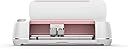


CRICUT INC CRICUT Maker Rose, One Size
Product ID: 95671116
Details
- Active surface area160.06 square
- BrandCricut
- ColourRose
- MaterialPlastic
- Operation modeManual
📱mobile & desktop compatible
🧵rotary blade for any fabric
✂️4 kg cutting force
✂️ Cut above the rest — craft your masterpiece with precision and power!
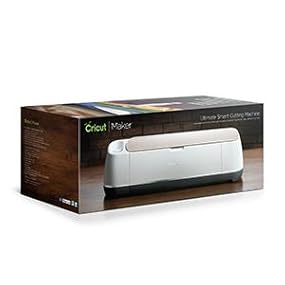
The CRICUT Maker Rose is a powerhouse crafting machine featuring up to 4 kg of cutting force, advanced rotary and knife blades for diverse materials, and seamless compatibility with computers and mobile devices. It includes a vast digital sewing pattern library, washable fabric pen, and a comprehensive starter kit with mats, blades, and 50 free projects, making it the ultimate tool for professional-grade DIY creativity.





| ASIN | B07GSH7FGX |
| Active Surface Area | 160.06 square inches |
| Active surface area | 160.06 square inches |
| Brand | Cricut |
| Colour | Rose |
| Compatible Devices | computer or mobile device |
| Customer Reviews | 4.8 out of 5 stars 4,241 Reviews |
| Global Trade Identification Number | 00093573766374 |
| Included Components | Cricut Maker |
| Item Type Name | CRICUT MAKER ROSE |
| Item Weight | 18.02 Pounds |
| Item weight | 18.02 Pounds |
| Manufacturer | CRICUT INC |
| Manufacturer Part Number | 2005466 |
| Material | Plastic |
| Model Number | 2005466 |
| Number of Items | 1 |
| Number of Packs | 1 |
| Operation Mode | Manual |
| Operation mode | Manual |
| Print media | Paper (plain) |
| UPC | 093573766374 093573285356 |
| Unit Count | 1.0 count |
A**A
Good machine
I love my Cricut I bought it a few days ago, it’s easy to use. But Cricut just changed their policy. I don’t use their software to design, for me it’s just a connection between my design and the machine, well now we can only upload 20 images/per month or pay a $10 monthly subscription. So after I bought the Cricut I still need to pay $10/month If I want to use it. I made a sticker yesterday (I’m learning) I uploaded 5 images trying to work with it. If you are thinking about buying a Cricut, take that in mind, if you want to take advantage of it you have a $10 monthly subscription. It’s like buying a printer, and having a limit of the images we can print monthly?? EDIT: Cricut reversed their policy, so I have to change my rate.
E**.
Buena opción
Es buena opción para realizar sus trabajos de corte, es fácil de utilizar solo que como todo requiere que veas o leas algunos tutoriales para usarla de manera correcta. El limite lo pone tu imaginación. Un detalle solo es el tamaño máximo del área de trabajo que es de 12"x24", pero no lo veo tan importante ya que con un poco de imaginación y además creo que la mayoría de los trabajos se pueden realizar en esas superficies.
A**A
Prodotto di qualità
Con un po' di pratica diventa facile da usare
R**D
Esta preciosa. Me encanta.
Ya tengo otros modelos de cricut y estoy encantada con la maker. Es la mejor máquina de corte que he adquirido y aparte el color se ve precioso. Los cortes muy precisos y limpios.
R**X
HELP, machine is defective and Cricut doesn’t want to Help
Update: 07/21/2020 Cricut replaced my machine. Therefore I’m rating this 5 Stars like I said I would. Customer service responded back to my email, asking for more info (Video proof) to troubleshoot the issues and decide if it meets the prerequisites for warranty. Today, 07/21/2020 the new machine arrived and I did a couple test cuts. Everything works better than the first machine I had. -USB cable connects just fine without sending too much power to my MacBook. -The Belt is taught and fastened, meaning it’s not making that loud noise when loading the belt. I’m happy Cricut was able to resolve my situation and I’m ready to put this past me. Cause I just wanted to create stuff and now I can. AND at the very least, I know a lot about my machine, now that I had to troubleshoot myself about all the issues I had from the last machine. ________________________________________ I sent an EMAIL to Cricut about my issue and I called customer service which put me on hold for 2 HOURS 28 MINUTES, then they hung up on me. I tried calling back right away and was automatically hung up on. Please contact me ASAP. I spent so much money on this and I bought a lot of vinyls and other accessories for the Cricut maker. This Cricut Maker has many issues. I’ve troubleshooted and resolved most of the them, but there’s one big problem that still exist. AND Customer service is lacking in responding. Issue 1: Cricut USB cable is defected, it sends too much power from the cutter machine into my MacBook, rendering any other accessories I have plugged in, defective. This led to more issues with my Ethernet cable not working because it was all plugged in via USB hub or adapter. I FIXED this issue by using another USB cable I had laying around. Connectivity works perfectly now. Issue 2: Loud Belt when Loading a cricut Mat into the machine. The ATS (Adaptive Tool System) moves from right to left when I load a mat. The ATS meets the left wall, but doesn’t recognize it, and continues trying to move left causing the belt to make a loud noise. I’ve troubleshooted this issue and I’m pretty sure that the belt needs to be taught or fastened. (Which I’m not going to attempt to do, fearing that it will void the warranty and that it’s not my problem to fix on my own). Everything else works fine. Issue 3: The Lightgrip mat that came with the machine was warped (as you see in the video) this cause the machine to flash red lights, but I troubleshooted that issue and used a different mat that I purchased separately. If the ATS is in the middle of the machine, before I load the mat in. It will move from right to left like normal, BUT it will continue moving left and make that Loud noise longer because its’ starting point was closer to the left wall. IF you help resolve this issue and exchange this Cricut Maker for a new one, I will upgrade my ratings to 5 stars (As long as the new machine isn’t also defective)
Trustpilot
3 weeks ago
1 month ago