💡 Upgrade your vintage tech with silent speed and true IDE power!
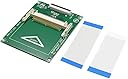
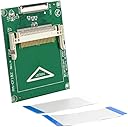
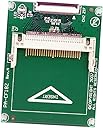
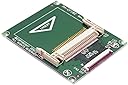
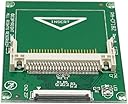
The CY CF Memory Card Adapter converts 1.8" ZIF HDDs into compact flash SSDs supporting up to 32GB CF cards in true IDE mode. Compatible with all CF types and major OS platforms, it operates noiselessly without external power, making it ideal for mini-ITX, laptops, and legacy device upgrades.


| ASIN | B00NPTXJTC |
| Best Sellers Rank | #34 in Computer Memory Card Adapters |
| Customer Reviews | 4.0 4.0 out of 5 stars (555) |
| Date First Available | January 13, 2015 |
| Is Discontinued By Manufacturer | No |
| Item Weight | 0.352 ounces |
| Item model number | EP-040 |
| Manufacturer | CY |
| Package Dimensions | 4.33 x 2.76 x 0.39 inches |
A**R
Works for Creative Zen Vision M Conversion
This CY CF card to ZIF converter worked perfectly for converting a Creative Zen Vision M MP3 player with a 30 GB hard drive to a 128 GB Micro SD card. (Note: The player only recognizes ~120 GB – likely a firmware limitation.) I had to install the firmware on the SD card using another Creative Zen Vision M (I think there was a problem with the motherboard on this player - the Creative firmware update utility did not recognize this player for some reason) and transplanted the SD Card and converter board back into this player. Once the firmware was installed, the first player worked great. After the first Creative Zen Vision M was working, I tried installing a Kinspec SSD in the second player. I tried using a Kingspec 128 GB SSD, which had worked for converting two Zune 30’s and a Zune 80 in the past. The firmware installed successfully using the Creative firmware update utility, however, files (music or video) could only be transferred to the player in ~100 MB chunks. Any more than that, and the player would disconnect from my computer and need to be reset. Once loaded, the files would play correctly, but I don’t have the patience to transfer 60 GB of music and videos 100 MB at a time. I replaced the Kinspec SSD with this converter board, a QUMOX Compact Flash to SD card adapter, and a 128 GB micro SD card. The Creative Zen Vision M runs much faster with the SD card and seems to have better battery life. In the end I have two working Creative Zen Vision M’s running 128 GB SD cards.
A**R
IPOD 4th generation Fix
I had a 4th generation Ipod that was given to me by dear friends of mine. I used it a lot in the past, but it quit working and was in a box for years. It was 20 GB, which was a lot of storage back then. Call me a "dinosaur" but I still prefer to own my own music and to organize it into folders of different playlists that I created. It is great to have an Ipod so I can connect it to my car and have the same music as at home. I find it wonderful especially driving on trips. I decided to fix the nonfunctioning Ipod; thus I bought a new battery, a CY memory card adapter, a compact flash memory card adapter type I, and 200 GB SD card. First, I replaced the battery. Then I changed out the drive to a solid state driver using the adapters and SD card. On Youtube one can find instructions on how to do this. Once completed I charged it up and..... to my surprise, it worked perfectly. Now I have a 200 GB Ipod. One can increase the memory even more by adding a better SD disc, but 200 GB is enough for me, at least for now.
C**K
Poor compatibility with cards and IDE
I've tried a number of CF cards, older and newer, and only my Transcend 133x works at all. On my 440bx-based Dell laptop, the card is detected after about a minute of waiting. It accesses the card fine after that, but is unable to boot from it. Any other card (Various Sandisk cards mainly) do not detect at all. The problem, as I see it, is that this adapter completely depends on the CF card's IDE mode. The adapter does basically nothing other than serving as a pin adapter for the two devices. So, compatibility is dependent on the compatibility between the card and the computer it's used in. Granted, the adapter is ~$6, so I don't expect an active adapter of some kind.
J**A
Works for iPod 4th gen - with caveats
Put a sd to cf adapter in it to update an old iPod 4th gen. Don’t know why but it only works with 64gb and under... it might be an issue with cf adapter. I only need 64gb - I’m a happy camper!
R**Z
Works great for the iPod classic 4th gen
It’s good to watch a few videos before you first flash mod. I bend the jumper over and cut the two solder joints down a bit then cover with kapton tape. You will have to cut the little alignment piece from the iPod ribbon, the one that fits into the hard drive hole to align the pins. Read the board it tells you which pins to align. Go from right to left and you will be fine. I used SanDisk extreme CF and the iflash cf to SD in 64G without issue. I format the cards to exfat and worked great. I’ve modded 3 iPods so far without issue.
W**S
Needs careful hands
Worked, but finicky. The ribbon cable in my iPod did not fit the connector exactly -- that is, inserting the ribbon completely into the connector caused the pads to miss slightly the connector contacts. As a result, it would not work. Inserting the ribbon most of the way, about .3mm short of complete, would provide electrical contact; but on manipulation for reassembly the ribbon would slide into the connector and it would not work. You need to be very careful on connection and assembly to get it to work correctly. This is not unique to this device, these small zifs are finicky and the iPod ribbon-cables are non-standard. Figuring this out was frustrating, but once I got it together and sealed-up it worked flawlessly.
T**E
Quality Assurane needed to cleanup.
I was able to remove a solder bridge before I applied power. I saw the bridge without a magnifying lens. I have since inspected the entire board with a magnifying lens.
M**N
Value for the money
This worked really well, if I had to complain about anything, it is that there was no predrilled hole where the screws are supposed to go. That was easily solved by drilling my own holes but one of the circuit lines was awfully close to where the holes are supposed to go. Installed this on a 3d printed cover/mount for the Amiga 1200 back panel. The leads for the jumper on the bottom were a bit long and needed to modify the 3d print to match. Not a big deal though.
R**O
No es válido para renovar un iPod Classic de 5ª Generación. La pestaña negra q trae para fijar la conexión al iPod bailay es incapaz de hacer su trabajo. Está mal hecho. Me pasa x no leer otras opiniones. X eso me animo a escribir ésta.
R**I
Ottimo prodotto, ho così potuto rivitalizzare il mio toshiba r100.
A**M
Excellent produit, fonctionne très bien, compatible avec l'ipod classic
カ**マ
今更ではありますが、iPod Classicのストレージを増強したくて購入しました。 真ん中から上は配線はないので切って隙間を増やすことで、バッテリーの増強をすることもできました。
D**B
Following a popular Instructable guide, I bought this adapter in conjunction with a flash memory card to successfully convert my 2004 model iPod to solid state storage and remove the physical HDD which was failing. If you attempt this, I recommend that you also buy a cheap kit of plastic tools for removing the casing. These are illustrated in the picture. The part has kept the iPod going for several more years so I can highly recommend it if you are not yet ready to consign your vintage iPod to the grave.
Trustpilot
1 week ago
1 month ago