Desert Online General Trading LLC
Dubai, United Arab Emirates
Desert Online General Trading LLC
Dubai, United Arab Emirates


❄️ Keep your SSD chill and your workflow blazing fast!
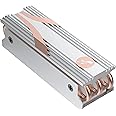
The Sabrent M.2 2280 SSD Rocket Heatsink (SB-HTSS) is a premium cooling solution designed for desktop computers. Featuring a high-efficiency copper and aluminum construction, it effectively dissipates heat from NVMe PCIe SSDs, preventing thermal throttling and ensuring sustained peak performance. Compatible with both single and double-sided M.2 2280 SSDs, it includes thermal tape, screws, and a screwdriver for quick, hassle-free installation.


| Brand | SABRENT |
| Cooler Heatsink Material | Copper |
| Product Dimensions | 7.9L x 2.5W x 2.3H Centimeters |
| Cooler Heatsink Compatibility | M.2 2280 SSDs |
| Item Weight | 0.13 Kilograms |
| Mounting Type | Tabletop |
| Manufacturer | Sabrent |
| UPC | 840025250611 392548525061 |
| Global Trade Identification Number | 00840025250611 |
| Model number | SB-HTSS |
| Colour | M.2 2280 Heatsink (Silver) |
| Number of Memory Sticks | 1 |
| Specific Product Use | Business, Gaming, Personal |
| Item Weight | 130 g |
| Item model number | SB-HTSS |
| Wireless Standard | IrDA |
| Included Components | Thermal tape, screws, & screwdriver included! |
| Are batteries included? | No |
S**.
Nice product, really can see the quality sabrent offer with this product
Nice product, the box is nicely presented, really nice instructions and will fit any m.2 ssd of this size, they describe the differences in two sided and one sided m.2s, which are both supported.This is required on some m.2s to keep the speed they have long term but if you don't ever do long term copy/pastes then you probably won't thermal throttle your ssd, aka, my Samsung 970 has the same idle temperature before and after installing this but it could run at full speed for a long period of time and not thermal throttle now, same with sbarents own 4.0 pci-E m.2 drives which I got another one of these for
B**T
Fastest route to ultra quick boot!
My Dell T7810 was created before PCIE SSD, so while the SATA booted quickly and performance was good I decided when the 500mb SSD started running out of space to upgrade both size and PCIE.I did make sure I was on the latest bios, and from there the installation was very easy. Everything else is lightening quick too now, apps load in milliseconds, even the Internet is faster.
K**D
not used yet
still not used, I'll use it when I'll buy another nvme M2 drive
T**R
Terrible instructions (no instructions)
Comes with no instructions and 3 thermal pads (2x slim and 1x thicker one). M.2 thickness is not standard and installation is mostly guesswork.Installation #1Put the thick pad between the m.2 and the card (too thick m.2 was bending).1 thin pad between the m.2 and the heat sink (not sure if it made good contact).1 thin pad between the "back" of the card and the flat metal piece that screws to the heat sink.Major bending after screwing it close, so went for option #2.Installation #22 thin pads stacked between the m.2 and the heat sink.left a gap between the m.2 and the card.I suspect there is better contact between the m.2 and the heat sink (likely some bending).Screws flat.The temperature is around 6~7c lower than a 970 PRO without and heat sink, it probably won't make any different at all on a home PC where you don't have to constantly read/write GBs of data...
M**O
Sabrent NVMe M.2 SSD to PCIe X16/X8/X4 Card with aluminum heat sink
Quattro stelle perché non c'è nessuna spiegazione riguardo il corretto uso e posizionamento delle striscie termoconduttive (pad termico)Ne ho utilizzate 3 su quattro, togliendo la sottile plastica protettiva che, se non rimossa, ostacolerebbe il corretto trasferimento del calore.Occorre anche incastrare bene il modulo SSD nella linguetta sporgente di alluminio, altrimenti quando si stringono le viti il modulo tende a piegarsi.Il raffreddamento è buono, la temperatura nell'utilizzo normale varia da 28 a 34 gradi max.
Trustpilot
5 days ago
1 week ago